EasyManua.ls Logo

Kenmore BC3005 - User Manual

Kenmore BC3005
23 pages
Print Icon
To Next Page IconTo Next Page
Loading...
Model/Modelo/Modèle: BC3005
Vacuum Cleaner Help Line:
1-877-531-7321 (US) / 1-844-608-3081 (CA)
8:00am-5:00pm EST, M-F
Use & Care Guide
Manual de Uso y Cuidado
Manuel d'entretien et d'utilisation
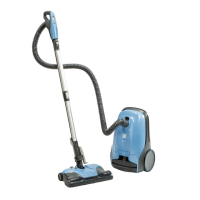
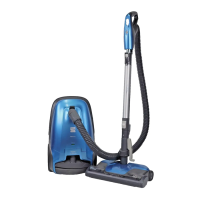
Canister Vacuum Cleaner
Aspiradora con tanque
Aspirateur-traîneau
www.kenmoreoorcare.com
Kenmore and the Kenmore logo are registered
trademarks of KCD IP, LLC and/or Transform SR
Brands LLC and are used under license.

Questions and Answers

  • J
    Joseph SmithJul 28, 2025
    Why won't my Kenmore BC3005 Vacuum Cleaner start?
    • K
      kaylahardyJul 28, 2025
      If your Kenmore Vacuum Cleaner won't start, there are several potential causes. First, ensure the vacuum is firmly plugged into the wall outlet and the On/Off switch is pressed. Also, check the household service panel for a tripped circuit breaker or blown fuse and reset or replace it if necessary. Finally, inspect the hose electrical connections and reconnect the hose ends if they are loose.
  • K
    Kim StanleyAug 1, 2025
    Why is my Kenmore BC3005 not picking up dirt?
    • K
      Karen CarrilloAug 1, 2025
      If your Kenmore Vacuum Cleaner isn't picking up dirt well, several factors could be responsible. Start by checking if the dust bag is full or clogged and change it if needed. Also, clear any clogged airflow passages and clean or change the filters if they are dirty. Ensure that the pile height setting and power level are correctly adjusted. If there is a hole in the hose, replace it. Finally, examine the PowerMate® brushroll and change it if it's worn.
  • H
    hadamsAug 5, 2025
    How to fix a Kenmore BC3005 cord that won't rewind?
    • J
      Jeremy MillerAug 5, 2025
      If the cord on your Kenmore Vacuum Cleaner won’t rewind, it might be due to a dirty power cord. Clean the power cord. Alternatively, the cord could be jammed. Try pulling out the cord and rewinding it.
  • J
    jessicabrockAug 9, 2025
    Why does the CHECK BAG indicator activate on my Kenmore Vacuum Cleaner?
    • P
      Peggy HernandezAug 9, 2025
      If the CHECK BAG indicator is activated on your Kenmore Vacuum Cleaner, it could mean several things. The dust bag might be full or clogged, so try changing it. Dirty filters can also cause this, so clean or replace them. Another possibility is a blocked airflow passage, which you should clear. In some cases, certain attachment tools can trigger the indicator, which is normal and the light should turn off when the tool is removed.
  • S
    Samantha ConnerAug 13, 2025
    What to do if my Kenmore BC3005 Vacuum Cleaner starts but shuts off?
    • M
      Mary MccoyAug 14, 2025
      If your Kenmore Vacuum Cleaner starts but then shuts off, it could be due to the hose or hood electrical connections. Check these connections and reconnect the hose ends. Also, the overload protector in the PowerMate® may have tripped. Remove any items that may be caught or jammed, then restart the vacuum cleaner. If it continues to start and stop, clean the brushroll and end caps, then restart.
  • L
    Lauren ElliottAug 18, 2025
    Why won't the PowerMate on my Kenmore BC3005 Vacuum Cleaner run?
    • B
      bmendozaAug 18, 2025
      If the PowerMate® on your Kenmore Vacuum Cleaner will not run when attached, ensure that the PowerMate® connections are firmly plugged in.
  • P
    patricia57Aug 22, 2025
    How to stop my Kenmore BC3005 Vacuum Cleaner from picking up rugs?
    • C
      carolynolsonAug 22, 2025
      If your Kenmore Vacuum Cleaner is picking up moveable rugs or the PowerMate® is pushing too hard, it could be due to the pile height setting being incorrect. Adjust the setting accordingly. Alternatively, the suction might be too strong; try sliding the electronic suction control to a lower power setting.

Summary

Kenmore Vacuum Cleaner Warranty

Important Safety Instructions

Parts and Features

Replacement Parts

Lists part numbers for replacement components and contact information for ordering.

Assembly Instructions

Main Component Assembly

Instructions for connecting the wand to the PowerMate® unit and attaching the handle.

Attachment Holder Installation

Steps for attaching the accessory holder clip to the wand.

Operating Instructions

How to Start

Steps for plugging in, preparing, and turning on the vacuum cleaner.

Performance;Safety Features

Canister Care

Removing Clogs

Steps to identify and clear blockages in the airflow passages for optimal suction.

Cleaning Exterior and Attachments

Guidance on cleaning the vacuum's exterior and its accessories.

PowerMate Care

Belt Changing and Brushroll Cleaning

Procedures for replacing the belt and cleaning the PowerMate® brushroll for optimal performance.

Brushroll Servicing

Instructions for checking brush wear and replacing the brushroll assembly.

Troubleshooting

Start-up and Power Issues

Problems related to the vacuum not starting or shutting off unexpectedly.

Cleaning Performance Issues

Addresses poor suction, dirt pick-up, and excessive power settings.

Operational and Handling Problems

Solutions for cord rewind issues, carpet marking, and PowerMate® operation.

Kenmore BC3005 Specifications

General IconGeneral
ModelBC3005
ColorBlue
Power SourceCorded Electric
Voltage120V
Amps12A
Cord Length26 ft
Dust Capacity1.5 liters
HEPA FilterYes
Washable FilterYes
TypeCanister
Included ToolsCrevice tool, upholstery tool

Related product manuals