3. Press the Water button on the dispenser control panel. Use a
sturdy container to depress and hold the dispenser lever for
5 seconds, then release it for 5 seconds. Repeat until water
begins to flow. Once water begins to flow, continue
depressing and releasing the dispenser lever (5 seconds on,
5 seconds off) for an additional 2 minutes. This will flush air
from the filter and water dispensing system. Additional
flushing may be required in some households. As air is
cleared from the system, water may spurt out of the
dispenser.
NOTE: After 5 minutes of continuous dispensing, the
dispenser will stop dispensing water to avoid flooding. To
continue dispensing, remove the container and press the
dispensing lever again.
4. Inspect the filter system for water leaks. If you see water
leaks, see the "Troubleshooting" section.
5. Turn on the ice maker switching the ice maker control to ON.
Please see "Ice Maker" for further instructions on the
operation of your ice maker.
• Allow 24 hours to produce the first batch of ice.
• Discard the first three batches of ice produced.
REFRIGERATOR USE
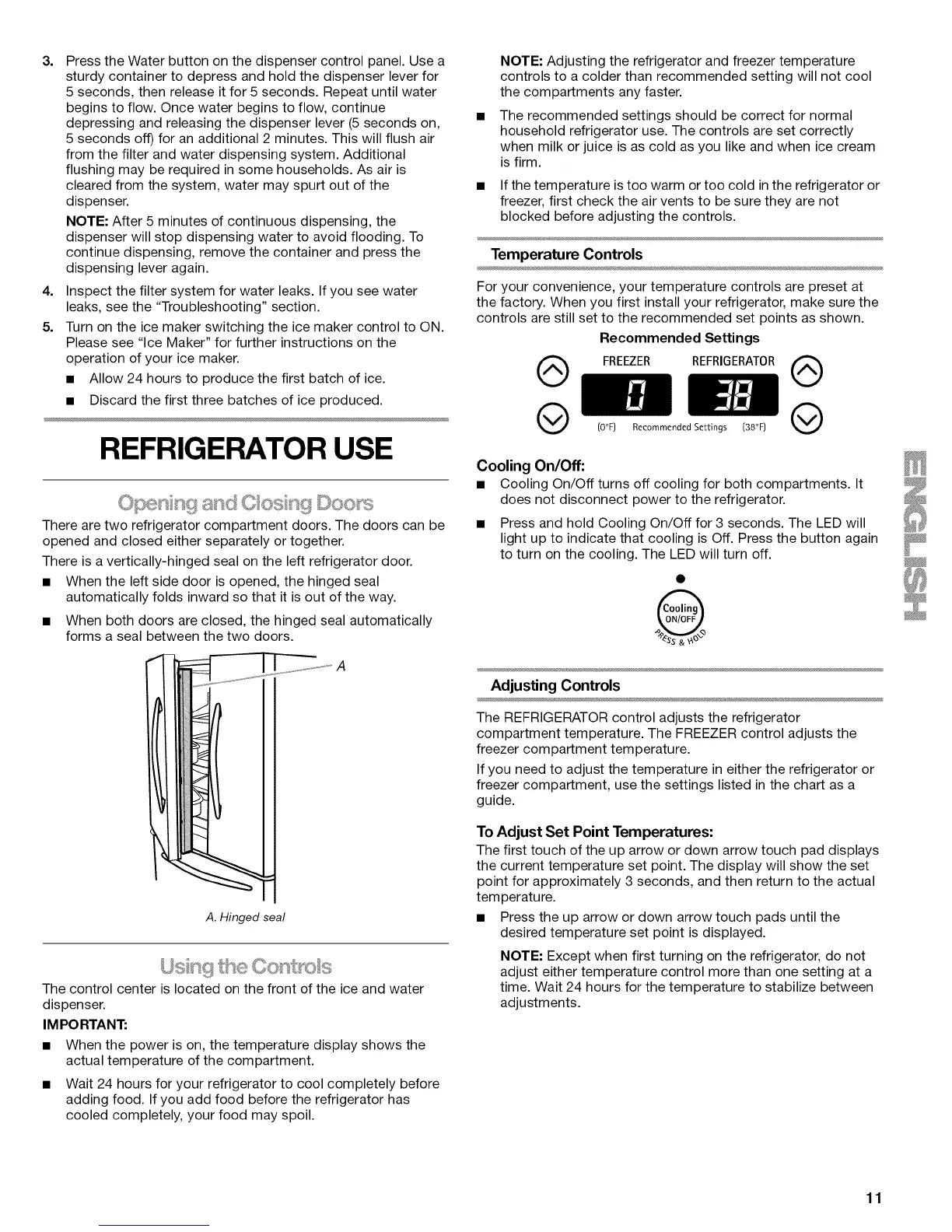
There are two refrigerator compartment doors. The doors can be
opened and closed either separately or together.
There is a vertically-hinged seal on the left refrigerator door.
• When the left side door is opened, the hinged seal
automatically folds inward so that it is out of the way.
• When both doors are closed, the hinged seal automatically
forms a seal between the two doors.
A
A. Hinged seal
The control center is located on the front of the ice and water
dispenser.
IM PORTANT:
• When the power is on, the temperature display shows the
actual temperature of the compartment.
• Wait 24 hours for your refrigerator to cool completely before
adding food. If you add food before the refrigerator has
cooled completely, your food may spoil.
NOTE: Adjusting the refrigerator and freezer temperature
controls to a colder than recommended setting will not cool
the compartments any faster.
The recommended settings should be correct for normal
household refrigerator use. The controls are set correctly
when milk or juice is as cold as you like and when ice cream
is firm.
If the temperature is too warm or too cold in the refrigerator or
freezer, first check the air vents to be sure they are not
blocked before adjusting the controls.
Temperature Controls
For your convenience, your temperature controls are preset at
the factory. When you first install your refrigerator, make sure the
controls are still set to the recommended set points as shown.
Recommended Settings
@ FREEZER REFRIGERATOR@
(0°F) Recommended Settings (38°F) @
Cooling On/Off:
• Cooling On/Off turns off cooling for both compartments. It
does not disconnect power to the refrigerator.
• Press and hold Cooling On/Off for 3 seconds. The LED will
light up to indicate that cooling is Off. Press the button again
to turn on the cooling. The LED will turn off.
@
S&'P,
Adjusting Controls
The REFRIGERATOR control adjusts the refrigerator
compartment temperature. The FREEZER control adjusts the
freezer compartment temperature.
If you need to adjust the temperature in either the refrigerator or
freezer compartment, use the settings listed in the chart as a
guide.
To Adjust Set Point Temperatures:
The first touch of the up arrow or down arrow touch pad displays
the current temperature set point. The display will show the set
point for approximately 3 seconds, and then return to the actual
temperature.
• Press the up arrow or down arrow touch pads until the
desired temperature set point is displayed.
NOTE: Except when first turning on the refrigerator, do not
adjust either temperature control more than one setting at a
time. Wait 24 hours for the temperature to stabilize between
adjustments.
11



 To Next Page