3.
Dispense Ice and Water
Cut Hazard
Use a sturdy glass when dispensing ice.
Failure to do so can result in cuts.
IM PORTANT:
• The dispenser will dispense either water or cubed ice, or both
water and cubed ice.
• Dispense water into containers that will not fit within the
dispenser area, such as sport bottles, by pressing the bottom
touch pad on the dispenser control panel.
• The tray at the bottom of the dispenser area does not drain. It
is designed to collect small spills and is removable to empty
or clean.
To dispense water or ice cubes:
1. Select water or cube ice by pressing the corresponding touch
pad on the dispenser control panel. A light above the touch
pad indicates your selection.
2. Press a sturdy container against the dispenser lever.
IMPORTANT: You do not need to apply a lot of pressure to
the lever in order to activate the dispenser. Pressing hard will
not make the water or ice dispense faster or in greater
quantities.
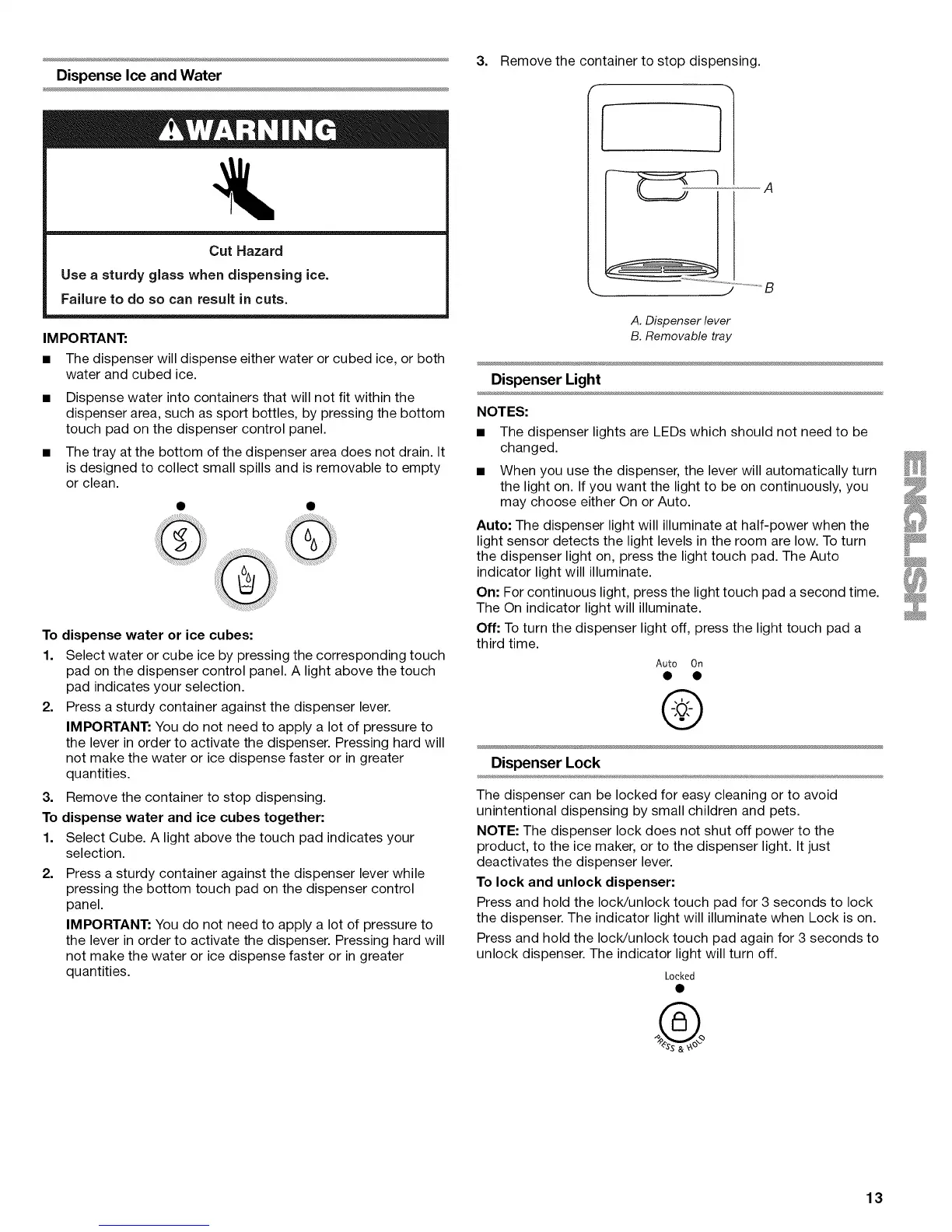
3. Remove the container to stop dispensing.
To dispense water and ice cubes together:
1. Select Cube. A light above the touch pad indicates your
selection.
2. Press a sturdy container against the dispenser lever while
pressing the bottom touch pad on the dispenser control
panel.
IMPORTANT: You do not need to apply a lot of pressure to
the lever in order to activate the dispenser. Pressing hard will
not make the water or ice dispense faster or in greater
quantities.
Remove the container to stop dispensing.
A. Dispenser lever
B. Removable tray
Dispenser Light
NOTES:
• The dispenser lights are LEDs which should not need to be
changed.
• When you use the dispenser, the lever will automatically turn
the light on. If you want the light to be on continuously, you
may choose either On or Auto.
Auto: The dispenser light will illuminate at half-power when the
light sensor detects the light levels in the room are low. To turn
the dispenser light on, press the light touch pad. The Auto
indicator light will illuminate.
On: For continuous light, press the light touch pad a second time.
The On indicator light will illuminate.
Off: To turn the dispenser light off, press the light touch pad a
third time.
Auto On
®
Dispenser Lock
The dispenser can be locked for easy cleaning or to avoid
unintentional dispensing by small children and pets.
NOTE: The dispenser lock does not shut off power to the
product, to the ice maker, or to the dispenser light. It just
deactivates the dispenser lever.
To lock and unlock dispenser:
Press and hold the IocWunlock touch pad for 3 seconds to lock
the dispenser. The indicator light will illuminate when Lock is on.
Press and hold the IocWunlock touch pad again for 3 seconds to
unlock dispenser. The indicator light will turn off.
Locked
ss&_,
13



 To Next Page