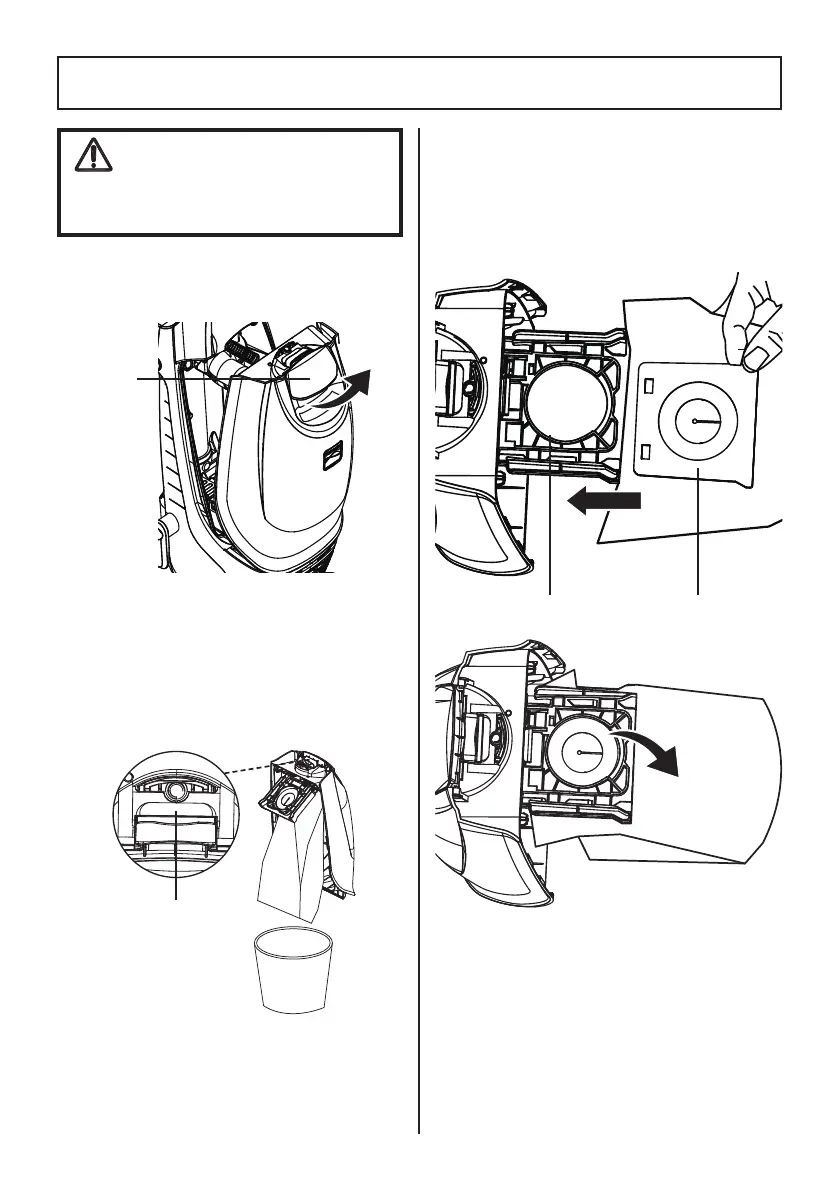
1. Pull bag chamber cover release handle
out and up, hold the cover using the
handle.
3. To install a new dust bag, insert the dust
bag collar into bracket until you hear
a ‘click’, and then rotate bracket down
until another ‘click’ can be heard. Tuck
the bag into the dust bag chamber. Be
sure all sides of the dust bag are flat
within the bag chamber.
NOTE:
Do not press the dust bag
release button when release bag chamber
cover, or the dust bag will drop down
automatically.
2. Tilt the bag chamber as shown. Press
Dust Bag Release button and the dust
bag drops down automatically.
- 18 -
DUST BAG REPLACEMENT
WARNING
Always unplug power cord from
electrical outlet before performing any
service on vacuum cleaner.
Dust Bag
Chamber
Cover
Release
Bracket Dust Bag Collar
Dust Bag
Release
Button



 To Next Page