OPERATING INSTRUCTIONS
CONNECTING POWER SUPPLY
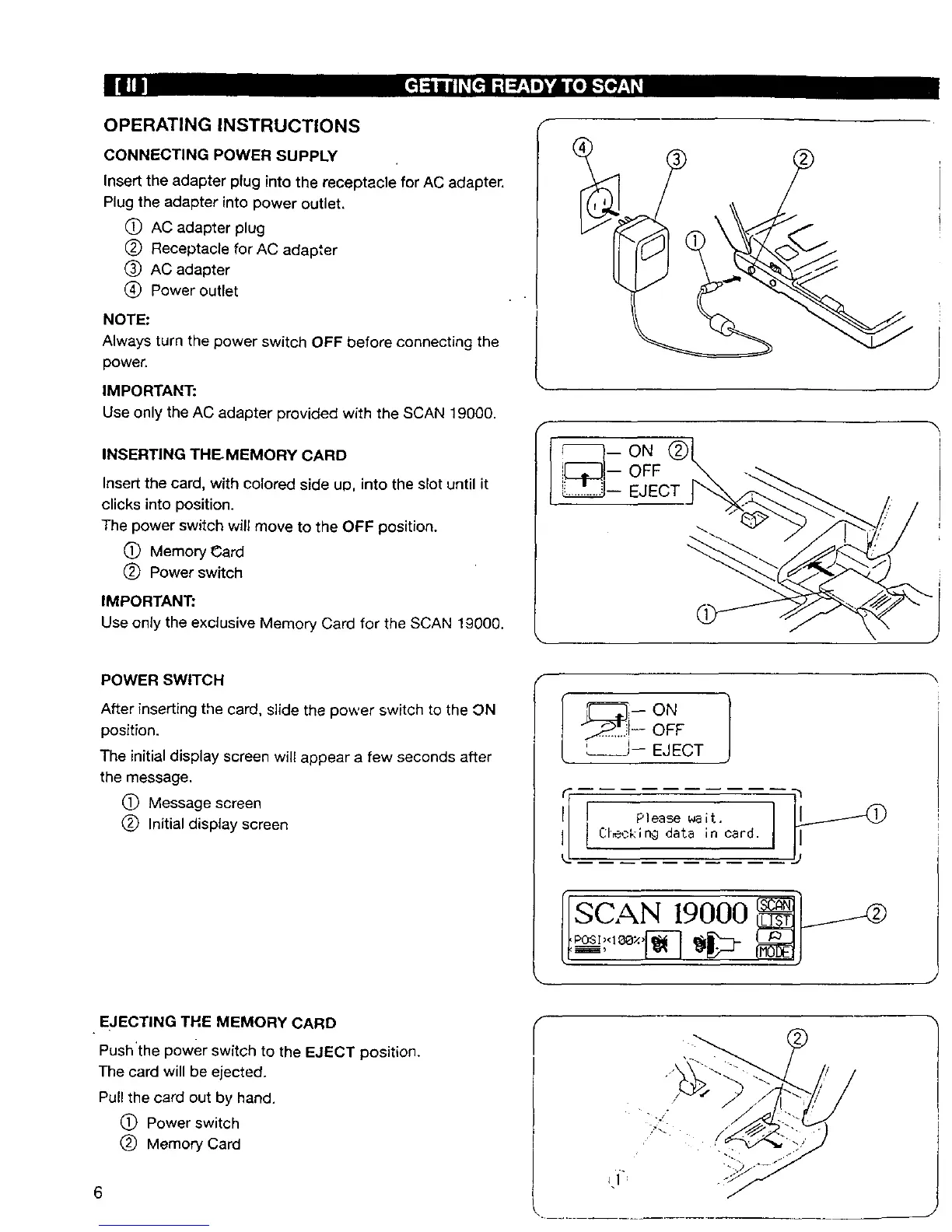
Insert the adapter plug into the receptacle for AC adapter.
Plug the adapter into power outlet.
C) AC adapter plug
(_) Receptacle for AC adapter
(_ AC adapter
(_) Power outlet
NOTE:
Always turn the power switch OFF before connecting the
power.
IMPORTANT:
Use only the AC adapter provided with the SCAN 19000.
INSERTING THE MEMORY CARD
Insert the card, with colored side up, into the slot until it
clicks into position.
The power switch will move to the OFF position.
(_ Memory Card
(_) Power switch
IMPORTANT;
Use only the exclusive Memory Card for the SCAN 19000.
F
POWER SWITCH
After inserting tile card, slide the power switch to the ON
position.
The initial display screen will appear a few seconds after
the message.
(_ Message screen
(_ Initial display screen
OFF
L___J-- EJECT
[ Please wait.
Cleckin9 data in card.
[SCAN 19000
EJECTING THE MEMORY CARD
Push'the power switch to the EJECT position.
The card will be ejected.
Pull the card out by hand.
(_ Power switch
(_) Memory Card
6


 To Next Page