f
@_ '#_ {!_!i_iiiiiiii!_ ii_i_i@i_!_ili_i,_!__ (i_!i!@!ii,!i_ill_ _i _'i_i@ iii
-- O O O iii .......................................................
siaii{_ii!i£i!ili!!ii!i!@iiiii_
!ii iiii ¸¸¸}/ o ii ¸
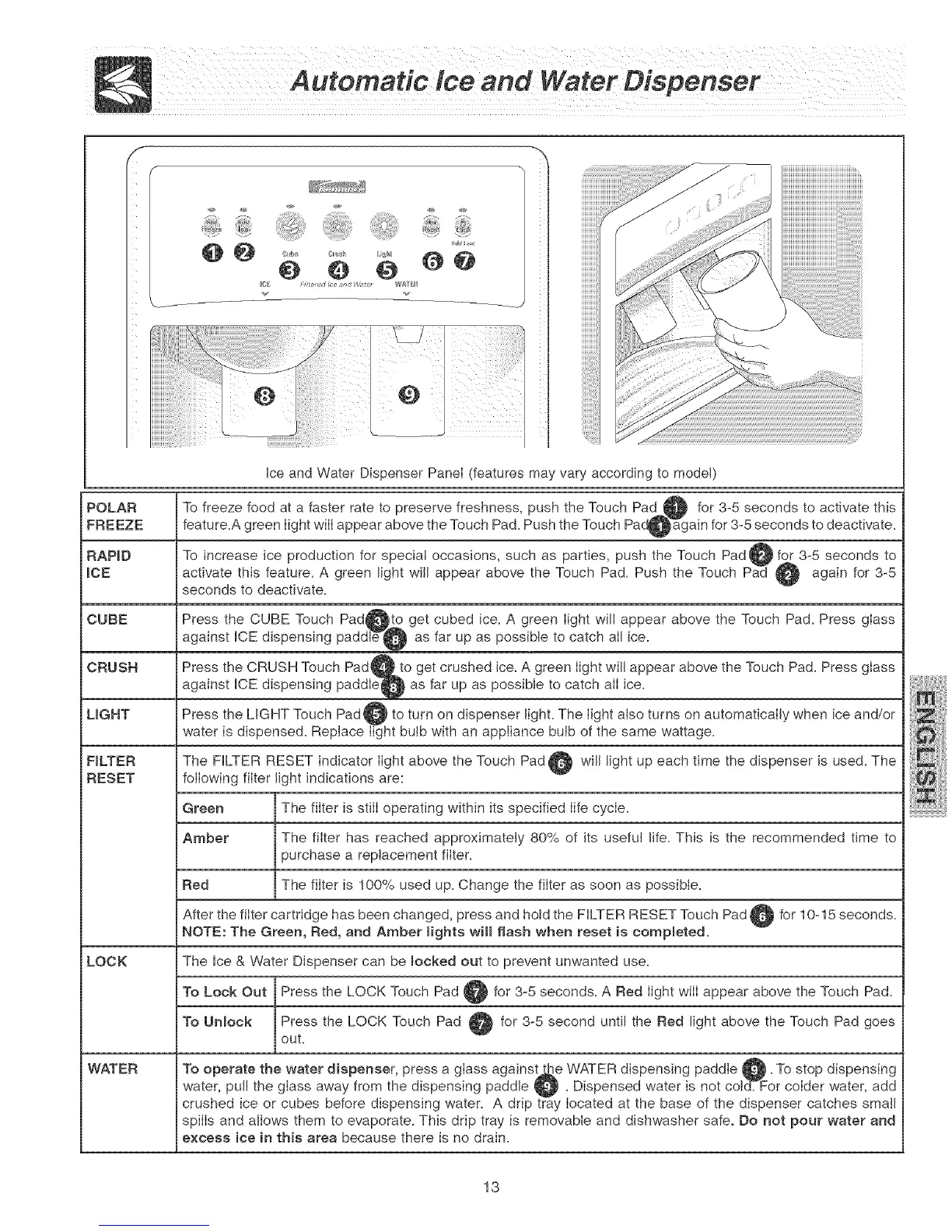
Ice and Water Dispenser PaneI (features may var
To freeze food at a faster rate to preserve freshness, push the Touch Pad _ for 3-5 seconds to activate this
feature.A green light wiII appear above the Touch Pad. Push the Touch Pad_again for 3-5 seconds to deactivate.
To increase ice production for special occasions, such as parties, push the Touch Pad @ for 3-5 seconds to
activate this feature. A green light will appear above the Touch Pad. Push the Touch Pad @ again for 3-5
seconds to deactivate.
POLAR
FREEZE
RAP_D
_CE
CUBE
CRUSH
LIGHT
F_LTER
RESET
Press the CUBE Touch Pad_to get cubed ice. A green light will appear above the Touch Pad. Press glass
against ICE dispensing paddleS@ as far up as possible to catch alI ice.
Press the CRUSH Touch Pad_. to get crushed ice. A green light will appear above the Touch Pad. Press glass
against ICE dispensing paddleQ as far up as possible to catch alI ice.
Press the UGHT Touch Pad@ to turn on dispenser light. The light also turns on automatically when ice and/or
water is dispensed. Replace light bulb with an appliance bulb of the same wattage.
The FILTER RESET indicator light above the Touch Pad _ will light up each time the dispenser is used. The
following filter light indications are:
Green The filter is still operating witMn its specified Iife cycle.
Amber The filter has reached approximately 80% of its useful life. This is the recommended time to
purchase a replacement filter.
Red The filter is 100% used up. Change the filter as soon as possible.
After the filter cartridge has been changed, press and hold the FILTER RESET Touch Pad @ for 10-15 seconds.
NOTE: The Green, Red, and Amber mights wHmflash when reset is compmeted.
LOCK The Ice & Water Dispenser can be mocked out to prevent unwanted use.
To Lock Out Press the LOCK Touch Pad @ for 3-5 seconds. A Red light wilI appear above the Touch Pad.
To Unmock Press the LOCK Touch Pad _ for 3-5 second until the Red light above the Touch Pad goes
out.
WATER To operate the water dispenser, press a glass against_e WATER dispensing paddle @. To stop dispensing
water, pull the glass away from the dispensing paddle _ . Dispensed water is not cotcE For colder water, add
crushed ice or cubes before dispensing water. A drip tray located at the base of the dispenser catches small
spills and allows them to evaporate. This drip tray is removable and dishwasher safe° Do not pour water and
excess ice in this area because there is no drain.
13



 To Next Page