
 Need help?
Do you have a question about the Kensington MD125U4 and is the answer not in the manual?
Host USB-C port must support Alt Mode and Power Delivery for proper functionality.
Requires 80W PD adapter and features a USB-C 3.2 Gen2 10Gbps port.
The docking station includes two USB-A 3.2 Gen2 10Gbps ports, each providing 5V/0.9A.
Details on video output resolutions and refresh rates supported via HDMI and USB4 connections.
The docking station supports 10/100/1000/2500 Mbps Ethernet network speeds.
Additional products powered by the dock must have a fire enclosure complying with IEC 60950-1 or IEC 62368-1.
Contact support or find more information at www.kensington.com/support.
Displays FCC, CE, UKCA, and VCCI-B compliance marks for the device.
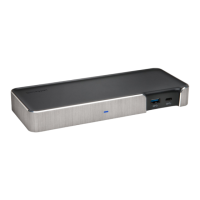
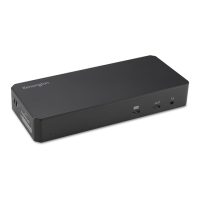
The Kensington MD125U4 USB4 Portable Docking Station is a versatile and compact solution designed to expand the connectivity and display capabilities of your USB-C enabled laptop or device. This docking station is engineered for users who require a robust and portable hub for their professional or personal computing needs, offering a seamless integration of multiple peripherals and external displays. Its design emphasizes ease of use and portability, making it an ideal companion for both office environments and on-the-go professionals.
The MD125U4 serves as a central hub that connects to your host device via a single USB-C cable, which should support Alt Mode and Power Delivery. This single connection then branches out to provide a wide array of ports, transforming your laptop into a powerful workstation. The primary function of this docking station is to extend your device's capabilities by adding multiple USB ports, display outputs, and network connectivity.
One of the key features of this docking station is its ability to deliver power to your host device. When connected to a compatible USB-C power adapter, the MD125U4 can pass through power to charge your laptop, eliminating the need for a separate charger. This power delivery function requires a minimum of 80W from your USB-C power adapter to ensure optimal performance and charging capabilities. This pass-through charging capability is particularly useful for maintaining a tidy workspace and reducing cable clutter, as you only need one cable running from the docking station to your laptop for both data and power.
For data transfer, the MD125U4 is equipped with multiple USB ports. It includes one USB-C 3.2 Gen2 port, capable of delivering data transfer speeds of up to 10Gbps and providing 5V/0.9A of power. This high-speed USB-C port is ideal for connecting modern peripherals such as external SSDs, high-resolution webcams, or other USB-C enabled devices that demand fast data throughput. Additionally, the docking station features two USB-A 3.2 Gen2 ports, each also offering 10Gbps data transfer speeds and 5V/0.9A power output. These USB-A ports are perfect for connecting a wide range of legacy peripherals, including keyboards, mice, printers, and external hard drives, ensuring compatibility with your existing accessories. The inclusion of both USB-C and USB-A ports ensures broad compatibility with various devices, making the MD125U4 a flexible solution for diverse setups.
Display connectivity is another core strength of the MD125U4. The docking station provides multiple HDMI outputs, allowing you to connect external monitors to extend or mirror your desktop. This is particularly beneficial for multitasking, graphic design, video editing, or any task that benefits from increased screen real estate. The docking station supports various display configurations and resolutions, depending on the capabilities of your host device's USB4, HBR3+DSC1.2, HBR3, or HBR2 support. For instance, with USB4 or HBR3+DSC1.2, it can support high resolutions and refresh rates, such as 8K@60Hz, 4K@120Hz, or 4K@144Hz, enabling a truly immersive visual experience. Even with HBR3 and HBR2, it supports respectable resolutions like 4K@60Hz or 2K@60Hz, ensuring clear and vibrant visuals for most applications. The ability to drive multiple external displays significantly enhances productivity and workflow efficiency.
Network connectivity is also integrated into the MD125U4, featuring an Ethernet port that supports speeds of 10/100/1000/2500 Mbps. This provides a stable and fast wired network connection, which is often more reliable and secure than Wi-Fi, especially in environments with heavy wireless interference or when dealing with large data transfers. The 2.5 Gigabit Ethernet capability ensures that you can take full advantage of high-speed internet connections, making it suitable for online gaming, streaming high-definition content, or accessing network-attached storage (NAS) devices.
The Kensington MD125U4 is designed with user convenience in mind, offering several features that enhance its usability. Its portable form factor makes it easy to carry in a laptop bag, allowing you to set up a full workstation wherever you go. The plug-and-play nature of the device means that in most cases, no special drivers are required, making setup quick and hassle-free.
The single-cable connection to your host device simplifies your workspace, reducing cable clutter and making it easy to connect and disconnect your laptop. This is particularly useful for users who frequently move their laptops between different locations or who prefer a minimalist desk setup. The integrated power pass-through capability further streamlines the setup by allowing you to power your laptop and all connected peripherals through a single power adapter connected to the docking station.
The MD125U4's robust display support is a significant usage feature. Whether you need to extend your desktop across two monitors for enhanced productivity or mirror your display for presentations, the docking station provides flexible options. The ability to support high resolutions and refresh rates ensures that your visual content is crisp, smooth, and vibrant, catering to professionals in creative fields, gamers, and anyone who values high-quality visuals.
The variety of USB ports ensures that you can connect all your essential peripherals, from external storage devices to input devices, without needing additional adapters. The high-speed data transfer capabilities of the USB 3.2 Gen2 ports mean that large files can be moved quickly, saving valuable time. The reliable wired Ethernet connection ensures consistent internet access, which is crucial for video conferencing, online collaboration, and accessing cloud services without interruption.
While the Kensington MD125U4 is primarily a hardware device, its maintenance aspects focus on ensuring its longevity and optimal performance. The device is designed to be durable, with a sturdy enclosure that protects its internal components. Regular cleaning of the exterior with a soft, dry cloth can help maintain its appearance and prevent dust buildup.
It is important to ensure that the additional products powered by this docking station comply with fire enclosure standards, specifically IEC 60950-1 or IEC 62368-1. This is a crucial safety aspect that contributes to the overall reliability and safety of your setup. Users are advised to contact the manufacturer of their host device to confirm this compliance, ensuring that all connected components meet necessary safety regulations. This proactive approach to safety helps prevent potential hazards and ensures a secure operating environment.
Keeping the firmware of the docking station updated, if applicable, can also contribute to its long-term performance and compatibility with new devices and operating systems. While the manual does not explicitly detail firmware updates, checking the Kensington support website periodically for any available updates is a good practice for any modern peripheral.
Proper cable management is also a form of maintenance. Ensuring that cables are not excessively bent, pinched, or tangled can prevent damage to the cables and the ports on the docking station and your peripherals. Using cable ties or organizers can help keep the workspace tidy and protect the integrity of the connections.
Finally, registering your product on kensington.com/register allows you to stay informed about product updates, support resources, and warranty information. This ensures that you have access to official support and can leverage any available assistance should you encounter issues. The Kensington support website (www.kensington.com/support) is a valuable resource for troubleshooting, FAQs, and obtaining further assistance, contributing to the overall maintainability and user experience of the MD125U4.
 General
| Headphone outputs | 0 |
|---|---|
| USB Power Delivery | No |
| USB 2.0 ports quantity | USB 2.0 ports have a data transmission speed of 480 Mbps, and are backwards compatible with USB 1.1 ports. You can connect all kinds of peripheral devices to them. |
| Connectivity technology | Wired |
| USB Power Delivery up to | 100 W |
| USB Power Delivery revision | 3.0 |
| USB 3.2 Gen 2 (3.1 Gen 2) Type-A ports quantity | 2 |
| HD type | 8K Ultra HD |
| Certification | FCC, IC, CB, RoHS, ACCO RSL |
| Plug and Play | Yes |
| Product color | Black, Grey |
| Housing material | Acrylonitrile butadiene styrene (ABS), Metal, Polycarbonate (PC) |
| Country of origin | Taiwan |
| Maximum refresh rate | 120 Hz |
| Storage temperature (T-T) | 0 - 60 °C |
| Operating temperature (T-T) | 0 - 45 °C |
| Package depth | 41 mm |
| Package width | 123 mm |
| Package height | 201 mm |
| Package weight | 430 g |
| Quantity per pack | 1 pc(s) |
| USB ports quantity | 3 |
| Minimum system requirements | CPU: Intel Core i5 6th generation or above Memory: 8Gb or above GPU: Intel HD Graphics 620 or above |
| Compatible operating systems | Windows 10 or above |
| Ethernet LAN data rates | 100, 2500, 1000, 10 Mbit/s |
| Power source type | USB |
 Weight and Dimensions
| Width | 101 mm |
|---|---|
| Height | 22.9 mm |
| Weight | 190 g |


 To Next Page