Problem
Possible reason
Solution
The unit doesn't
work at all
Outdoor unit
cannot call in
The unit is not connected power.
The unit is power off.
Check if the connection
between indoor and outdoor
units is cut off.
Check if the indoor unit is
under OFF mode.
Well connect the wire between indoor
and outdoor unit.
Refer to OPERATION point1 "a. ON”
Well connect the wire between
indoor and outdoor unit.
Refer to OPERATION point1 "a.
ON”
Trouble shooting guide
Feature and parts
Operation Operation
Products Introduction
Specification
Item
Model
Power
Communication
Consumption
Ring tone
Wiring length and
wire requirement
Operation temperature
Available outdoor unit
DC13.5V/1.5A
Handset Hands-free
1 3 . 5 V,150mA
Chord ring
3 0 m
RVV4*0.3
50m
RVV4*0.5 RVV4*0.75
100m
- 1 0℃ to +55℃
Connectable with KENWEI 3-wired or 4-
wired outdoor unit
E100F E101F
Top Way Intelligent Science & Technology Co., Ltd http:// www.kenwei.com
speaker
speaker
Touch
button
Mic.
Handset
Touch
button
Earphone
Mic.
Connection
terminal
Ring select/ No bother (Mute)
Intercom
Unlock
Power LED / Talk
Thank you for purchasing our product of building intercom series. Please
read the instructions carefully and follow the directions before installing the
product. Any problem regarding the product, please inquire your supplier.
General features
Touch button
No bother (Mute) function
Intercom and call transfer between indoor units (support max. to 4pcs units)
Kinds of chord ring and Ding dong sound (optional) with clear tone
Extension switch for multi function (optional)
CAUTION: To avoid the risk of electric shock, please don't remove cover
or back. Please ask professional person if maintenance needed.
Remind users that important operation and maintenance guide are
included in the attached user's manual.
reserves the right to change or modify designs and specifications
without any prior notice for the improvement and promotion of products'
quality. Please refer to the real products.
Remark:
Remark
During operation, please touch the center of button (as the above picture shows)
1. ON/OFF
a. ON
LED on.
Under OFF mode, touch " " button , it will sound "DI", with the unit turns on to standby mode,
and power LED on.
b. OFF
Under standby mode, touch and hold the " " button till it sounds "DI",means the unit enter
into OFF mode and power LED off.
2.Call remind
a. Outdoor unit calls in
E100F: When outdoor unit calls in,it will sound the ring,but if the handset has been picked up
already,the " " LED will flash and sound the ring at the same time and if the unit under no
bother made,the " " LED will flash but without ringing.
E101F: When outdoor unit calls in, the " " LED flash and sound the ring at the same time,but if
the unit under no bother mode,the " " LED will flash but without ringing.
b. Indoor unit calls in
E100F: When indoor unit calls in,it will sound "DU LONG DONG" , but if the handset has been
picked up already,the" "LED flash and sound"DU LONG DONG" at the same time and if the
unit under no bother mode , the ” ” LED will flash but without ringing.
E101F: When indoor unit calls in , the “ ” LED will flash and sound the “DU LONG DONG ” at
the same time , but if the unit under no bother mode , the ” ” LED will flash but without ringing.
After connecting to power, the unit will enter into standby mode automatically, with power
3. Talk/ Stop
a. Call and talk
talk mode. If the indoor unit has pickup handset already, touch to enter into talk mode.
E101F: when outdoor unit calls in, indoor unit will sound ring. Touch " " to enter into talk
mode.
b. Standby to talk
Under standby mode, touch " " to talk .
c. Stop
E100F: Under talk mode, hang up the handset or touch " " to stop talking and back to standby
mode. Or the unit will automatically stop talking after 90s.
E101F: Under talk mode, touch " " to stop and back to standby mode. or the unit will
automatically stop talking after 90s.
4.Unlock
a. Under talk mode, touch " " to open the door. (Outdoor unit should be equipped with
electronic lock)
b. Under talk mode, when touch " " button, the unlock pulse time is 3s; if you
touch and hold " " button, the pulse time would last 8s.
5. Ring select
Under standby mode, touch " " , the unit will sound the current ring tone. Each time by
touching " " , you will hear different music. Choose the one you prefer, then touch " " button
to exit.
E100F: When outdoor unit calls in, indoor unit will sound ring. Pickup the handset to enter into
" "
number of the unit.
If the unit hasn't set room number, it will return to standby mode automatically, and cannot
sound "DU".
10.Same room number alar m (suitable for more indoor units)
When unit B's room number is the same as unit A's, unit B will sound "DI" at intervals. You
need change this room number manually to avoid inflict.
11. Busy mode (suitable for more indoor units)
When unit A is under talk mode, others will enter into busy mode.
When 2 indoor units are under intercom mode, others will enter into busy mode. All of units
will back to standby mode when intercom finished.
12. Communication failures
Under talk mode, the unit will sound “DU” when you touch " " button, means the
communication problem between indoor and outdoor units. Please check the connection between
them.
Under intercom mode, the will unit sound “DU” when you touch " " button, means
communication problem between this two indoor units. Check the connection between them,and
the power condition as well.
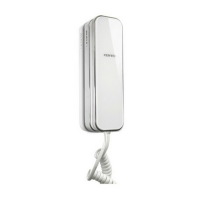
E100F
Touch button
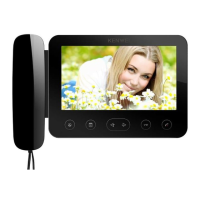
E100F
E101F
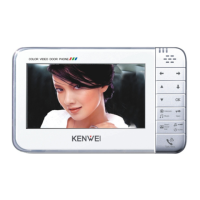
E101F
Hands-free with
touch button
6. No bother/ Exit
" "
"DI", and the " " LED flash.
b. Under standby & no bother mode, hold " ", the unit will exit no bother
mode after it sound "DI DI", and the " " LED stop flashing.
7.Intercom (for more indoor units)
a. When there are 2 indoor units, under standby mode, touch " " button, then " " button,
you can call another one to talk.
b. When there are more than 2 indoor units connected, if unit A want to call unit B, the times you
touch " " button must be the same with unit B's room number, then touch " " button to call.
(For example, to call No.3 unit, you should touch " " button three times, then " " button)
c. Under intercom mode, only the be called one can start the talk by picking up the handset
(E100F).
Under intercom mode, only the be called one can start the talk by touching " " button (E101F).
d. Under intercom mode, caller can stop calling by holding " " around 2s.
Remark: If you touch " " button over 4 times, the unit will sound "DU", means you have to call
over the system’s configuration. You need restart.
8.Call transfer (suitable for more indoor units)
When one indoor unit is under talk mode, if you want to transfer the call to another unit, please
do the same operation as intercom. After successful transfer, only the be transferred unit will ring,
the others will enter into busy mode.
9.Check room number
Under standby mode, hold " " button till the unit sounds "DI" to enter into room number
checking mode. Then you will hear “DU” sound. The times of "DU" sounded, means the room
a. Under standby mode, hold , the unit will enter into no bother mode after the unit sound
1
2
3
4
5
6
4 WIRED AUDIO DOOR PHONE
— UNIT
-
INDOOR


 To Next Page
 Need help?
 General