EasyManua.ls Logo

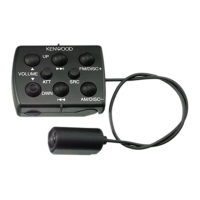
Kenwood KCA-RC406 - User Manual

Kenwood KCA-RC406
3 pages
Print Icon
To Next Page IconTo Next Page
Loading...
B64-5055-00/00 (W)
Изделие изготовлено в Mалайзии
© 2012 JVC KENWOOD Corporation
KCA-RC406
REMOTE CONTROL UNIT
INSTRUCTION MANUAL
TELECOMMANDE
MODE D’EMPLOI
FERNBEDIENUNG
BEDIENUNGSANLEITUNG
AFSTANDSBEDIENING
GEBRUIKSAANWIJZING
TELECOMANDO
ISTRUZIONI PER L’USO
UNIDAD DE CONTROL REMOTO
MANUAL DE INSTRUCCIONES
ПУЛЬТ ДИСТАНЦИОННОГО УПРАВЛЕНИЯ
ИHCTPУKCИЯ ПO ЭKCПЛУATAЦИИ
リモトコントロ ニッ
取扱説明書
B64-5055-00_KCA-RC406.indd 2 2012/10/09 15:55
Question and Answer IconNeed help?

Do you have a question about the Kenwood KCA-RC406 and is the answer not in the manual?

Summary

General Control Functions

Volume Control

Adjusts the audio volume level up and down.

Source Selection

Selects the audio source. Press and hold to turn off the unit.

Volume Mute

Temporarily reduces volume. Press again to restore previous level.

Navigation Controls

Navigate through lists, return to previous items, and select.

Confirm Selection

Confirms a selected item or action.

Audio Control Mode

Enters the audio control settings menu.

Audio Source Operations

Tuner;HD Radio Operation

Controls for selecting bands, stations, and preset tuning.

CD;Audio File Operation

Manage music and folder selection, play/pause functions.

iPod Operation

Navigate and control music playback from an iPod.

SiriusXM Tuner Operation

Select channels and recall preset stations for SiriusXM.

Hands-Free Phone Control

Making a Phone Call

Instructions for entering Bluetooth mode and dialing numbers.

Answering Calls

How to answer incoming calls and manage call waiting.

During a Call

Actions available while on an active phone call.

Remote Control Unit Maintenance

Preparing for Use

Instructions for removing the battery insulation sheet.

Changing the Battery

Guidance on replacing the remote control's battery.

Important Precautions

Safety warnings regarding battery handling and placement.

Summary

General Control Functions

Volume Control

Adjusts the audio volume level up and down.

Source Selection

Selects the audio source. Press and hold to turn off the unit.

Volume Mute

Temporarily reduces volume. Press again to restore previous level.

Navigation Controls

Navigate through lists, return to previous items, and select.

Confirm Selection

Confirms a selected item or action.

Audio Control Mode

Enters the audio control settings menu.

Audio Source Operations

Tuner;HD Radio Operation

Controls for selecting bands, stations, and preset tuning.

CD;Audio File Operation

Manage music and folder selection, play/pause functions.

iPod Operation

Navigate and control music playback from an iPod.

SiriusXM Tuner Operation

Select channels and recall preset stations for SiriusXM.

Hands-Free Phone Control

Making a Phone Call

Instructions for entering Bluetooth mode and dialing numbers.

Answering Calls

How to answer incoming calls and manage call waiting.

During a Call

Actions available while on an active phone call.

Remote Control Unit Maintenance

Preparing for Use

Instructions for removing the battery insulation sheet.

Changing the Battery

Guidance on replacing the remote control's battery.

Important Precautions

Safety warnings regarding battery handling and placement.

Kenwood KCA-RC406 Specifications

General IconGeneral
InterfaceIR Wireless
Input typePress buttons
Product colorBlack
Backlight buttonsNo
Brand compatibilityKenwood
Maximum range- m
Number of devices supported-
Battery typeCR2025
Number of batteries supported1
Quantity per pack1 pc(s)
Batteries includedYes
Weight and Dimensions IconWeight and Dimensions
Depth90 mm
Width42 mm
Height13 mm
Weight30 g

Related product manuals