EasyManua.ls Logo

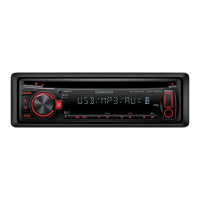
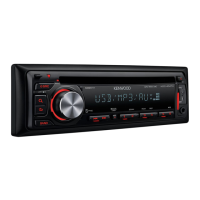
Kenwood KDC-448U - User Manual

Kenwood KDC-448U
71 pages
Print Icon
To Next Page IconTo Next Page
Loading...
Before reading this manual, click the button below to check the latest edition and the
modified pages.
IM327_Ref_K_en_00© 2010 Kenwood Corporation All Rights Reserved.
KDC-X895
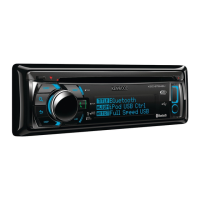
KDC-BT848U
KDC-X595
KDC-448U
CD-RECEIVER
INSTRUCTION MANUAL
Take the time to read through this instruction manual.
Familiarity with installation and operation procedures will help you obtain the best performance from your new
CD-receiver.
For your records
Record the serial number, found on the back of the unit, in the spaces designated on the warranty card, and in the space
provided below. Refer to the model and serial numbers whenever you call upon your Kenwood dealer for information or
service on the product.
Model KDC-X895/ KDC-BT848U/ KDC-X595/ KDC-448U Serial number
US Residence Only
Register Online
Register your Kenwood product at www.Kenwoodusa.com
Check the latest edition

Table of Contents

Question and Answer IconNeed help?

Do you have a question about the Kenwood KDC-448U and is the answer not in the manual?

Summary

Before Use

Initial Setup and Precautions

Covers first-time use, warnings, cleaning, and condensation.

Function Setting

Audio Adjustments

Audio Control Settings

Adjustments for Bass, Treble, Balance, Fader, EQ, and speaker settings.

Audio Preset Memory

iPod Control Operation

Music Search and Alphabetical Browsing

Methods for finding music by title, artist, album using search and alphabet.

iPod Control Navigation

iPod Playback Features

iPod Playlist Management

iPod Playlist Control

CD and USB Music Search

Navigating and Selecting Audio Files

How to search and select music from CD or USB storage.

CD and USB Playback Modes

Tuner Operation

Tuner Settings

Log Memory Functions

Display Settings

Information and Illumination Settings

General Operation: Clock

Initial Settings Configuration

Source Selection and Language Setup

Setting initial parameters like source priority, beep sound, and display language.

Hands-Free Phoning: Setup

Registering Your Cell Phone

Step-by-step guide to pair a Bluetooth-enabled cell phone with the unit.

Hands-Free Phoning: Call Handling

Answering and Rejecting Calls

How to accept or decline incoming phone calls.

Hands-Free Phoning: Dialing

Dialing Numbers and Using Call Logs

Procedures for making calls directly or from call history.

Hands-Free Phoning: Speed Dial

Speed Dialing and Preset Registration

Setting up and using speed dial numbers for quick calls.

Hands-Free Phoning: During Call

Call Management and Volume Adjustment

Handling calls during an active call (call waiting) and adjusting volume.

Hands-Free Phoning: Voice Dialing

Bluetooth Audio Streaming

Connecting and Basic Playback Control

Connecting a Bluetooth audio device and controlling playback.

Bluetooth Setup: Registration

Registering Bluetooth Devices

Steps to pair a cell phone or audio device with the unit.

Bluetooth Setup: Advanced Options

Special Device Pairing and PIN Code

Procedures for special device registration and PIN code management.

Bluetooth Setup: Phone Book

Bluetooth Setup: Management

Bluetooth Voice Commands: Dialing

Bluetooth Voice Commands: Categories

Bluetooth Detail Settings

Configuring Call and Audio Settings

Adjusting microphone gain, noise reduction, echo cancel, auto answer, and speaker output.

SMS (Short Message Service)

HD Radio Tuner: Basic Operation

Source Selection and Station Presets

Selecting HD Radio source and memorizing stations.

HD Radio Tuner: Tuning

HD Radio Tuner: Settings

Satellite Radio Tuner: Basic Use

Satellite Radio Tuner: Memory

Remote Control: Source Specific

Troubleshooting Guide: Unit Issues

Resolving Common Unit and Media Errors

Solutions for problems related to display, discs, and audio files.

Troubleshooting Guide: Device Errors

Resolving USB, iPod, and Voice Recognition Issues

Troubleshooting steps for USB, iPod, phone connectivity, and voice command errors.

Technical Specifications: Tuner and Audio

Summary

Before Use

Initial Setup and Precautions

Covers first-time use, warnings, cleaning, and condensation.

Function Setting

Audio Adjustments

Audio Control Settings

Adjustments for Bass, Treble, Balance, Fader, EQ, and speaker settings.

Audio Preset Memory

iPod Control Operation

Music Search and Alphabetical Browsing

Methods for finding music by title, artist, album using search and alphabet.

iPod Control Navigation

iPod Playback Features

iPod Playlist Management

iPod Playlist Control

CD and USB Music Search

Navigating and Selecting Audio Files

How to search and select music from CD or USB storage.

CD and USB Playback Modes

Tuner Operation

Tuner Settings

Log Memory Functions

Display Settings

Information and Illumination Settings

General Operation: Clock

Initial Settings Configuration

Source Selection and Language Setup

Setting initial parameters like source priority, beep sound, and display language.

Hands-Free Phoning: Setup

Registering Your Cell Phone

Step-by-step guide to pair a Bluetooth-enabled cell phone with the unit.

Hands-Free Phoning: Call Handling

Answering and Rejecting Calls

How to accept or decline incoming phone calls.

Hands-Free Phoning: Dialing

Dialing Numbers and Using Call Logs

Procedures for making calls directly or from call history.

Hands-Free Phoning: Speed Dial

Speed Dialing and Preset Registration

Setting up and using speed dial numbers for quick calls.

Hands-Free Phoning: During Call

Call Management and Volume Adjustment

Handling calls during an active call (call waiting) and adjusting volume.

Hands-Free Phoning: Voice Dialing

Bluetooth Audio Streaming

Connecting and Basic Playback Control

Connecting a Bluetooth audio device and controlling playback.

Bluetooth Setup: Registration

Registering Bluetooth Devices

Steps to pair a cell phone or audio device with the unit.

Bluetooth Setup: Advanced Options

Special Device Pairing and PIN Code

Procedures for special device registration and PIN code management.

Bluetooth Setup: Phone Book

Bluetooth Setup: Management

Bluetooth Voice Commands: Dialing

Bluetooth Voice Commands: Categories

Bluetooth Detail Settings

Configuring Call and Audio Settings

Adjusting microphone gain, noise reduction, echo cancel, auto answer, and speaker output.

SMS (Short Message Service)

HD Radio Tuner: Basic Operation

Source Selection and Station Presets

Selecting HD Radio source and memorizing stations.

HD Radio Tuner: Tuning

HD Radio Tuner: Settings

Satellite Radio Tuner: Basic Use

Satellite Radio Tuner: Memory

Remote Control: Source Specific

Troubleshooting Guide: Unit Issues

Resolving Common Unit and Media Errors

Solutions for problems related to display, discs, and audio files.

Troubleshooting Guide: Device Errors

Resolving USB, iPod, and Voice Recognition Issues

Troubleshooting steps for USB, iPod, phone connectivity, and voice command errors.

Technical Specifications: Tuner and Audio

Kenwood KDC-448U Specifications

General IconGeneral
Power Output (RMS)22W x 4
Max Power Output50W x 4
TunerAM/FM
CD PlaybackYes
USB PortYes
BluetoothNo
Display TypeLCD
RDSYes
Equalizer3-band parametric
AUX InputYes
MP3 PlaybackYes
WMA PlaybackYes
FLAC PlaybackNo
AAC PlaybackYes
Detachable FaceplateYes
Remote ControlYes
Channels4
Preout Voltage2.5V
Preamp Outputs2 (front & rear)

Related product manuals