EasyManua.ls Logo

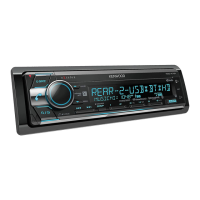
Kenwood KDC-X700BT - User Manual

Kenwood KDC-X700BT
44 pages
Print Icon
To Next Page IconTo Next Page
Loading...
Data Size: B6L (182 mm x 128 mm)
Book Size: B6L (182 mm x 128 mm)
GET0973-001A (MW/M0)© 2014 JVC KENWOOD Corporation
KDC-X700BT
CD-RECEIVER
INSTRUCTION MANUAL
JS_KWD_KDC_X700BT_MWM0_01_EN.indd 1JS_KWD_KDC_X700BT_MWM0_01_EN.indd 1 9/12/2013 3:41:59 PM9/12/2013 3:41:59 PM

Questions and Answers

  • O
    olivia96Aug 17, 2025
    What to do if "PROTECT" appears on Kenwood Car Receiver?
    • K
      Kyle McmillanAug 17, 2025
      If the Kenwood Car Receiver displays “PROTECT” and no operations can be performed, ensure the speaker wire terminals are properly insulated, and then reset the unit. If the problem persists, it may require professional attention.
  • D
    danielleglennAug 20, 2025
    How to improve radio reception on Kenwood KDC-X700BT Car Receiver?
    • C
      Christopher KingAug 20, 2025
      To improve poor radio reception on your Kenwood Car Receiver, ensure the antenna is firmly connected and fully extended.
  • K
    Katie YoungAug 22, 2025
    What to do if phone sound quality is poor on Kenwood KDC-X700BT?
    • S
      Susan WatsonAug 23, 2025
      If you are experiencing poor phone sound quality with your Kenwood Car Receiver, try reducing the distance between the unit and the Bluetooth device. Alternatively, move the car to a location with better signal reception.
  • K
    Kevin SuarezAug 25, 2025
    How to fix no sound on Kenwood KDC-X700BT?
    • S
      Shane JacksonAug 26, 2025
      If no sound is coming from your Kenwood Car Receiver, first adjust the volume to a suitable level. Then, check all cords and connections to ensure they are properly connected.
  • M
    myersbenjaminAug 27, 2025
    Why can't I control my Bluetooth player from my Kenwood KDC-X700BT Car Receiver?
    • C
      Cory HerreraAug 28, 2025
      If the connected Bluetooth audio player cannot be controlled via the Kenwood Car Receiver, check if the player supports Audio/Video Remote Control Profile (AVRCP). If it does, try disconnecting and reconnecting the Bluetooth player.
  • A
    Adrienne EricksonAug 30, 2025
    What to do if "PLEASE EJECT" appears on Kenwood KDC-X700BT Car Receiver?
    • J
      Jonathon BeardAug 30, 2025
      If your Kenwood Car Receiver displays “PLEASE EJECT”, try resetting the unit. If the problem persists, it may require professional attention.
  • K
    Kayla WilsonSep 1, 2025
    How to fix "iPod ERROR" on Kenwood KDC-X700BT Car Receiver?
    • M
      martinezjoySep 1, 2025
      If you see “iPod ERROR” on your Kenwood Car Receiver, try reconnecting the iPod. If that doesn’t work, reset the iPod.
  • S
    Scott JamesSep 4, 2025
    What to do if "NO DEVICE" appears on Kenwood Car Receiver?
    • T
      Timothy LopezSep 4, 2025
      If your Kenwood Car Receiver displays “NO DEVICE”, connect a USB device and switch the source to USB again.
  • C
    Christine BarnesSep 6, 2025
    How to eject a disc from Kenwood KDC-X700BT Car Receiver if it's stuck?
    • S
      Shawn RamirezSep 6, 2025
      If the disc cannot be ejected from your Kenwood Car Receiver, press and hold the M button to forcibly eject it. If this doesn't work, reset the unit.
  • V
    vramirezSep 9, 2025
    What does "NA FILE" mean on Kenwood Car Receiver?
    • H
      Howard HumphreySep 9, 2025
      If your Kenwood Car Receiver displays “NA FILE”, ensure the disc contains supported audio files.

Summary

BEFORE USE

Safety and General Precautions

Important safety instructions, volume settings, and general operational advice.

Maintenance and Handling

Procedures for cleaning, handling discs, and remote control care.

RADIO OPERATIONS

Tuning and Storing Stations

How to search for, store, and select radio stations.

CD, USB, and iPod Integration

Playback Control and Navigation

Managing playback, track selection, and list browsing for media.

PANDORA INTERNET RADIO

BLUETOOTH WIRELESS CONNECTIVITY

Connecting the Microphone and Pairing Devices

Installing the microphone and the process of pairing Bluetooth devices.

BLUETOOTH MOBILE PHONE OPERATIONS

Call Handling and Sound Quality

Receiving, rejecting, ending calls, and improving call audio quality.

BLUETOOTH DEVICE MANAGEMENT

AUDIO SETTINGS

Audio Control Adjustments

Adjusting subwoofer levels, LPF, phase, HPF, fader, balance, and volume offset.

DISPLAY SETTINGS

TROUBLESHOOTING

Common Sound and Operation Issues

Solutions for no sound, unit not working, and display errors.

Radio and Disc Playback Troubleshooting

Resolving issues with radio reception, file recognition, and disc errors.

Bluetooth Connectivity and Audio Issues

Addressing Bluetooth detection, pairing, echo, noise, and voice call problems.

INSTALLATION AND CONNECTION

Warnings and Cautions

Important safety warnings and precautions before installing the unit.

Basic Installation Procedure

Step-by-step guide for wiring, mounting, and connecting the unit.

Wiring Connections Diagram

Detailed diagram showing all electrical connections for the unit.

Kenwood KDC-X700BT Specifications

General IconGeneral
BrandKenwood
ModelKDC-X700BT
CategoryCar Receiver
LanguageEnglish

Related product manuals