EasyManua.ls Logo

KERONG KR-S80-A - User Manual

KERONG KR-S80-A
18 pages
Print Icon
To Next Page IconTo Next Page
Loading...
Technology Change Life
User manual
Question and Answer IconNeed help?

Do you have a question about the KERONG KR-S80-A and is the answer not in the manual?

Summary

Preface

Relative Products

Product Appearance

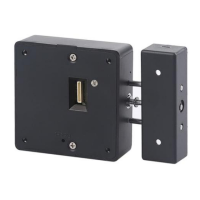
Lock Body

ABS material, size 80*80*27mm.

Lock Hook

Different hook types suit for various application.

Card

Different shapes of cards available: wrist band, tag fob, rectangle card.

External Power Supply

External battery box and power adaptor for emergency power supply.

Product Installation Dimensions

Lock Body Dimensions

Detailed measurements and screw hole specifications for the lock body.

Hook A Dimensions

Installation dimensions and screw hole details for Hook A.

Hook E Dimensions

Installation dimensions for Hook E.

Hook Dimensions

Installation dimensions for another hook type.

Installation Drawing

Product Functions

Parameters

Technical parameters: material, power, voltage, working environment, anti-static.

Functions & Features

Details sound prompt, light prompt, low voltage alarm and their features.

Alarm Functions

Low voltage and lock status alarms, and locking protection mechanisms.

Card Functions

Defines roles of manager, user, delete, and master cards.

Button Functions

Explains functions assigned to buttons 1-4 and reset.

Functional Cards

Details card encryption, compatibility, and encryption setting.

Operations

Public Mode

Mode introduction for public mode, any card to lock and same card to unlock.

Set Lock into Public Mode

Step-by-step guide to configure the lock for public mode operation.

Set Manager Card (Public Mode)

Procedure for programming a manager card for public mode.

Set User Card (Public Mode)

Note on user card usage in public mode (not required).

How to Use User Card (Public Mode)

Illustration of using any card to lock and unlock in public mode.

Set Delete Card (Public Mode)

Steps to set a delete card for managing user cards in public mode.

Private Mode

Mode introduction for private mode, manager & user cards are programmed.

Set Lock into Private Mode

Steps to set the lock into private mode.

Set Manager Card (Private Mode)

Procedure for programming a manager card for private mode.

Set User Card (Private Mode)

Steps to set user cards for private mode.

How to Use User Card (Private Mode)

Illustrates using a user card to unlock and close cabinets.

Set Delete Card (Private Mode)

Steps to set a delete card in private mode.

Limited Public Mode

Mode introduction for limited public mode, programmed manager & user cards.

Set Lock into Limited Public Mode

Steps to set the lock into limited public mode.

Set Manager Card (Limited Public Mode)

Procedure for programming a manager card for limited public mode.

Set User Card (Limited Public Mode)

Steps to set user cards for limited public mode.

How to Use User Card (Limited Public Mode)

Illustrates using a user card to unlock and close cabinets.

Set Delete Card (Limited Public Mode)

Steps to set a delete card in limited public mode.

Reset Lock

Warm Tips

Overview

The Kerong KR-S80-A is a card-operated cabinet lock designed for various applications, offering different operating modes and security features. It is suitable for both wooden and metal cabinets with varying door thicknesses, and its compact design allows for flexible installation.

Function Description:

The KR-S80-A functions as a secure locking mechanism for cabinets, controlled by RFID cards. It supports three main operating modes: Public Mode, Private Mode, and Limited Public Mode, catering to different usage scenarios.

  • Public Mode: In this mode, the lock remains unlocked until a user places their belongings in the cabinet and swipes a card to lock it. The same card is then used to unlock the cabinet. Once unlocked, the cabinet becomes available for the next user. This mode is ideal for shared spaces like gyms, libraries, or public lockers where different users might use the same cabinet at different times. A manager card can be programmed for emergency unlocking and to set user cards.
  • Private Mode: This mode is designed for individual, dedicated use. The lock is always in a locked state, and both a manager card and user card must be programmed. To lock the cabinet, the user simply pushes the door closed. To unlock, the user swipes their designated user card. The manager card in this mode is primarily used for programming user cards, not for emergency unlocking. This mode is suitable for personal lockers in offices, schools, or homes where a specific user has exclusive access to a cabinet.
  • Limited Public Mode: This mode combines aspects of both public and private modes. Initially, the lock is in a locked state, and both a manager card and user card need to be programmed. To unlock, the user swipes their card. After unlocking, the cabinet remains unlocked, allowing the user to access their belongings multiple times without re-swiping. To lock the cabinet after use, the user must swipe their card again. This mode is useful for situations where a user needs temporary, repeated access to a cabinet within a specific period, such as in a workshop or a lab, before making it available for another user.

Usage Features:

The KR-S80-A offers a user-friendly experience with visual and auditory prompts for various operations.

  • Card Operation: The primary method of operation is through RFID cards. The lock supports different card types, including wristbands, tag fobs, and rectangle cards, providing flexibility for users.
  • Manager Card: A manager card is essential for setting up and managing the lock. In Public Mode, it can be used for emergency unlocking and programming user cards. In Private and Limited Public Modes, its main function is to program user cards.
  • User Card: User cards are used for locking and unlocking the cabinet, depending on the chosen operating mode. In Public Mode, any card can be used to lock and unlock. In Private and Limited Public Modes, specific user cards must be programmed.
  • Delete Card: A delete card allows for the convenient removal of all user cards at once, or a specific card if advanced functionality is enabled. This is useful for resetting user access or managing card assignments.
  • Button Functions: The lock body includes several buttons for direct configuration:
    • Button 1: Sets manager and user cards.
    • Button 2: Sets delete cards.
    • Button 3: Changes the working mode (Public, Private, Limited Public).
    • Button 4: Changes to single-key or double-key mode (if applicable).
    • Reset Button: Resets the lock to factory settings. These button functions can also be disabled and managed via a handset machine for more centralized control.
  • Functional Cards: Special functional cards can be used to change the working mode, enable/disable the lock status alarm, and enable/disable the lock sound. These cards can be encrypted for enhanced security, ensuring that only authorized function cards can configure the lock.
  • Locking Protection: To prevent unauthorized access attempts, the lock implements a locking protection mechanism. After five continuous incorrect code/card inputs, the lock becomes unavailable for 5 minutes. During this period, only a manager card/code can make it available again.
  • Lock Status Alarm: In Private Mode, the lock can be configured to sound an alarm for 10 seconds if it remains in an unlocked state for more than 30 seconds, reminding users to secure their belongings. This feature can be enabled/disabled via buttons or a handset machine.

Maintenance Features:

The KR-S80-A is designed with features to ensure reliable operation and alert users to maintenance needs.

  • Low Voltage Alarm: The lock provides a clear indication when the battery voltage is low. When the voltage drops below 4.5V, a blue light will shine, and the lock will emit a "di di" sound upon opening or as an automatic alarm. This prompts users to change batteries in a timely manner.
  • Battery Replacement: If the battery voltage falls below 4V, the lock will prevent further locking until new batteries are installed, ensuring that the lock always has sufficient power to operate securely. The batteries are designed to last for approximately one year under normal standby conditions.
  • External Power Supply: For emergency situations where batteries are depleted, the lock can be powered externally using an external battery box or a power adaptor connected to the lock body or front panel.
  • Reset Functionality: The reset button allows users to restore the lock to its factory settings, invalidating all previously set cards. This is useful for troubleshooting or reconfiguring the lock for new users or applications.
  • Installation Considerations: The manual emphasizes the importance of ensuring the lock is working correctly, batteries are included, and all cards are set before final installation, minimizing potential issues post-setup.

KERONG KR-S80-A Specifications

General IconGeneral
ModelKR-S80-A
Working Temperature-20°C to 60°C
Operating Frequency13.56MHz
Storage Temperature-30°C to 70°C
TypeRFID Lock
MaterialPlastic
Dynamic Power Consumption≤ 200mA
Low Voltage AlarmYes
Working Humidity10% to 90%
Card TypeMIFARE Classic
Humidity5%~95%RH