43
LiPo Battery Disposal & Recycling
Wasted batteries must not be placed with household trash.
Please contact local environmental or waste agency or the
supplier of your model or your nearest Li-Po battery recycling center.
3. Notice for Battery
* Turn off the drone switch first when finished flying and then take out the battery.
* Charge the battery after the battery surface cooling down.
* Keep away from heat and put the battery in dry place when the battery is not being
used for a long time.
* Do not put the battery with metal product to avoid short circle.
* Stop using the battery if the battery swell up, damaged or seriously heating etc.
* Put the battery and charger on the ground and keep away from inflammable when
charging to avoid accident.
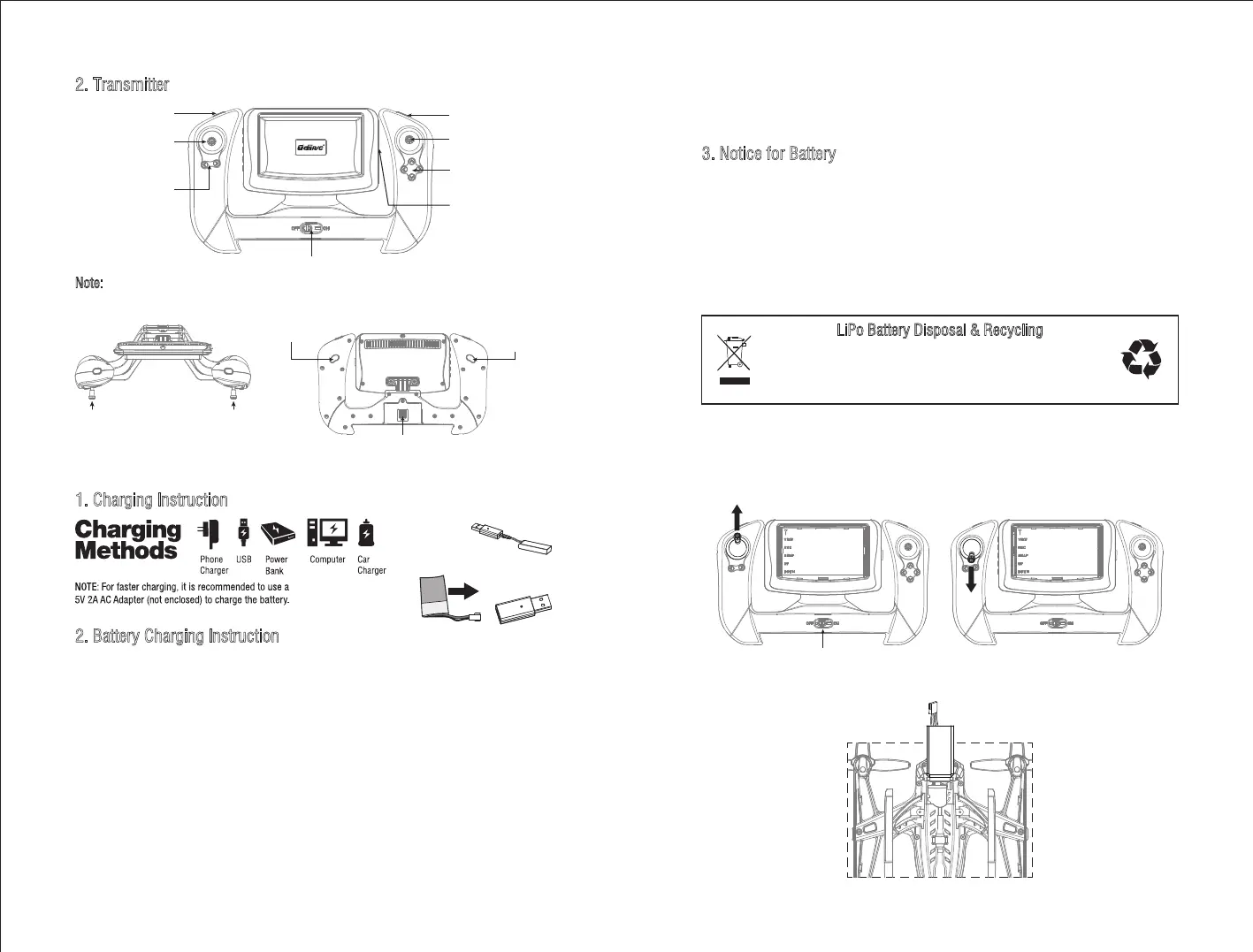
2. Transmitter
Note: Camera Adjustment Button only available when the drone is equipped with camera
platform equipment.
Forward/Backward/
Left/Right Flying Stick
Camera Adjustment
Button
Left/Right Rotation
Trim
Forward/Backward/
Left/Right Flying Trim
TF Card Slot
Power Switch and Indicator Light
Throttle/Left and Right
Rotation Stick
Headless Mode Return Home
(Under Headless Mode)
High/Medium/Low
Speed Mode
360°Flip Mode
Battery Box
1. Charging Instruction
2. Battery Charging Instruction
* When charging the drone battery, the USB indicator light is red and turns to green when
fully charged.
* When charging the transmitter battery, the USB indicator light is red and turns to green
when fully charged.
* If the transmitter battery is low when flying, the transmitter will issue constantly sound
of “di---di” to alarm. At this time please land the drone as soon as possible and replace
the battery, or the drone may out of control.
* If the drone battery is low when flying, the drone LED light flashes and the transmitter
will issue constantly sound of “di-di” to alarm. At this time please land the drone as
soon as possible, or the drone may crash suddenly for low battery.
Flying Preparation
Drone Battery
Transmitter Battery
* The charging time of the drone battery is about 70minutes, while the charging time of
the transmitter battery is about 60minutes.
Frequency Pairing:
1. Turn on the transmitter switch and the LED indicator will begin to flash rapidly. Push
the left Throttle Stick all the way up, then all the way down (Picture 1-2). The indicator
light flashes slowly, which indicates the transmitter enters code pairing search.
2. Put the battery into the battery box.
Power Switch
Pictuer 1 Picture 2
Camera Adjustment
Button
* Make sure that there is no short circuit of the power wire.
* Please use the recommended charger only.
* Check the charger’s wire, plug, surface regularly. Do not use any broken charger.


 To Next Page
 Loading...