3 The
La
yers
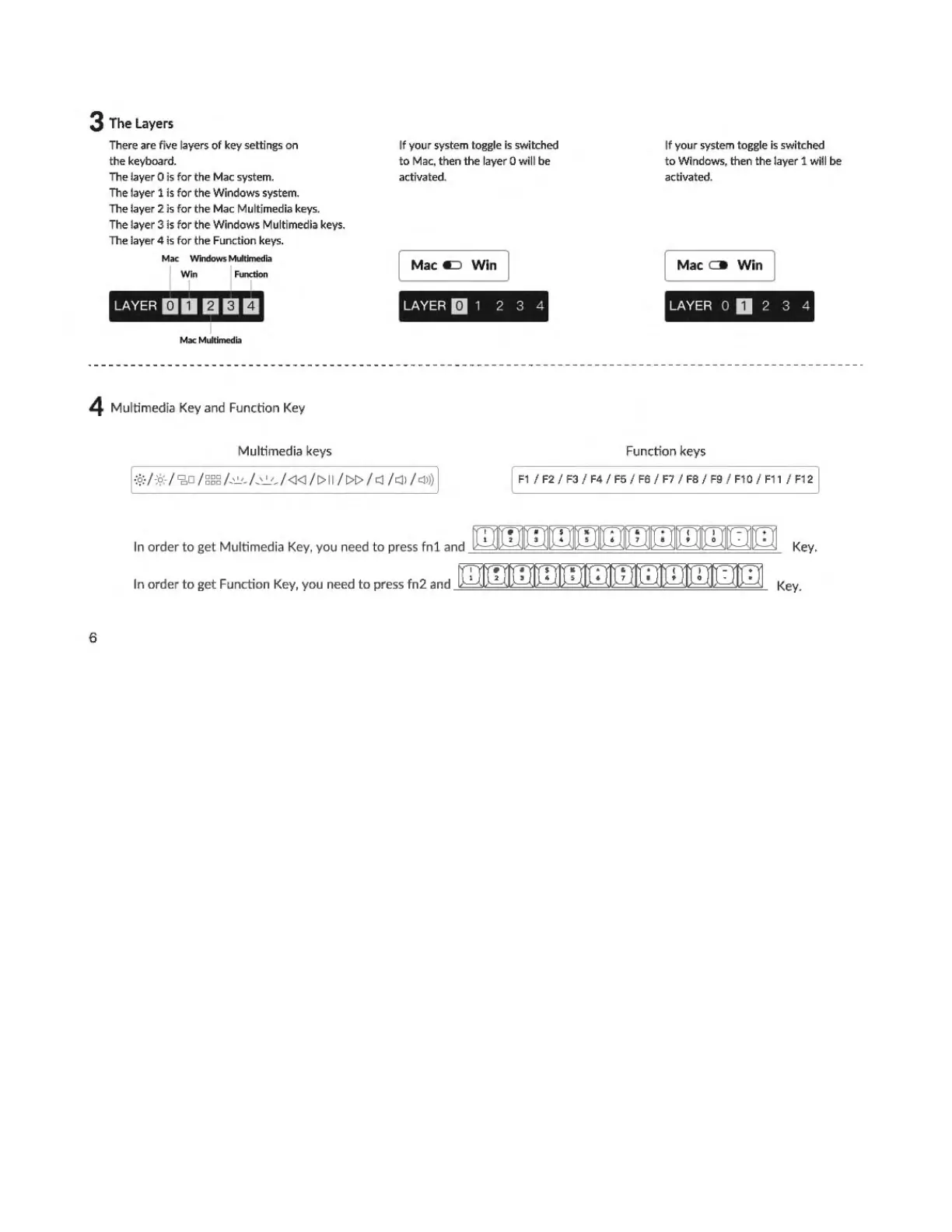
There are five layers
of
key
sett
ings
on
t
he
keyboard.
The lay
er
O is
for
the
Mac system.
The layer 1 is
fo
r
the
W
indows
system.
The layer 2 is
for
the
Mac
Multimedia keys.
The layer 3 is
for
the
W
indows
Multimedia keys.
The layer 4 is
for
the Fun
ct
io
n keys.
Ma
c Windows
Multimed
ia
i'" IFl
on
LAYER
mo
mam
Mac
Multimedia
If your system toggle is switched
to
Mac, th
en
the layer O will be
activated.
M
aca=i
Win
LAYER m 1 2 3 4
If your system toggle is switched
to Windows, then the layer 1
wi
ll
be
activat
ed
.
Ma
co
Win
LAYER O O 2 3 4
4
Mu
ltimedia Key and Function Key
Multimedia keys Function keys
F1 /
F2
/ F3 /
F4
/
FS
/ F6 / F7 /
FB
/ F9 /
F1
0 / F11 / F1 2
In order
to
get
Mu
ltimedia Key, you need
to
press
fnl
and
rnmmmmmml!Irlmm
□□
Key.
. 1
2$4
5
671f0
••
In order
to
ge
t Function Key, you need
to
press fn2 and -'===="======='===='==='=="'==='==="'====""="'=~ Key.
6



 To Next Page