User Manual
COGE5, COGE5-F
page 74 of 110© KEYMILE December 2015 EN/LZTBU 372 144/3 RA
110
User Interface Reference
8.2.4 AP: / unit-x, Fault Management
For the a description of the general aspects of the
− “Fault Management - Status”, and
− “Fault Management - Configuration”
management functions, please refer to [302] User Guide “XMC25/XMC23/
XMC22”. The following table lists the fault causes of the current AP.
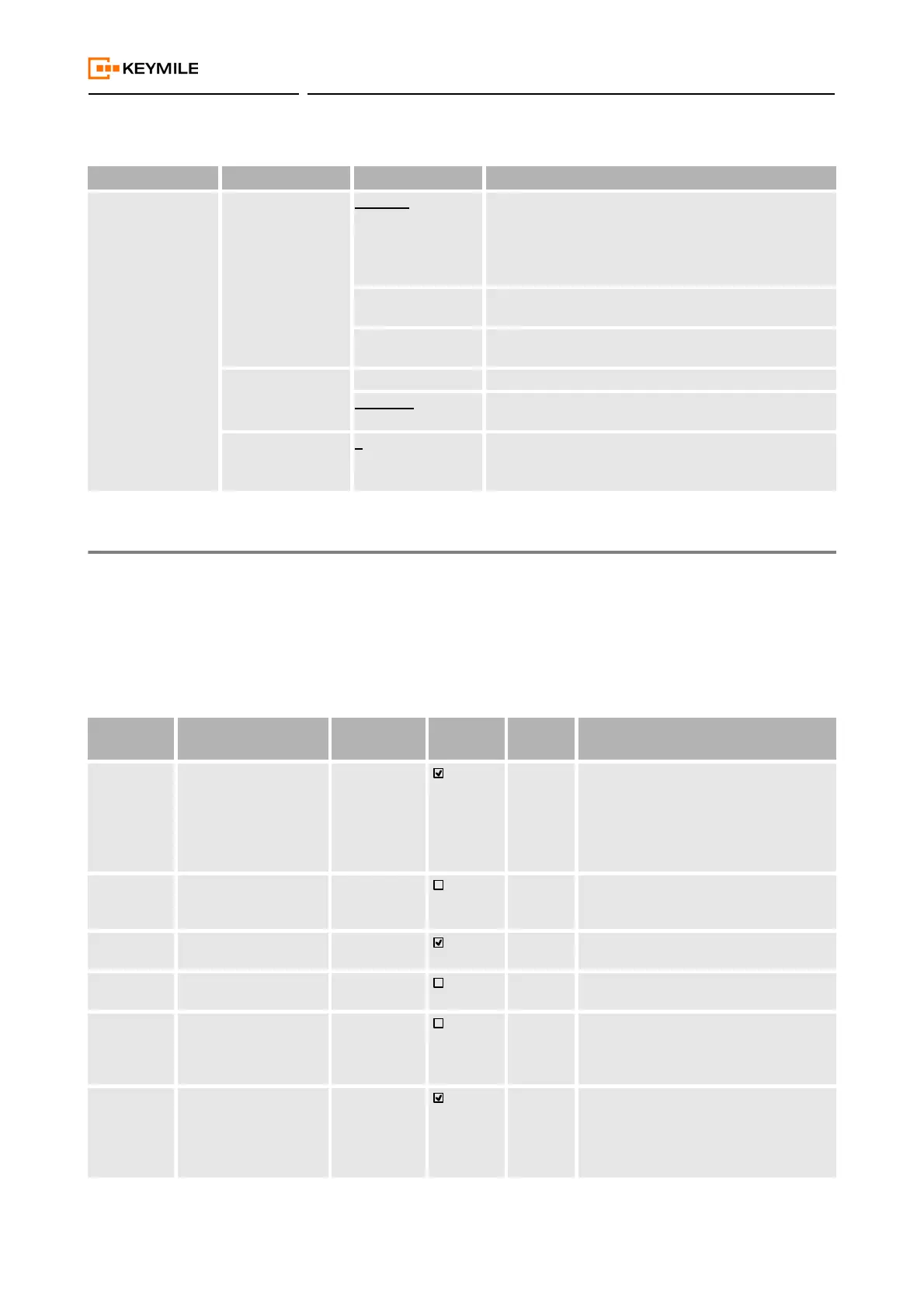
Table 19: AP: / unit-x, Configuration - PTP
Operation Name Parameter Name Range Descriptions / Details
Clock Config Clock Type Disabled The COGE5 unit is not used as a PTP ordinary or
boundary clock.
It can be used as a PTP transparent clock.
No PTP port can be used as PETS timing source.
See section 5.4.3 Precision Time Protocol (on page 44).
Ordinary Clock The COGE5 unit is used as a PTP ordinary clock and/or
transparent clock.
Boundary Clock The COGE5 unit is used as a PTP boundary clock and/
or ordinary clock and/or transparent clock.
Clock Mode One Step Time information uses a single event message.
Two Step Time information uses the combination of an event
message and a subsequent general message.
Clock Domain 0 … 255 A domain consists of one or more PTP devices commu-
nicating with each other.
0 is the default domain.
Table 20: AP: / unit-x, Fault Management
ID Fault Cause Event Type Traffic
Affecting
Default
Severity
Description
CCE Configuration or Cus-
tomization Error
Processing
Error Alarm
Major An invalid configuration has been
accepted by the unit by mistake.
To get rid of the alarm redo the complete
configuration or reboot the unit.
If the alarm persists please contact KEY-
MILE.
GSW General Software
Alarm
Equipment
Alarm
Major The XMC20 has detected an unspecific
problem with the ESW running on this
unit.
MFA Maintenance Function
Active
Communica-
tion Alarm
Warning An operator initiated maintenance func-
tion is active on this unit.
SWM Software Mismatch Equipment
Alarm
Minor The running ESW does not match the
assigned ESW.
SSWNA Scheduled Software
Not Available
Equipment
Alarm
Minor The ESW that is scheduled for installa-
tion is not available on the unit. Make
sure that the ESW is downloaded to the
unit.
HWIC Hardware Incompatible
With Configuration
Equipment
Alarm
Major The plugged HW is not compatible with
the unit configuration HW stored in the
database. You may need to change the
HW or re-create the configuration for the
unit.


 To Next Page