Setting the Time & Date or
Setting the Birthday/Anniversary Reminder
2
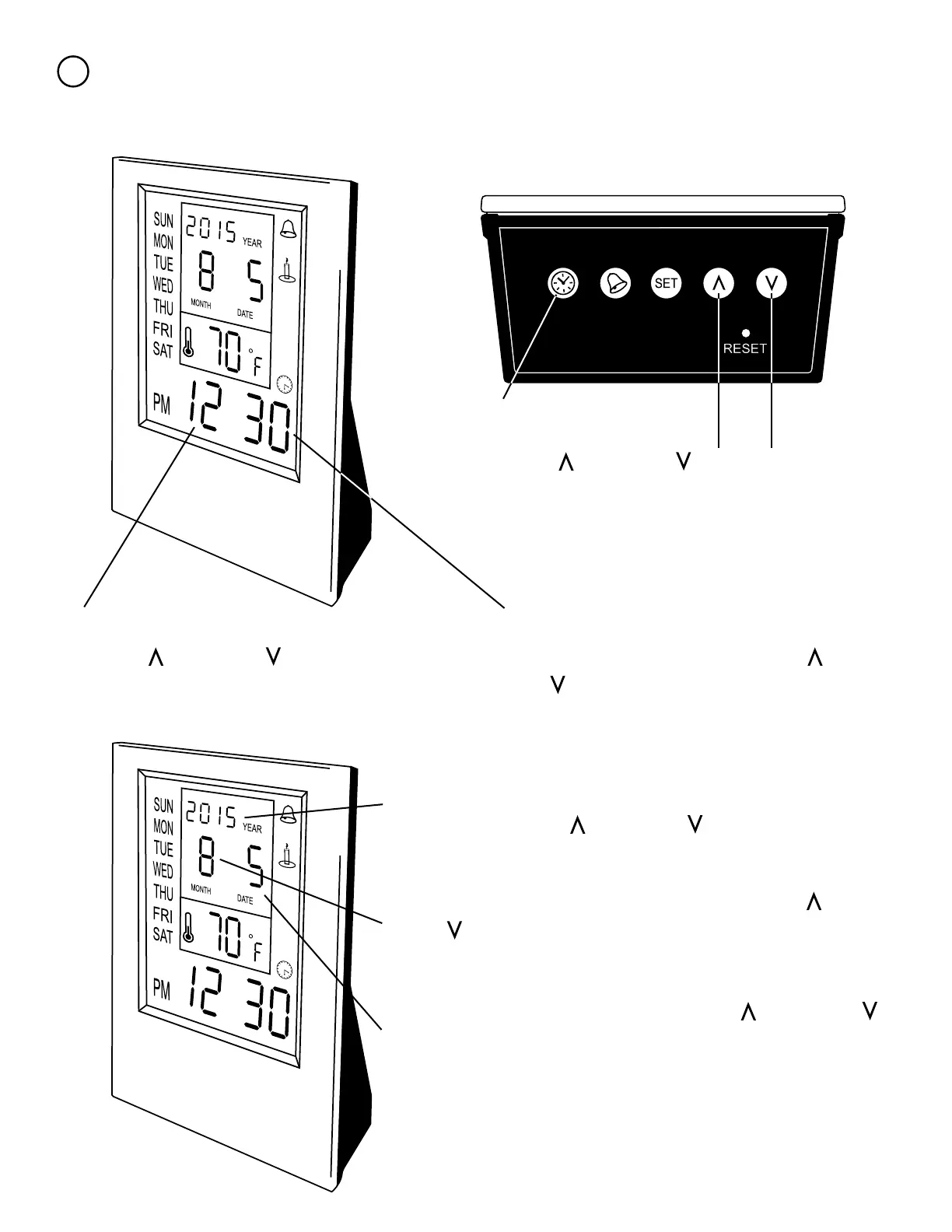
To set the time push the clock.
Now use the and down to choose between
Standard (12hr) and Military (24hr) time. Hit the set
button once you have the correct one selected
Now push the set button again. The minutes
should now be ashing. Use the up and
down to set the time to the correct minute(s).
Finally push the set button again. Now the year will be
ashing. Use the up and down to change the year.
Hit set once the year is correct.
The hour should now be ashing on the display.
Use the up and down to adjust the time to
the correct hour.
Now the month should be ashing. Use the up and
down to select the correct month. Hit the set button
once it is correct.
Now day should be ashing Use the up and down
to make the day correct. Hit the set button once it is
correct and this will cause the unit of time to ash again.
Hit the clock button to move on to setting the Alarm.



 To Next Page