
 Need help?
Do you have a question about the KGK CCS3000L and is the answer not in the manual?
Details the scope and purpose of the instruction manual for the KGK JET CCS3000L series.
Limits liability for damage caused by product defects, unauthorized modifications, or non-genuine parts.
Explains safety symbols (Danger, Warning, Caution) and their meanings for safe operation.
Provides essential guidelines on suitable and unsuitable locations for equipment installation.
Details precautions for using the correct voltage and handling power cables safely.
Outlines immediate actions to take in case of smoke or foreign material entry.
Provides precautions for handling organic solvents and first aid for poisoning.
Details the key features of the continuous ink jet printer, including nozzle capping and high-quality printing.
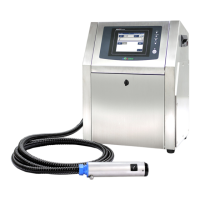
Describes the main components: main unit, printhead, and operation panel, and their connections.
Lists the product package contents and sets of maintenance tools included with the printer.
Suggests useful items for emergency responses, backups, and general convenience.
Identifies key parts like the main switch, front door, knob, and handle on the main unit.
Labels various connectors and ports on the rear and left side of the main unit.
Illustrates and describes internal components of the main unit, including reservoirs and pumps.
Details the touch panel, standby switch, and indicator lamps (Ready, Ink, Solvent, Alarm).
Shows diagrams of the printhead, labeling components like the nozzle, heater, and electrodes.
Specifies power supply, operating temperature, and humidity for optimal installation and performance.
Defines the required space around the main unit for proper ventilation and access.
Covers printhead installation direction, positioning relative to the main unit, and distance from workpiece.
Illustrates how to connect external devices like PLC, sensors, UPS, and signal lamps.
Visualizes the sequence of operations for starting up, running, and shutting down the printer.
Provides step-by-step instructions for powering on the main unit and operation panel.
Guides users through creating and selecting message data for printing on the device.
Explains how to adjust printing parameters like delay, height, and print direction.
Details switching between running and stop modes, including heating and capping.
Covers performing print jobs, stopping the printhead, and safely powering off the system.
Advises on careful operation of the touch screen to prevent damage.
Details the elements and functions displayed on the main operating screen.
Explains the purpose and function of various icon buttons used for navigation and settings.
Illustrates the menu structure, including Print setting, System setting, and Maintenance options.
Details the meaning of icons for printhead status, head heating, ink/solvent levels, and consumables.
Illustrates how to navigate between different operation screens like Print setting, System setting, and I/O.
Details how to check unit information and perform test prints.
Explains how to view system state, logs, and current numbering values.
Refers to a table for compatible ink, solvent, and cleaning solution lists.
Provides formulas and guidelines for calculating ink and solvent consumption based on nozzle diameter and operating time.
Describes alarm levels for ink and solvent reservoirs and refilling procedures.
Explains the principles and operation of measuring ink viscosity using a Zahn cup.
Details the logic for refilling ink or solvent based on viscosity measurements.
Lists detailed specifications for dye and pigment machines, including print method, speed, and character types.
Details the available standard fonts, character types, and font matrix sizes.
Describes various message module types like text, calendar, barcode, and 2D code.
Explains how to perform multiple lines printing with different font sizes and arrangements.
Details font sizes and print positions for vertical dots of 22, 20, and 16 dots.
Details font sizes and print positions for vertical dots of 15, 12, 11, and 10 dots.
Details font sizes and print positions for vertical dots of 9, 7, and 5 dots.
Provides samples and limits for positioning dots in fixed-width fonts across various vertical dot counts.
Provides detailed dimensional drawings and measurements for the main unit.
Shows detailed dimensional drawings and measurements for the printhead.
 General
| Category | Industrial Equipment |
|---|---|
| Model | CCS3000L |
| Operating Temperature | 5°C to 40°C |
| Communication Interface | Ethernet, USB |
| Power Supply | 100-240V AC, 50/60Hz |
| Display | LCD Touch Panel |

 To Next Page