The D.Bridge KHG is an alkalinity controller designed for aquariums, offering automatic dKH monitoring and correction. It aims to maintain a stable dKH level in the tank by automatically calculating and dosing sodium bicarbonate solution.
Function Description
The KHG continuously measures the dKH value of aquarium water. For the "C" version, it includes an automatic dKH controlling feature that calculates the required amount of sodium bicarbonate solution based on the desired dKH target, total aquarium water volume, and current test results. The controller then doses the solution accordingly. The device supports remote monitoring and control via a web browser on the local network, eliminating the need for dedicated software or an app. It also features an SD memory card for long-term data logging.
Important Technical Specifications
- Resolution (Standard Edition): 0.33 dKH
- Continuous Measuring Test Accuracy: +/- 0.33 dKH
- Measurement Range: 5 - 12 dKH
- Reagent Usage: Approximately 3-4 cc per test, with used reagent safely returned to the aquarium.
- Test Duration: Each test takes about 3-7 minutes.
- Automatic Measuring Interval: Settable from 30 to 240 minutes.
- Network Connectivity: Ethernet (RJ45) for connection to a home router or LAN.
- Power: DC 12V.
- pH Probe: Requires KHG approved pH probe.
- SD Card: Preinstalled for data logging.
Usage Features
Installation and Setup:
- Placement: The KHG must be placed on a level surface and completely upright, no more than 100 cm away from the tank, to ensure accurate sample delivery and prevent solution contamination of internal components.
- Tube Connections:
- SW IN (Saltwater In): Connects to the tank water source for sampling. Requires water to be filtered by 5 microns or less to prevent blockages. A medical-grade check valve (included) must be installed in the correct direction.
- SW OUT (Saltwater Out): Purges reaction chamber water. A medical-grade check valve (included) must be installed in the correct direction.
- S.S. IN (Sodium Bicarbonate Solution In): Connects to the Sodium Bicarbonate Solution Reservoir.
- S.S. OUT (Sodium Bicarbonate Solution Out): Delivers sodium bicarbonate solution to the tank or sump for auto-correction.
- KS (Reagent Solution): Connects to the KHG reagent solution bottle.
- pH Probe Calibration:
- Rinse the pH probe with distilled water and pat dry with tissue paper (without twisting).
- pH 7.0 Calibration: Insert the probe into pH 7.0 calibration solution (at least 1.5 cm deep). Press and hold buttons 2 and 4 simultaneously for 3 seconds until a beep is heard.
- pH 4.0 Calibration: Rinse the probe again. Insert it into pH 4.0 solution (at least 1.5 cm deep). Press and hold buttons 1 and 3 simultaneously for 3 seconds until a beep is heard.
- Calibration must be performed in the pH 7.0 then pH 4.0 order.
- pH Probe Insertion: Insert the calibrated pH probe until its cap is level with the red line, then hand-tighten the white knob.
- Tube De-Gassing:
- SW Tube De-Gas: Use the web browser interface to purge air from the tank water inlet tube. Repeat until tank water flows.
- KS De-Gas: Use the web browser interface to purge air from the reagent solution tube. Observe the observation hole until reagent solution drops at a rate of one drop per 3 seconds (at least 10 drops), then press "RESET" or hold button 4 for 3 seconds to stop.
- Initial dKH Value: Key in the last known dKH value in "System Setup" under "Last KH (dKH)". Ensure this value is not 1.5 dKH away from the desired alkalinity target. Save settings, which will trigger a forced reboot.
- First Test: After reboot, the LCD will show "STANDBY". Access the main control page in the browser and click "GET dKH" to perform a full test.
Main Control Page (via Web Browser):
- Get dKH: Initiates a dKH test.
- Purge Chamber: Empties all solutions from the reaction chamber. Essential before moving the KHG to prevent damage.
- SW Tube De-Gas: Pumps saltwater into the reaction chamber, purging gas. Used during initial setup or after reassembly.
- KS De-Gas: Purges gas from the KH reagent solution tube.
- ENG Mode ON/OFF: Advanced functions, to be used only under instruction from support staff.
- Test KH Doser: Tests the sodium bicarbonate solution pump.
- Test Accelerator: Tests the reaction chamber agitator.
- RESET: Resets warning signals and stops KS De-Gas.
- Refresh: Refreshes the browser display.
- Display Record: Displays the log.
- Reboot: Forces a reboot of the KHG.
- System Setup: Accesses system settings.
System Setup Parameters:
- Auto mode: Default 1 (automatic mode). Other values disable it.
- Check intervals (Min): Sets the interval between dKH tests (recommended 180 minutes). Shorter intervals use more reagent.
- No_SW_ERR: Sets the alarm threshold for insufficient water pumped into the reaction chamber (default 140-160 steps). Adjustable based on tank distance and head pressure.
- Err Range (dKH): Sets the variance range for dKH values. If a test deviates by this amount from the previous value, a second test is performed for verification (recommended 0.5 dKH).
- Err Try: Number of retests if "Err Range" condition is met.
- Last KH (dKH): Used after system reset or diagnostics.
- ADJ KH (dKH): Allows forced adjustment (correction) of KHG's dKH value if there's a consistent deviation from another test kit. Can be positive or negative.
- Enable KH Auto: Set to "1" to activate automatic mode (not available for M model).
- KH auto correction: Sets the desired tank dKH value. KHG will actively maintain this level. It's recommended to set existing alkalinity dosing slightly below the target and let KHG fine-tune.
- M.L.Q (Maximum Liquid Quantity): Sets the maximum amount of sodium bicarbonate (in ml) KHG can add at any given time, acting as a safety feature (not available for M model).
- Total volume (L): Total water volume of the tank in Liters, used for auto-correction calculations (not available for M model).
- SYS_Sound: Set to "1" for system sound ON. Other values deactivate it. Does not silence alarms.
- PORT: Default 8090. To be used only as instructed by network administrator.
- Timezone: Sets the time zone (UTC).
- NTP Server: To be used only as instructed by network administrator.
- MAC: MAC Address of the KHG (cannot be changed).
- S/N: Serial Number of the KHG (cannot be changed).
- SAVE: Saves all settings and forces a reboot.
- New PW / Confirm PW: Allows setting a new password (max 8 characters, no special characters). No reboot necessary after changing.
- Clear SD: Initiates SD card memory purge. Recommended every 3 months. Requires unplugging and reconnecting power to re-enable logging.
Display Information (Bottom of Main Control Page):
- Last KH: n.nn: Last dKH value obtained.
- pH: n.nn: Last pH value obtained.
- CKI = nn: Testing interval in minutes.
- NT: nn min: Time remaining until next test.
- W: nnn: Step motor setting value (steps) for pumping water.
- AutoMode: n: Automatic testing mode (1=ON, 0=OFF).
- P: STANDBY: Current system status.
- SYS: READY: Sublevel control status (for support staff).
- L.Time: MM/DD hh:mm: Date and time of the last test.
- C.Time: MM/DD hh:mm: Date and time of the current test.
Log Field Interpretation:
- Date / Time: Timestamp of the log entry.
- W.131: Number of pitches the Tank Water Input Pump ran.
- %0: Percentage of possible errors assessed by optically matching agent dropped speed.
- AK.35.00: Calculated amount of baking soda supplemented (e.g., 22.15 cc).
- KH :7.90: dKH value (before adding baking soda).
Maintenance Features
General Maintenance:
- Initial Readings: Perform 5 dKH readings after initial assembly and installation for optimal performance.
- Moving the KHG: Always use the "Purge Chamber" function to drain all liquids. Detach and invert the Reaction Chamber, then pat dry to prevent corrosive saltwater damage.
- pH Probe:
- Use only KHG approved pH probes.
- Keep a spare pH probe.
- Exchange the pH probe every three months and perform pH4 and pH7 calibration.
- When storing a pH probe, clean thoroughly, pat dry, and immerse the glass bulb in 3M potassium chloride solution.
- The life of a pH probe is approximately 18 months, but reduced accuracy may occur after long exposure to saltwater. Avoid drying the pH probe for more than 12 hours.
- Reagent Solution: Ensure the KRS solution is not depleted.
- Sodium Bicarbonate Solution: Prepare solution by mixing 65 grams of sodium bicarbonate powder per one liter of water. Ensure the error tolerance is within 5%.
- KHG Placement: Keep the KHG in a protected container away from saltwater splashes.
- Cover: Do not attempt to open the cover of the KHG; doing so voids the warranty.
- Lubrication: KHG Reagent Pump should be lubricated every 6 months using only Molykote® EM-30L Grease.
- Troubleshooting: If issues persist, contact your dealer.
Error Messages and Troubleshooting:
- SW>ERR (System water intake error):
- Press "SW Tube De-Gas" and check the Sodium Bicarbonate pump.
- Check for blockages in the tank water intake tube.
- Check if the white water level sensor in the Reaction Chamber moves freely.
- Sensor may be malfunctioned.
- SW<ERR (Reaction chamber water purging error):
- Press "Purge Chamber" and check the "Waste Water Purge Pump".
- Check for blockages in the purge tube.
- Check if the white water level sensor in the Reaction Chamber moves freely.
- Sensor may be malfunctioned.
- KS_ERR (KRS solution suction error):
- Check if KRS solution is depleted.
- Check for blockages in the KRS solution intake tube.
- Press "KS De-Gas" and check the KRS pump.
- If the KRS pump is turning, check the observation window for blinking drop sensor light when solution drops.
- Sensor may be malfunctioned.
- KH>ERR (KH value high error):
- Indicates tested value is 1.5 dKH higher than "KH auto correction" setting.
- Check if "KH auto correction" setting is reasonable.
- Check for air bubbles in the KRS solution tube.
- Check if the pH probe is secured at proper depth.
- Check the dilution ratio of sodium bicarbonate solution.
- KH<ERR (KH value low error):
- Indicates tested value is 1.5 dKH lower than "KH auto correction" setting. KHG will stop dispensing Sodium Bicarbonate.
- Check if "KH auto correction" setting is reasonable.
- Check for air bubbles in the KRS solution tube.
- Check if the pH probe is secured at proper depth.
- Check the dilution ratio of sodium bicarbonate solution.
- AC_ERR (KH accelerator error):
- Check if the small white agitator in the Reaction Chamber is missing.
- Check if the pH probe is secured at proper depth.
- Accelerator may be malfunctioned.
- pH<ERR (pH reading low error):
- Occurs if pH reading is below 4.5. Alarm activates.
- Check if the pH probe is properly secured.
- Execute pH probe calibration.
- Check if the Reaction Chamber is dry inside.
- If the Reaction Chamber is dry, check if the water level sensor moves freely.
- pH>ERR (pH reading high error):
- Occurs if pH reading is higher than 8.8. Alarm activates.
- Check if the pH probe is properly secured.
- Execute pH probe calibration.
Network Configuration:
- RJ45 Network Cable: Ensure it's securely attached to the KHG and connected to a home router or LAN.
- IP Address: The display panel will show the automatically assigned IP and port number. If DHCP doesn't assign an IP, the default is 192.168.1.10.
- WiFi Bridge: KHG is not directly WiFi capable but can be used with an RJ45 WiFi Bridge.
- Fixed IP: If KHG fails to obtain an IP from DHCP, it will fix itself at default settings: IP: 192.168.1.120, Submask: 255.255.255.0, Gateway: 192.168.1.1, Port: 8090.
- Mobile Devices: For mobile access, ensure your mobile device is in the same IP range as the KHG.
Internal Clock:
- Each time KHG reboots, it attempts to obtain time from the network time server. If unavailable, it uses its internal clock and displays "Time N/A".
- The KHG does not ship with an internal battery. For instructions on obtaining and installing one, contact your dealer.
Intake Tube Position:
- The KHG intake tube must be positioned below the water surface of the tank water source.
Siphoning Prevention:
- To prevent siphoning of tank water via KHG, the Reaction Chamber purge tube and the Sodium Bicarbonate tube must not be immersed into the tank.
Intake Tube Protection:
- The KHG intake tube should not be positioned at the bottom of the tank and should be protected to prevent debris from entering and blocking the tubing.

 Need help?
 General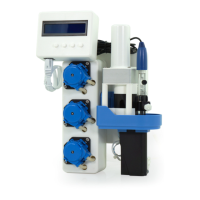

 To Next Page