Press ‘Menu’ to ‘Fast Cook’ > indicator light
flashes > select ‘Start’ > once cooking is
completed, cooker switches to ‘Keep Warm’
status.
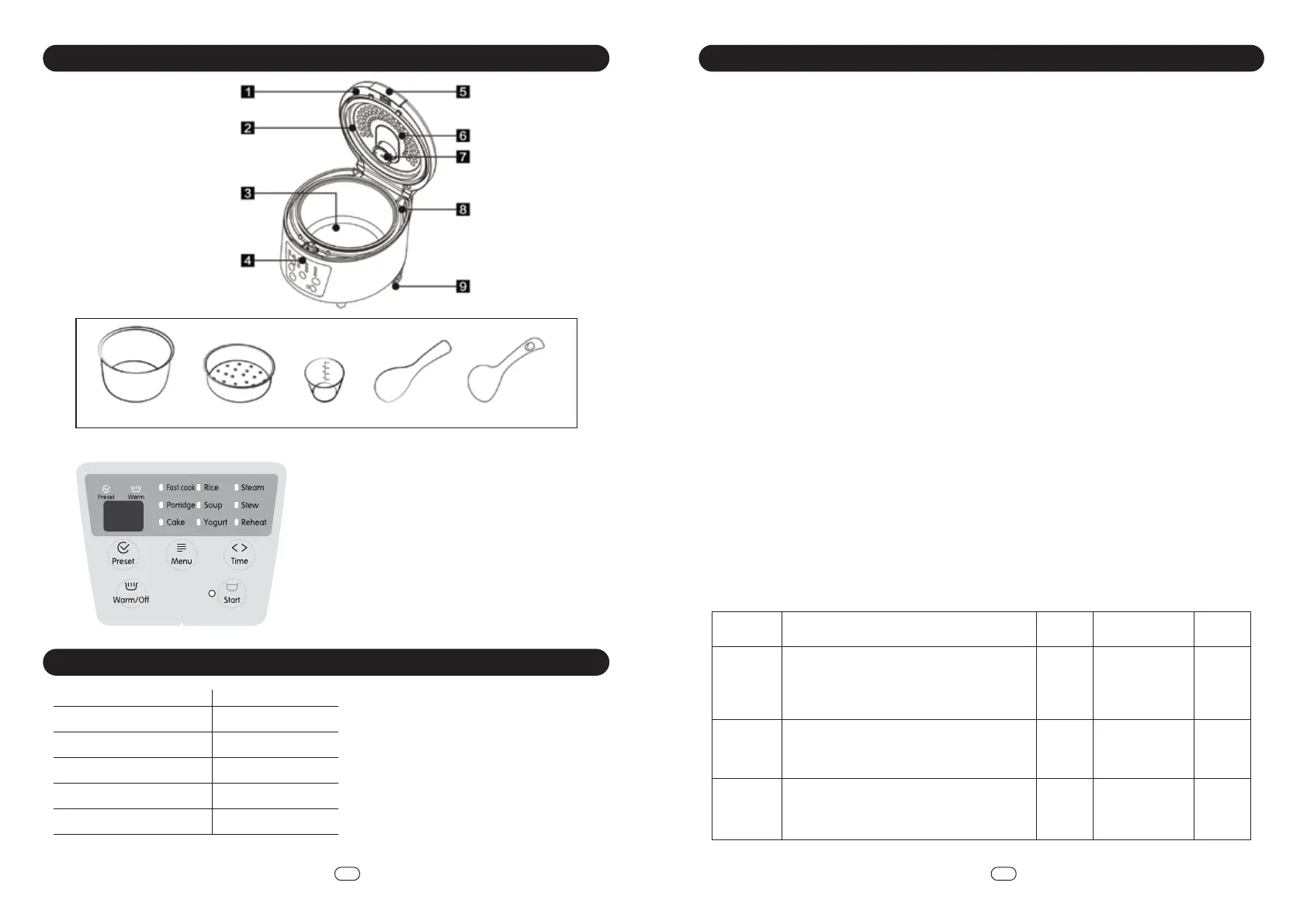
Parts Identication
How To Use
3 4
EN EN
Inner pot Rice Spoon Soup Spoon
Steamer
Measuring Cup
1. Top lid
2. Sealing ring
3. Inner pot
4. Control panel
5. Lid button
6. Inner cover
7. Steam valve
8. Middle ring
9. Base
CONTROL PANEL
Specications
Model
Voltage
Power
Capacity
Net Weight
Product Dimension (LxWxH)
RCM18
220-240V~ 50-60Hz
700W
1.8L
3.1kg
325 x 275 x 220mm
*Specications are subject to change without prior notice.
Read the instruction manual careful and operate by following the Instruction Manual.
• Plug in and make sure the voltage of electrical socket is match with this product.
• Please take out all parts, such as ceramic coating inner pot, steam outlet, detachable inner lid to
wash before using.
• Please ensure there is no impurities on the bottom of inner pot. User is advised to ensure the inner
pot fits closely with the heating plate.
• Please clean the pot with a soft cloth and water. Do not scrub to avoid damage to the pot. Please
turn off the power and unplug cord after each use.
Function
• To select each cooking function on the menu, press the ‘Menu’ button until your preferred function.
To identify, the indicator light flashes on the selected function.
Preset
• To select the function, press ‘Preset’- the rice cooker is ready at preset status. ‘Time’ is for setting your
preferred cooking time.
• Please set cooking time followed by preset time should you wish to adjust the cooking time.
• The preset time is cooking complete time.
• For instance, it is 12pm now and you wish to have dinner at 6pm. Set your timer to 6 hours. Food will
be ready by 6pm.
Keep Warm
• Once cooking is done, the rice cooker turns into ‘Keep Warm’ status immediately. The keep warm
function lasts up to 12 hours, however the recommended time to keep warm your rice is 6 hours to
avoid any burned rice on the bottom.
FUNCTION
Menu Operation Step Default
Time
PresetTime Adjustment
Range
Fast Cook -- 24 hr--
Press ‘Menu’ to ‘Steam’ > indicator light flashes
> select ‘Start’ > once cooking is completed,
cooker switches to ‘Keep Warm’ status.t
Steam 18 min 24 hr18-90 min
Press ‘Menu’ to ‘Rice’ > indicator light flashes >
select ‘Start’ > once cooking is completed,
cooker switches to ‘Keep Warm’ status.
Rice -- 24 hr--
Preset
Fast cook
Porridge
Cake
Rice
Soup
Menu
Warm/O
Keep warm
Yogurt
Steam
Stew
Reheat
Preset
Time
Start


 To Next Page
 Loading...