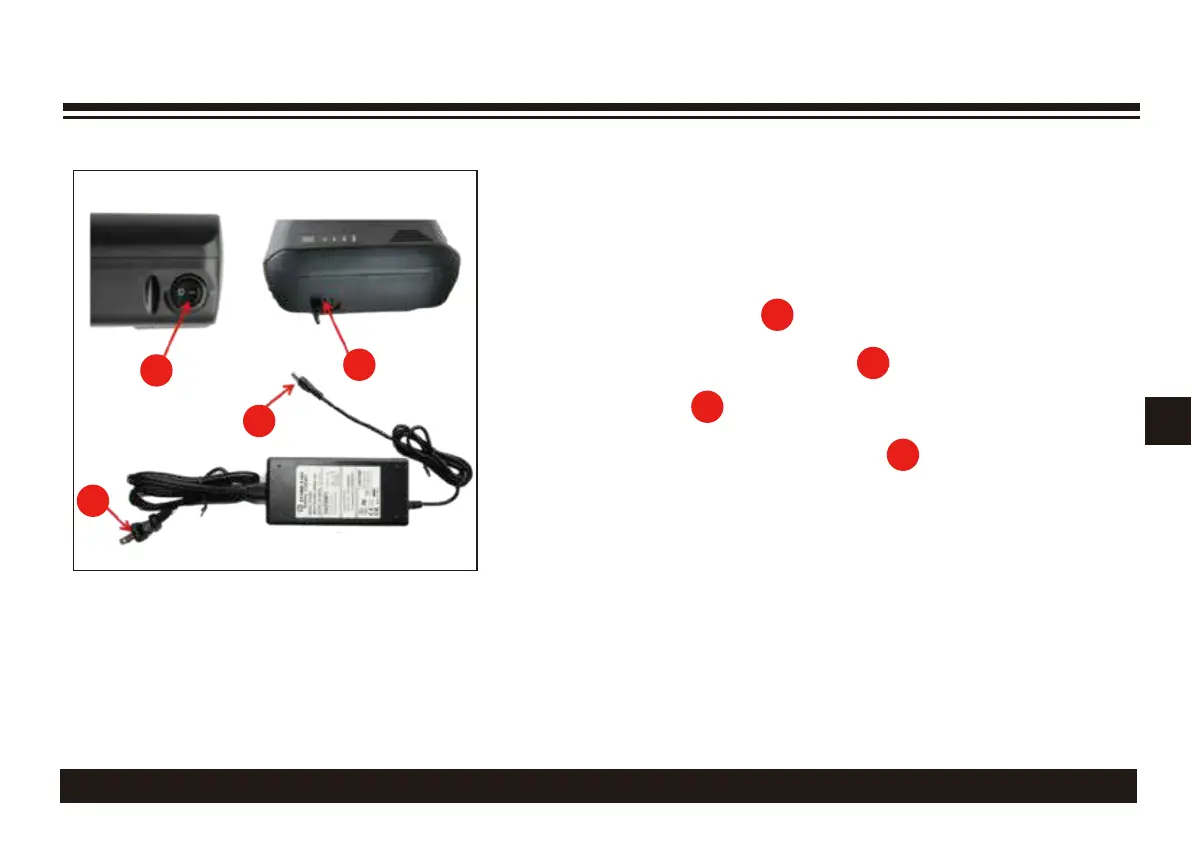
(b) Open the soft cover (5) of the battery charging port.
(c) Insert the charging connector (6) into the battery
charging port (5). The charger LED indicator is off.
d) Connect the charger power plug (7) to 100V/240V AC,
the charger LED indicator is GREEN Lig
ht. See page 5
(e) Turn On the battery for charging. The charger
LED indicator turn to RED Light.
CHARGING THE BATTERY
(f) When the charger LED indicator turns GREEN again, the charging process is completed.
Pull out the charger connector with battery, store the charger for next charge.
2
5
6
7
4
(a) Make sure the battery voltage is accordance
with the charger.
1>36V battery can only be charged by 36V (42V) charger.
2>48V battery can only be charged by 48V (54V) charger.
(b) Open the soft cover (5) of the battery charging port.
(c) Insert the charging connector (6) into the battery
charging port (5). The charger LED indicator is off.
(d) Connect the charger power plug (7) to 100V/240V AC,
the charger LED indicator is GREEN Light.
(e) Turn On the battery for charging. The charger
LED indicator turn to RED Light.
(a)
Make sure the battery voltage is accordance with
the charger.
36V battery can only be charged by the 36V (42V) charger
48V battery can only be charged by the 48V (54V) charger
5
6
5
(
7



 To Next Page