Audio system
583
MENU : iPod
®
iPod
®
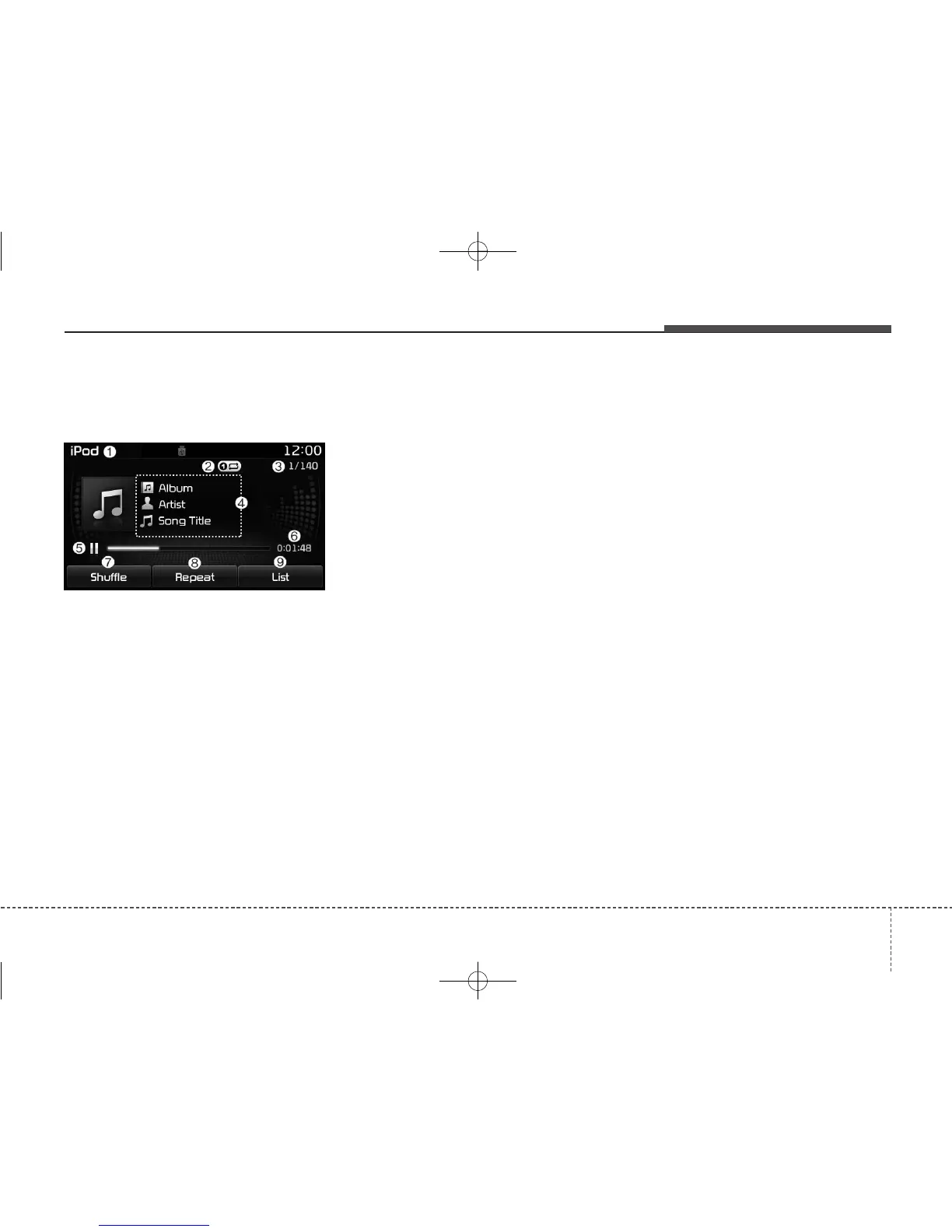
Mode Display Controls
(1) Mode
Displays current operating mode.
(2) Operation State
From Repeat/Shuffle, displays the cur-
rently operating function.
(3) Song Index
Displays the current song/total num-
ber of songs.
(4) Song Info
Displays information about the cur-
rent song.
(5) Play/Pause
Changes the play/pause state.
(6) Play Time
Displays the current play time.
(7) Shuffle
Turns the Shuffle feature on/off.
Each time the button is pressed, the
feature changes in order of Shuffle
All
➟ Off.
• Shuffle All : Plays all songs in shuffle
order.
(8) Repeat
Turns the Repeat feature on/off.
• Repeat : Repeats the current song
(9) List
Moves to the list screen.
Turn the TUNE knob left/right to
search for the desired category.
Once you find the desired category,
press the TUNE knob to select and
play.



 To Next Page