Audio system
5 109
With the Phone Button
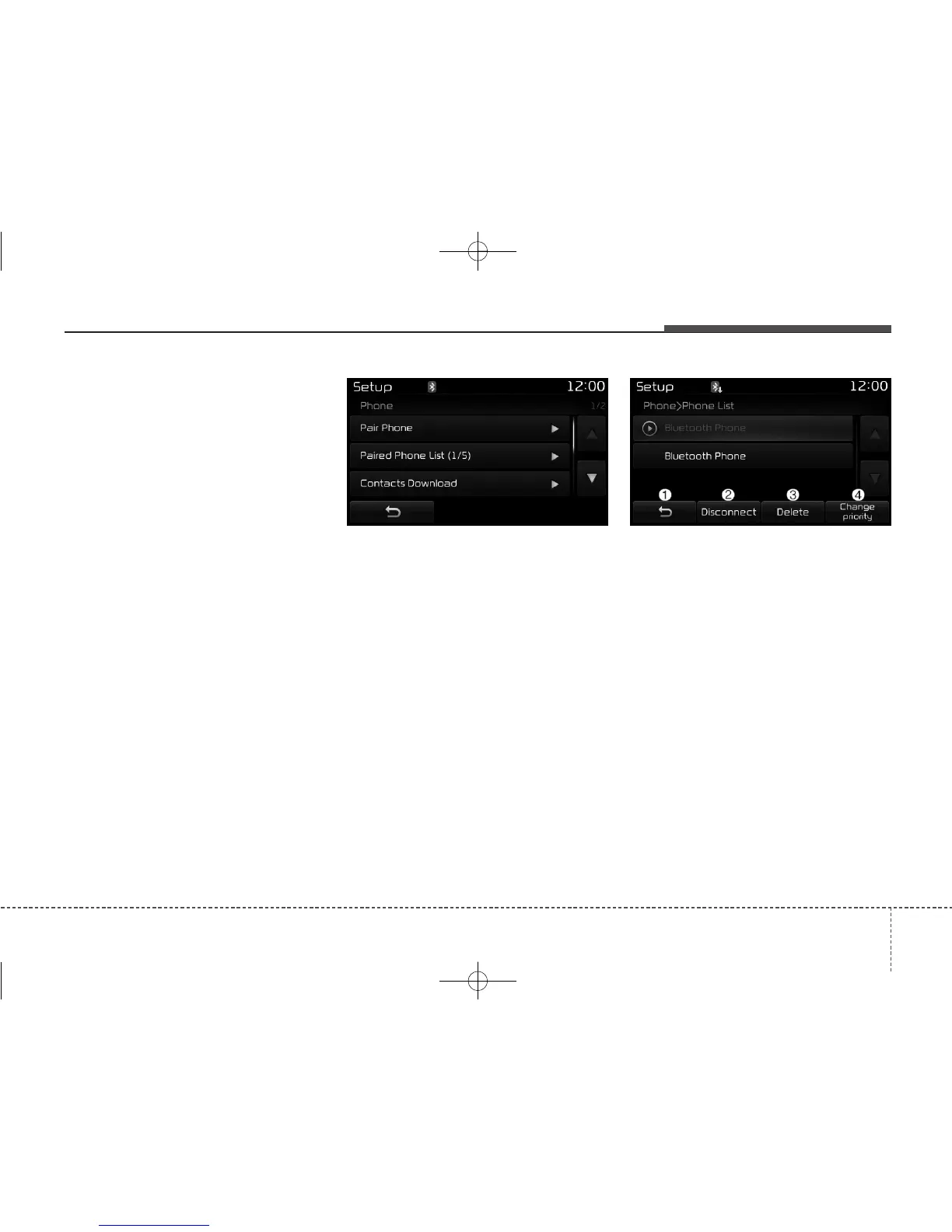
Press the [SETUP] button Select
[Phone]
You can select and control options
related to [Pair Phone], [Paired
Phone List], [Contacts Download],
[Auto Download], [Outgoing Volume]
and [Bluetooth System Off].
Pairing a New Device
Bluetooth
®
Wireless Technology
devices can be paired with the audio
system.
For more information, refer to the
“Pairing through Phone Setup” section
within
Bluetooth
®
Wireless Technology.
Viewing Paired Phone List
This feature is used to view mobile
phones that have been paired with
the audio system. Upon selecting a
paired phone, the setup menu is dis-
played.
For more information, refer to the
“Setting
Bluetooth
®
Wireless Technology
Connection” section within
Bluetooth
®
Wireless Technology.
(1) Moves to the previous screen
(2) Connect/Disconnect Phone :
Connect/ disconnects currently
selected phone
(3) Delete : Deletes the currently
selected phone
(4) Change priority : Sets currently
selected phone to highest con-
nection priority



 To Next Page