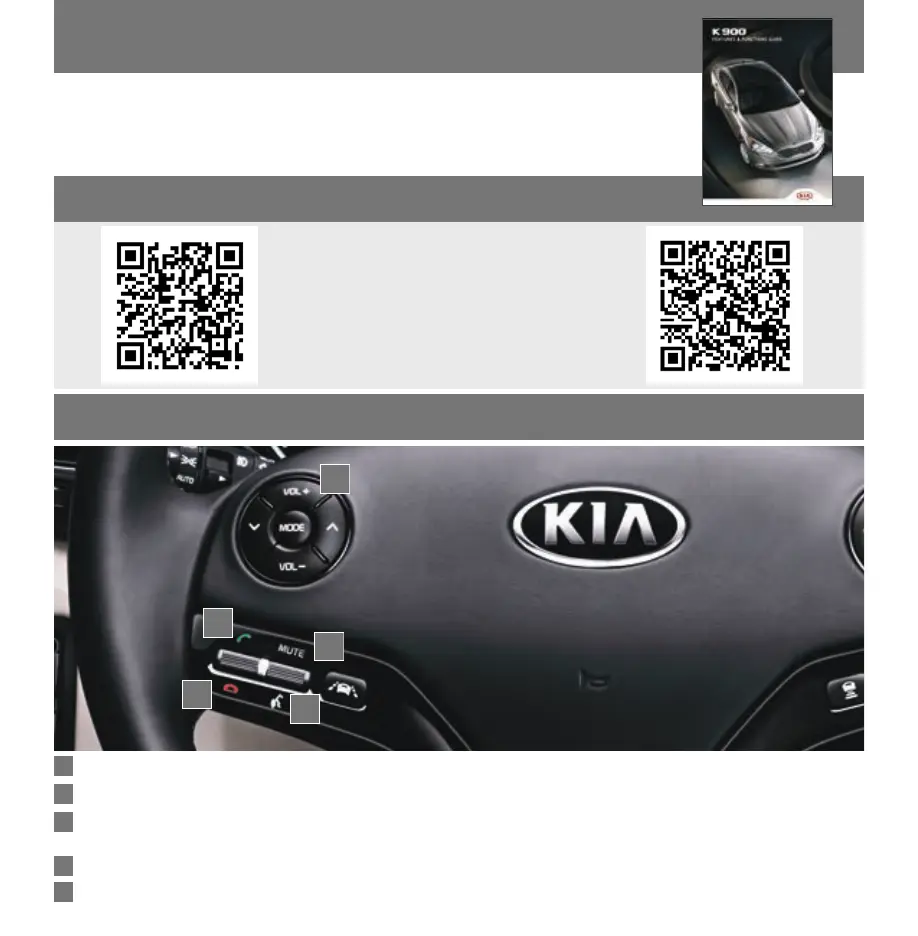
STEERING WHEEL CONTROLS
1
OWNER’S MANUAL, FEATURES AND FUNCTIONS GUIDE
Volume button Press VOL + / VOL – to raise/lower speaker volume.
Mute button Press up to mute.
Talk button Press down to activate Voice Recognition, bring up menus, place calls and use
Siri
®
Eyes Free (paired iPhone
®
required).
Receive/Place Call button Press up to place/receive/answer an incoming call.
End Call button Press down to end a call.
Many of the Tips presented in this book are covered in greater detail in
the Owner’s Manual, Features and Functions Guide (with QR Codes) and
Quick Start Guide hang-tag supplied with your new vehicle.
A
B
C
D
E
A
B
C
D
E
QR CODES
To view a video on your mobile device,
snap one of these
QR Codes or visit the listed website.
https://www.youtube.com/KiaFeatureVideos



 To Next Page