
 Need help?
Do you have a question about the Kia KDS and is the answer not in the manual?
Details the specific Kia Niro HEV/PHEV models and production date ranges affected by service action SA484.
Comprehensive guide to update the HCU/LDC system software using the KDS diagnostic tool for Niro vehicles.
Instructions and passwords for performing the ECU upgrade manually when the automatic method fails.
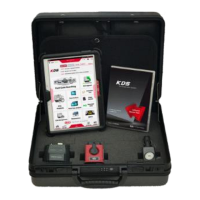
Identifies the Kia Diagnostic System (KDS) as the essential tool required for performing the ECU software upgrade.
Provides necessary warranty information including claim codes, labor operation, and time for the SA484 service action.
This document outlines a technical service bulletin (TSB) for a software logic improvement in the Hybrid Control Unit/Low Voltage DC/DC Converter (HCU/LDC) system of certain Kia Niro Hybrid Electric Vehicles (HEV) and Plug-in Hybrid Electric Vehicles (PHEV). The primary function of this service action, identified as SA484, is to address an issue where the HCU/LDC system might incorrectly set a Power Train Diagnostic Trouble Code (P-DTC). By updating the software logic, the vehicle's diagnostic accuracy and overall system performance related to the hybrid powertrain are enhanced, preventing potential false error codes and ensuring reliable operation.
The service action is applicable to 2020-2021 model year Niro HEV (DE HEV) and Niro PHEV (DE PHEV) vehicles manufactured within specific date ranges: October 20, 2020, to February 4, 2021, for Niro HEV, and November 26, 2020, to January 22, 2021, for Niro PHEV. This targeted approach ensures that only affected vehicles receive the update, optimizing service efficiency.
The core of this service action involves an ECU (Engine Control Unit) upgrade procedure using the Kia Diagnostic System (KDS). The KDS is a specialized diagnostic tool that facilitates the reprogramming of the vehicle's control units. The upgrade process is designed to be straightforward, guiding technicians through a series of steps to ensure the new software logic is successfully installed.
The ECU upgrade procedure begins with essential preparatory steps to ensure a smooth and successful update. Technicians must first confirm that the KDS tablet is fully charged, ideally at 60% or higher, to prevent power interruptions during the critical reflash process. Additionally, the vehicle's battery must be adequately charged (12.3 volts or higher), or a fully charged jump starter box should be connected to maintain stable power throughout the procedure. These precautions are crucial as power fluctuations can lead to an incomplete or corrupted ECU upgrade, potentially rendering the PCM (Powertrain Control Module) inoperative.
The VCI-II (Vehicle Communication Interface-II) must be connected to the vehicle's OBD-II (On-Board Diagnostics II) connector, typically located under the driver's side of the instrument panel. The KDS operates wirelessly for ECU upgrades, eliminating the need for a USB cable connection during the reflash itself, which offers greater flexibility in the service bay.
Once the KDS tablet is powered on and the 'KDS' application is selected from the home screen, communication with the VCI (A) is established. The vehicle is then configured using the 'AUTO VIN' (C) feature, which automatically identifies the vehicle and ensures the correct upgrade event is selected. This automation minimizes manual input errors and streamlines the diagnostic process.
The technician then selects 'ECU Upgrade' from the KDS menu. The system will automatically check the server for recently uploaded events and download the relevant upgrade event, identified as #563: "DE PE HEV/PHEV HCULDC P-DTC IMPROVEMENT." It is imperative that the vehicle has been correctly identified in 'Vehicle Selection' for the appropriate event to be downloaded.
The upgrade process can be performed in 'Auto Mode,' which is the recommended method. In this mode, the KDS guides the technician through the update, displaying the progress on a bar graph. The upgrade occurs in two parts: first, the event is downloaded to the VCI-II, and then the ECU itself is upgraded. During this entire process, it is critical not to touch any system buttons on the KDS (such as 'Back,' 'Home,' etc.) or interrupt the power supply. The ignition must remain in the 'ON' position, and the engine must not be started.
Upon completion of the upgrade, the KDS will prompt the technician to turn the ignition 'OFF' for ten seconds and then back 'ON' before selecting 'OK' to continue. This step allows the control unit to reset and properly integrate the new software. Finally, the technician is prompted to run a 'Fault Code Searching' to check for and erase any Diagnostic Trouble Codes (DTCs) that may have been set during the upgrade, such as those related to EPS (Electric Power Steering), ESC (Electronic Stability Control), and TPMS (Tire Pressure Monitoring System). Starting the engine after this confirms the normal operation of the vehicle.
The TSB also outlines a 'Manual Upgrade Procedure' as a contingency if the 'Auto Mode' upgrade fails. This manual process requires specific passwords for each ECU part number, which are provided in a table within the bulletin. If the automatic upgrade fails, the technician must turn the ignition 'OFF' for approximately 10 seconds and then back 'ON' to reset the control unit before attempting the manual procedure. This reset is a crucial maintenance step to clear any transient states from the failed automatic attempt.
In manual mode, the technician selects 'Manual Mode' from the ECU Upgrade screen, then chooses the 'HCULDC' system and Upgrade Event #563. The appropriate control unit part number is selected based on the ROM ID Information Table, and the corresponding password from the provided table is entered. The rest of the manual upgrade process mirrors the automatic one, with similar warnings about not interrupting the process or power supply.
A critical maintenance aspect highlighted in the bulletin is the importance of verifying the ROM ID (Read-Only Memory Identification) of the vehicle's ECM (Engine Control Module) against the provided 'ROM ID Information Table.' This verification ensures that the correct software version is being applied to the vehicle, preventing potential compatibility issues. The bulletin explicitly states that technicians should always check the Electronic Parts Catalog (EPC) for the correct ECU Part Number and ROM IDs, rather than relying solely on the parts label affixed to the ECU, as this can sometimes be inaccurate or outdated.
The document also includes important warnings regarding potential issues during the upgrade. If a "Communication Fail" screen appears, technicians are instructed to verify the VCI-II and KDS communication and restart the procedure. If an error persists or the upgrade cannot be performed, technicians are advised NOT to disconnect the KDS/VCI-II but to contact the GIT America Help Desk or Techline for assistance. This guidance emphasizes a structured approach to troubleshooting, preventing further damage or complications.
The bulletin is categorized as a 'Service Action,' which is a repair program performed during the warranty period without customer notification. This means that the repair is proactively addressed during routine service visits. For tracking purposes, VIN (Vehicle Identification Number) inquiry data for this repair is provided, and Kia retailers are instructed to reference SA484 when accessing the WebDCS system. This systematic tracking ensures that all affected vehicles receive the necessary update and that warranty claims are processed correctly.
The overall design of this service action, from the detailed upgrade procedure to the troubleshooting guidelines and warranty information, aims to provide technicians with a comprehensive framework for effectively addressing the HCU/LDC software logic issue. By ensuring accurate diagnostics and proper software updates, the service action contributes to the long-term reliability and performance of the affected Kia Niro HEV and PHEV vehicles.
 General
| Software | Kia Diagnostic Software |
|---|---|
| Category | Diagnostic Equipment |
| Compatibility | Kia Vehicles |
| Display | Touchscreen |
| Connectivity | USB, Bluetooth, Wi-Fi |
| Protocols Supported | CAN, OBD-II |
| Manufacturer | Kia |
| Model | KDS |
| Function | Vehicle Diagnostics |
| Software Updates | Via Wi-Fi |

 To Next Page