Page 3 of 7
Printed TSB copy is for reference only; information may be updated at any time. Always refer to KGIS for the latest information.
TSB: SA484 Niro HEV/PHEV (DE HEV/PHEV) September 2021
SERVICE ACTION: HCU/LDC LOGIC IMPROVEMENT FOR P-DTC (SA484)
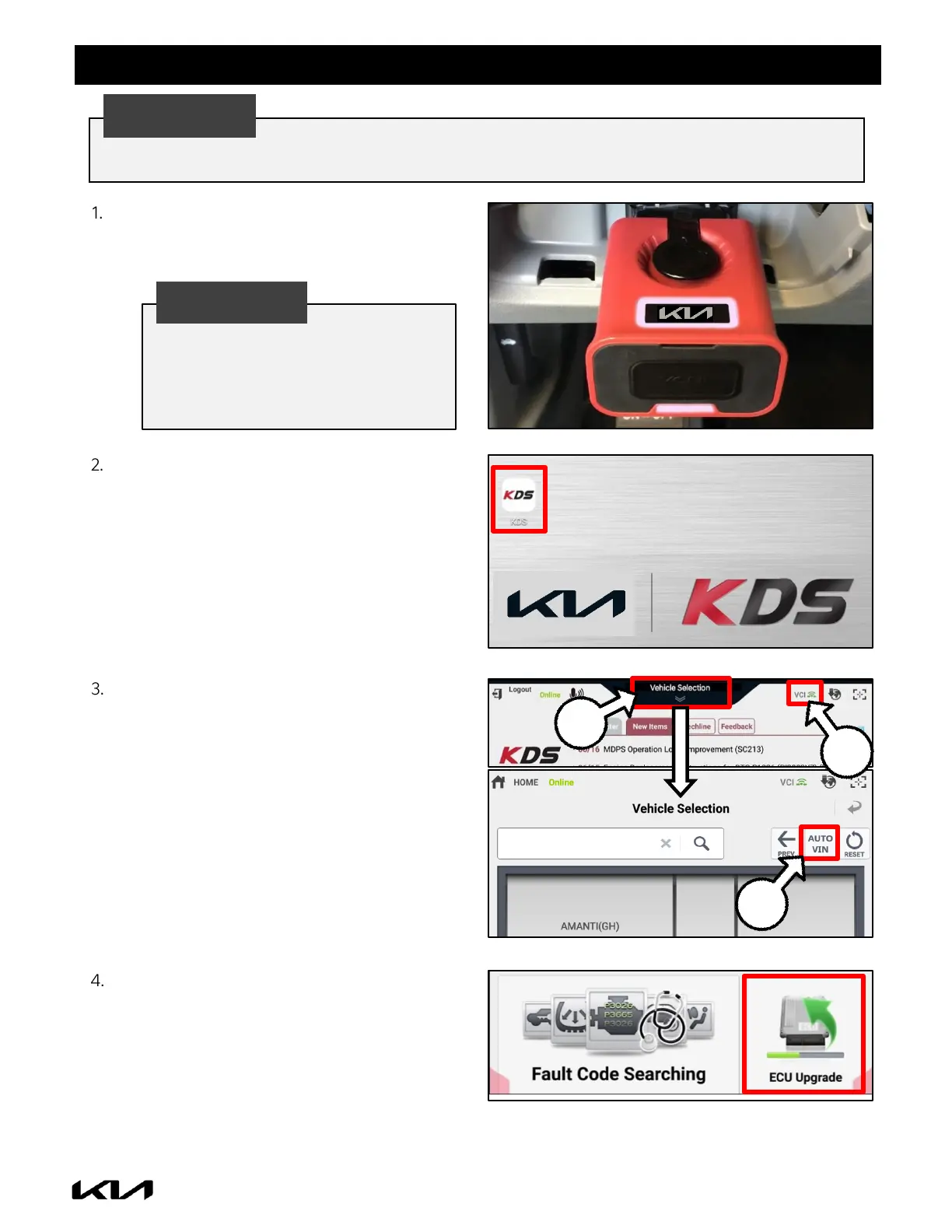
Connect the VCI-II to the OBD-II connector,
located under the driver’s side of the
instrument panel.
With the ignition ON, turn ON the KDS tablet.
Select ‘KDS’ from the home screen.
Confirm communication with VCI (A) and then
configure the vehicle (B) using the ‘AUTO VIN’
(C) feature.
Prior to performing the ECU upgrade, be sure to check that the KDS is fully charged.
The ECU upgrade function on KDS
operates wirelessly. It is not necessary
to perform the upgrade via USB cable.


 To Next Page
 Loading...