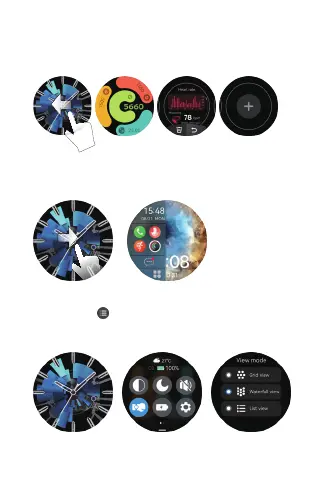
e.Split- screen browser: Slide right from the main page to
enter into split-screen. Long press the function icon in the
split-screen and you can customize your functioniconsin
icons in the area.
f.Change the menu style:Slide down based on watchface main
page and click“ ” to change menu style. 3 style “list” or
“waterfall flow” or “chessboard”for your options (You can
also go to settings to switch )
d. Open the shortcut interface: Slide the watch main face
to the left, and sliding continues to show more shortcuts.
Long press the function interface to enter the component
editing interface to remove or add functional components.


 To Next Page