02.2 Open "GloryFit" and select "Select device" on the
device page, search Watch Lora(ID-xxxx), then follow
the instructions on the screen.
If the GloryFit APP is successfully connected, you can
see this icon" " at the top of the setting page.
02.3 How to connect to BT call feature:
Using BT call feature and playing music on the watch
must be successfully connected to audio Bluetooth.
After the APP and the watch are successfully bound, it
will automatically prompt whether to pair with the
audio Bluetooth Watch Lora (ID-xxxx), and you can
directly pair it.
* Be sure to check whether the mobile phone audio
Bluetooth "Watch Lora(ID-xxxx)" is successfully
connected, you need to enter the phone "Settings"-"Blue-
tooth". If not, you need to enter the phone
"Settings"-"Bluetooth"-Search audio Bluetooth "Watch
Lora(ID-xxxx)"-Click "Watch Lora(ID-xxxx)" to pair.
Notes:
1.1 The company reserves the right to modify the
contents of this manual without any further notification.
It is normal that some functions may vary in certain
versions of software.
1.2 Please charge this product with the configured cable
for no less than 2 hours before using it.
1.3 Before using the product, you need to connect the
APP synchronization time and set your personal
information.
1.4 This product supports IP68 rank waterproof, not
suitable for deep sea diving, hot water, tea and other
corrosive liquids are destructive to the watch, and will
not be able to enjoy the product warranty and free
maintenance services.
01 How to wear
Please wear the device on your wrist correctly, about
one finger from the carpal and adjust it to comfortable
position. Below pictures as reference.
Tip: Please wear the device a bit little tighter when heart
rate monitor.
02 How to download & connect to APP
02.1 There are 3 methods to download & install APP:
A. Long press the upper button to power on, scroll down
on watch face, click "Settings-QR Code", use your mobile
phone to scan the QR Code to download and install
"Gloryfit " APP.
B. Scan below "GloryFit" QR Code to download and
install "GloryFit" APP.
C. Search "GloryFit" in APP Store or Play Store to
download and install“GloryFit”APP.
05 Other functions
Find watch, 12/24h time system, sedentary reminder,
low battery reminder, incoming call reminder, online
dial/custom dial, unit setting, turning the wrist to
brighten the screen, goal achievement reminder.
06 Charging
Attach the charging cable to the watch charging port,
ensuring the metal pins fully connected.
Please use the correct charging adapters which are 5V
0.5A above.
Note: If smart watch can not be powered on after being
left unused for long time, please clean up the charging
metal pins to make sure connecting well.
Tips:
(1) Please upgrade the APP to latest version to get a
better experience.
(2) Andorid 5.0 and iOS 9.0 or above system are
compatible with the APP(
IOS model system version 13
and above supports one-key connection prompt
).
(3) For the first time connection with iphone, "Pair"
reminder will pop-up, click to pair, then incoming calls
and instant messages will be pushed.
(4) For the first time connection with android,
"Permissions" reminder will pop-up, please follow up
the guidance and allow permissions to ensure all
functions working properly.
(5) To connect successfully, please turn on mobile
phone’s Bluetooth, GPS and network.
(6) If the device cannot be searched or connected
during use, please reset or turn off the watch to try
again.
(7)
You can’t turn off your Watch while it’s charging. To
turn off your Watch, first disconnect it from the charger.
(8) If you need to use the functions involved in the
following pictures, such as Heart rate monitoring, make
sure that the
"GloryFit" APP switch is on.
g. Normal operation: Press the button to return back to
previous page. On main page, press the button to turn
on/off the screen.
04 Function introduction
03 Operating Instructions
a. Setting page: Slide down from main page, go to
shortcut page.
b. Information page: Slide up from main page.
c. Main Menu page: Slide right from the main page. You
can change the menu styles by double click the button
of watch or change on setting page.
d. Shortcut page:Slide left from main page.
e. Quick access to change watch faces: Long press the
watch face on main page, slide left or right to choose
watch faces.
f. Power on / off: Press and hold the button for 3s+ on
the main page.
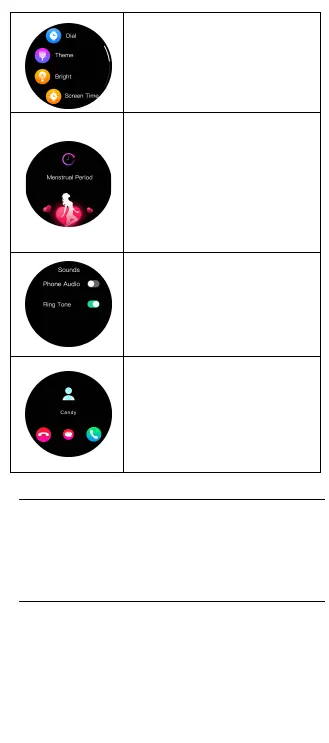
Sounds Set: Turn on/off
Phone Audio: Control the watch
play sound, such as play music or
other playback sounds.
Ring Tone: Control whether the
ring tone of the watch is on or off.
SMS quick reply:
Android phones only.
This function needs to be enabled
on the APP.
When the watch receives a call,
you can refuse to answer the call
by quickly answering the message.
Settings: Dail/Theme/
Bright/Screen
Time/Sounds/Info/O/
Reset/QR Code/Password.
Physiological Cycle: Set the
personal information to
"female"
on the APP, and turn on
the physiological cycle
function to display the
corresponding safety period,
menstrual period, and
ovulation period reminders on
the watch side.
07 Parameters
Bluetooth: 5.2
Screen Size: 1.32”
Waterproof: IP68
Net Weight: 27g
Battery Type: Li-ion
Size: φ42.3*13mm
Charging Voltage: 5V
Battery Capacity: 280mAh
Working Temperature: -20℃~60℃
08 Warranty
1. One year warranty for default hardware defectives,
half of year for battery and charging cable.
2. Below reasons cause to defectives are not included in
free warranty service:
(1) Personal assemble or disassemble.
(2) Falling damage during use.
(3) All man-made damage or due to the third party's
fault, improper use(Such as: water in the smart watch,
external force shattering, scratch during use etc.)
3. Please provide a warranty card with the details filled
when request for after selling service.
4. Please contact with direct dealers for warranty
service.
5. Please note all functions of the product are based on
physical objects.
IEC/EN 62133-2:2017
AnnexC(informative)
Recommendations to the end-users
The following represents a typical but non-exhaustive,
list of good advice to be provided by the equipment
manufacturer to the end-user.
a) Do not dismantle open or shred secondary cells or
batteries.
b) Keep batteries out of the reach of children.
c) Battery usage by children should be supervised.
Especially keep small batteries out of reach of small
children.
d) Seek medical advice immediately if a cell or a battery
has been swallowed.
e) Do not expose cells or batteries to heat or fire.Avoid
storage in direct sunlight.
f) Do not short-circuit a cell or a battery. Do not store
cells or batteries haphazardly in a box or drawer where
they may short-circuit each other or be short-circuited
by other metal objects.
g) In the event of a cell leaking. do not allow the liquid
to come in contact with the skin or
eyes. If contact has been made, wash the affected area
with copious amounts of water and seek medical
advice.
h) Do not use any charger other than that specifically
provided for use with the equipment.
i) Do not use any cell or battery which is not designed
for use with the equipment.
j) Always purchase the battery recommended by the
device manufacturer for the equipment.
k) Keep cells and batteries clean and dry.
l) Secondary cells and batteries need to be charged
before use. Always use the correct charger and refer to
the manufacturer's instructions or equipment manua for
proper charging instructions.
m) Do not leave a battery on prolonged charge when
not in use.
n) After extended periods of storage, it may be
necessary to charge and discharge the cells
or batteries several times to obtain maximum
performance.
o) Retain the original product literature for future
reference.
p) Use the cell or battery only in the application for
which it was intended.


 To Next Page
 Loading...