30
Introduction
Daily use
KIMAX2
Menu
Configuration
Calibration
Protecting
calibration
Electrical
installation
Sensor
installation
Additional
information
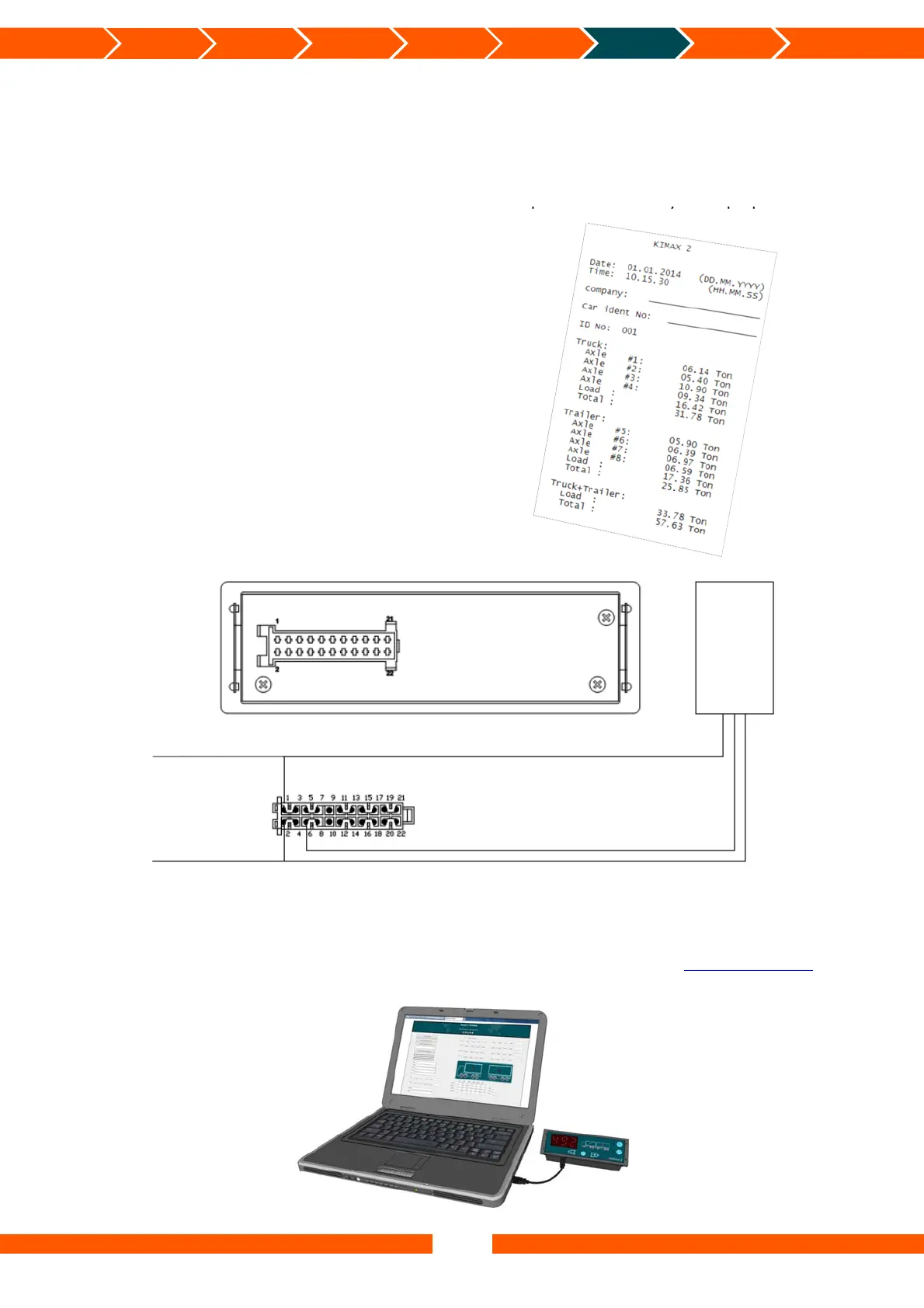
Printer serial output
The Kimax 2 Radio panel offers you an RS-232 serial output, for printers.
The string of data is broadcasted when the printer function is activated in the menu.
The printer output can be tested by setting up a ”HyperTerminal” on your laptop with the
below parameters,
Baudrate 4.800
Data bits 8
Parity N
Stopbit 1
Flowcontrol N
and you can read the broadcasted values as
numeric characters.
You need to set up your printer for receiving
the above parameters too.
The most common printers with a serial input
can be used with Kimax 2.
Connection diagram for serial printer:
Kimax 2 Terminal
The possibility of controlling the Kimax 2 Radio in a visual environment exists in form of the
Kimax 2 Terminal. By using the Kimax 2 Terminal it is possible to monitor and setup your
Kimax instrument. Find out more about the Kimax 2 Terminal by visiting www.kimax.com or
contact your local Kimax distributor or Sense-Tech Weighing Systems ApS.
Rearside
Printer
Gre
– Printer Tx
RS-232
-Batter
Brown
Batter
Black


 To Next Page
 Loading...