
 Need help?
Do you have a question about the Kimax HD03WF and is the answer not in the manual?
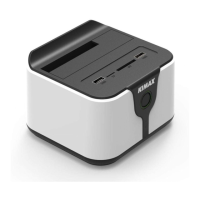
Highlights include high-speed USB3.0, wireless storage, private cloud, and router capabilities.
Instructions for installing the hard drive into the device and initial setup.
Guide to powering on the device and connecting via Wi-Fi using provided credentials.
Steps for accessing and managing files wirelessly via computer or mobile.
Details on connecting the router to the internet using DHCP, PPPOE, or Wireless Relay.
Troubleshooting steps for wired USB connection issues, focusing on disk initialization.
Guidance on resolving issues where WIFI wireless cannot recognize connected hard drives.
Troubleshooting steps for failed wireless relay connections, covering routing and password requirements.
 General
| Brand | Kimax |
|---|---|
| Model | HD03WF |
| Category | Docking Station |
| Language | English |

 To Next Page