NARRATE
™
2
Proper product installation, in accordance with these instructions, is the responsibility of the installing agent.
If you have any questions concerning these instructions, please call Kimball Customer Care.
Part 2964205
Assembly Instructions
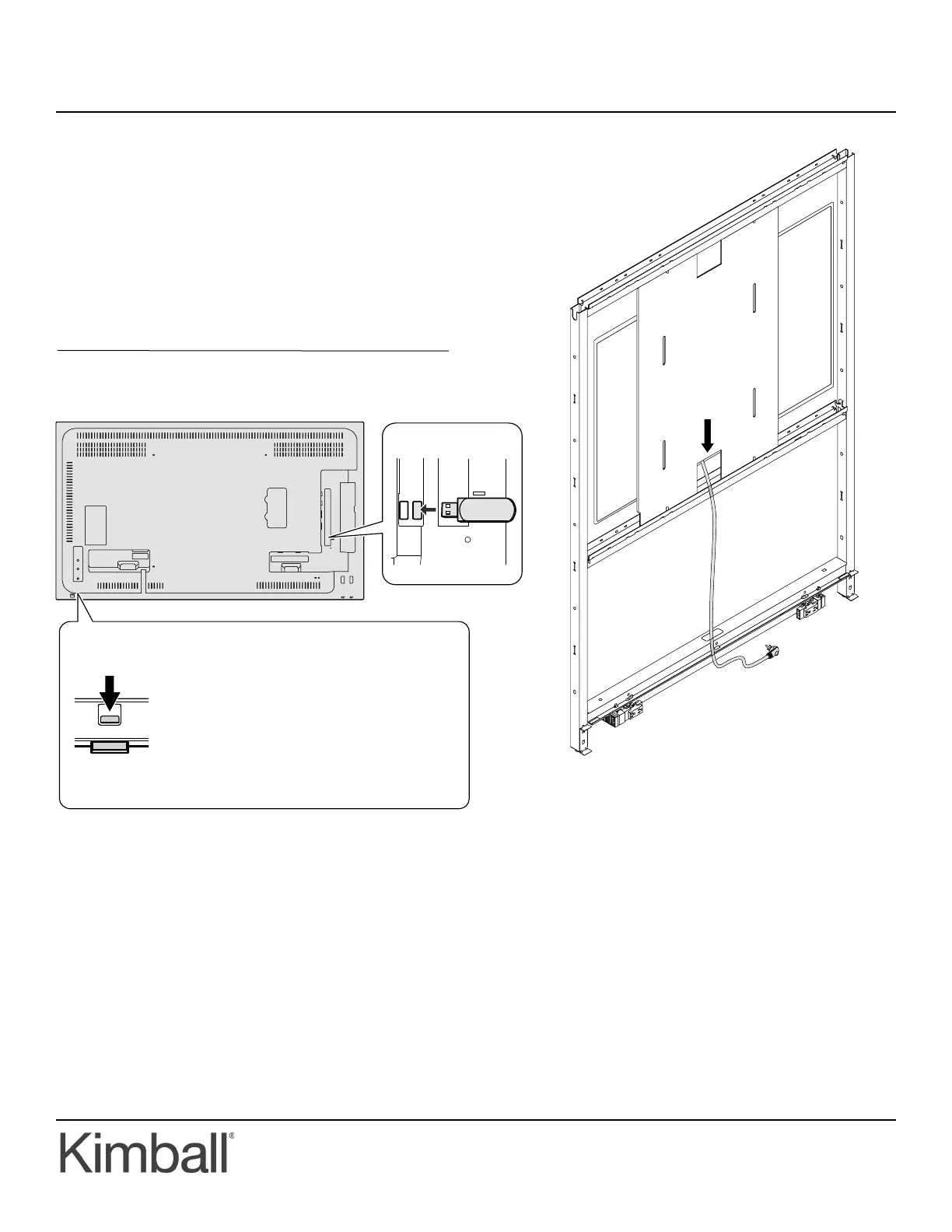
5. Install the IR repeater by extending the light pipe on the
TV down and placing one of the transmitters of the IR
repeater directly next to the light pipe per the included
instructions with the IR repeater. Plug the IR repeater
into the back of the USB Port on the back of the TV for
power. Figure E
6. Run the TV power cord through the center cutout in the
frame and plug into the receptacles on the outside of the
frame. Run the IR repeater Receiver outside of the panel
through the cutouts in the middle of the frame and exit
out of the wireway cover. Place the IR repeater receiver
in a visible location using the adhesive back. Figure D
Installation (Continued)
Rear View
Figure D
Figure E
Slide the lever on the rear of the monitor to
pull out the power LED/remote control sensor.
Press the power LED/remote control sensor
directly to store it inside the monitor.
How to pull out the power LED/remote control sensor
Lever
USB port
Power LED remote
control sensor



 To Previous Page
 Loading...