EasyManua.ls Logo

Kinesis Gaming FREESTYLE EDGE - User Manual

Kinesis Gaming FREESTYLE EDGE
2 pages
Print Icon
To Next Page IconTo Next Page
Loading...
Quick Start Guide
Programming with the SmartSet App
Customize keyboard layouts and settings with the convenient SmartSet Programming App.
To Launch the App: 1) open the v-Drive ( + F8), 2) locate the “FS EDGE” removable drive in
Windows File Explorer, then 3) double-click the SmartSet App icon (10-15 seconds to load).
Layouts: The active layout will load automatically, but any of the other 8 layouts can be loaded
manually using the Load button. The keyboard image shows the action assigned to each key
position for a given layout. To customize the layout, click any key position to designate the active
key (white outline). Use the Layer toggle-switch to navigate between the top layer and the Fn layer.
Remapping: Designate an active key, then use the Edge to input the new key action, or select a
Special Action from the menu at right. Remapped keys are displayed in blue font.
Macros: Designate an active key, then click the macro text box and type your macro (edit with the
Backspace and Clear buttons). Up to 3 macros can be assigned to each trigger key by selecting
one of the 3 radio buttons and then choosing one of the 6 modier keys as a “co-trigger”. Use the
sliders to set a custom playback speed (use “G” for the global speed) or to program the macro to
playback a xed number of times (use “R” to repeat when held). Macro trigger keys are displayed
with a blue outline in the diagram. A maximum of 24 macros can be assigned to each layout.
Settings and Lighting: Use the App to adjust basic keyboard settings and set the custom lighting
mode (Note: Settings and Lighting are not layout-specic).
Implementing Changes: The App does not dynamically update the keyboard or reect onboard
changes since launch. To implement your changes, rst click Save or Save As. Then use the
Refresh onboard shortcut ( + Layout), or close the App and then close the v-Drive ( + F8).
Copyright © 2017. Kinesis Corporation. All rights reserved. Version 6/27/2017.
KinesisGaming.com
CHERRY MECHANICAL
SWITCHES
SMARTSET™
PROGRAMMING ENGINE
20” ADJUSTABLE
SPLIT
BLUE LED
BACKLIGHTING
4
KB950
Question and Answer IconNeed help?

Do you have a question about the Kinesis Gaming FREESTYLE EDGE and is the answer not in the manual?

Summary

Programming with the SmartSet App

Programming Layouts

Details how to customize keyboard layouts and assign actions to keys using the SmartSet App.

Getting Started

Features

Lists key features of the Freestyle Edge keyboard, including switch type, backlighting, and memory.

Package Contents

Details the items included with the Freestyle Edge keyboard.

System Requirements

Specifies the operating systems and hardware required to use the keyboard.

Warranty and Support

Provides information on the product warranty and how to contact support.

Configuration Options

Explains how to adjust the keyboard's physical configuration for user preference.

Onboard Programming

Backlighting Control

Covers turning backlighting on/off and adjusting custom brightness or effects.

Key Remapping

Details the process of remapping keyboard keys to different actions.

Macro Recording

Explains how to record and assign macros on-the-fly.

Layout Switching

Describes how to cycle through and jump to different keyboard layouts.

Status Reporting

How to view the current keyboard settings via a status report.

v-Drive Access

Instructions for opening and closing the v-Drive for app access or programming.

Macro Speed Adjustment

How to adjust global macro playback speed or disable it.

NKRO Mode

Enabling or disabling NKRO mode for simultaneous keypress registration.

Game Mode

Enabling or disabling Game Mode to prevent Windows key conflicts.

Resetting Keyboard Settings

Guides on performing soft and hard resets for the keyboard.

Refreshing Settings

Applies changes made via the SmartSet App or Direct Programming.

Overview

The KinesisGaming Freestyle Edge is a highly customizable mechanical keyboard designed for gamers and power users, offering extensive programming capabilities and ergonomic flexibility.

Function Description

The Freestyle Edge is a split mechanical keyboard that allows users to customize its layout and functionality through three primary methods: onboard programming, the SmartSet App, and direct programming. Its core function is to provide a highly personalized typing and gaming experience by enabling users to remap keys, create macros, and adjust various settings. The keyboard features blue LED backlighting with multiple modes, enhancing visibility and aesthetics. It supports NKRO (N-Key Rollover) mode, ensuring that every simultaneous keypress is registered, which is crucial for fast-paced gaming. A dedicated Game Mode temporarily disables Windows key commands to prevent accidental exits from games. The keyboard also includes multimedia actions accessible via the Fn layer.

Usage Features

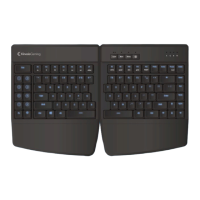
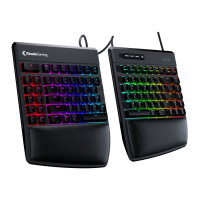
Ergonomic Flexibility: The Freestyle Edge is designed with a unique adjustable linking cable, allowing users to separate the left and right modules up to 20 inches. This split design promotes a more natural hand and wrist position, reducing strain during extended use. The modules can be rotated and positioned independently to suit individual preferences, making it adaptable to various desk setups and ergonomic needs. Detachable palm supports are included to further enhance comfort.

Programming Capabilities:

  • Onboard Programming: Users can program the keyboard directly without software. By holding the SmartSet Key and tapping secondary keys, various functions can be accessed:
    • Backlighting On/Off: Toggles the blue LED backlighting between off and the custom setting.
    • Adjust Custom Backlighting: Enters Backlight Mode to select brightness levels (1-9), turn off (0), or choose special effects like "Pitch Black" or "Breathe."
    • Remap Key Action: Enters Remap Mode, allowing users to reassign key actions. The process involves selecting a "source" key and then a "destination" key.
    • Record Macro On-The-Fly: Enters Macro Record Mode to create macros. Users select a "trigger" key or combination, type the macro content, and then tap Macro again to exit.
    • Switch Layouts: Cycles between the 3 primary layouts. Holding the SmartSet Key and tapping 1-9 allows direct jumps to any of the 9 available layouts.
    • Run a Status Report: Prints a list of the keyboard's current settings to the screen (requires a text editing program to be open).
    • Open/Close the v-Drive: Accesses the SmartSet App or enables direct programming by editing .txt files.
    • Adjust Global Macro Speed: Enters Macro Speed Mode to select a global playback speed for macros (1-9) or temporarily disable macro playback (0).
    • Enable/Disable NKRO Mode: Activates N-Key Rollover, ensuring all simultaneous keypresses are registered. It remains active until the keyboard is unplugged or the v-Drive is opened.
    • Enable/Disable Game Mode: Temporarily disables Windows key commands to prevent accidental game exits. The Game Mode LED indicator ("G") illuminates when active.
  • SmartSet App: A graphical user interface (GUI) for Windows, pre-installed on the v-Drive, provides a visual way to customize keyboard settings and layouts. This app allows users to remap keys, create macros, adjust backlighting, and manage layouts with a more intuitive interface.
  • Direct Programming: For advanced users, the keyboard's settings can be modified by directly editing configuration (.txt) files stored on the v-Drive.

Layout Management: The keyboard supports 9 dual-layer, fully-programmable layouts. This means each layout has two layers (primary and Fn layer), allowing for a vast number of custom key assignments and macros. Users can switch between these layouts seamlessly.

Macro Capabilities: The Freestyle Edge allows for the creation of complex macros, which can be recorded on-the-fly or programmed via the SmartSet App. Macros can be assigned to any key or key combination and can have their playback speed adjusted globally.

Game Bank: The keyboard includes a Game Bank with 8 programmable keys, offering quick access to frequently used commands or macros during gaming sessions.

Maintenance Features

Reset Functions:

  • Perform a Soft Reset: Permanently erases all custom remaps and macros in both layers of the active layout, restoring it to default settings.
  • Perform a Hard Reset: Resets all 9 layouts to their default keyboard settings. This is performed by holding a specific shortcut while plugging the Edge into the computer.

Refresh Settings: This function implements any changes made to layouts and settings after using the SmartSet App or Direct Programming, ensuring that the keyboard reflects the latest configurations.

Plug-and-Play Compatibility: The Freestyle Edge is 100% plug-and-play, requiring no special drivers or software installation for basic functionality across major operating systems, including Windows, Mac OS, Chrome OS, and Linux. This simplifies setup and ensures broad compatibility.

Durability: The keyboard features premium Cherry® mechanical switches, known for their durability and tactile feedback. It also comes with heavy-duty braided cables, designed for longevity and resistance to wear and tear. The anti-ghosting feature ensures reliable performance even during rapid, complex keypresses.

Kinesis Gaming FREESTYLE EDGE Specifications

General IconGeneral
LayoutSplit
BacklightingRGB
ProgrammabilityYes
Macro KeysYes
Switch TypeCherry MX
ConnectivityUSB
Key RolloverFull N-Key Rollover
Cable Length1.8 m
Weight1.0 kg
CompatibilityWindows, macOS, Linux

Related product manuals