
 Need help?
Do you have a question about the Kings Access Technology Solo USB and is the answer not in the manual?
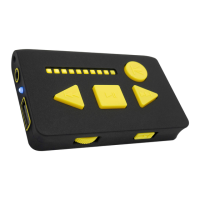
The Solo has been designed for users who want a high-quality, dedicated, ultra-portable music player.
Lists key attributes including high-quality audio playback, book-marking function, portability, and unique power supply design.
Details the keypad lock function and the on/off/volume control wheel for operation.
Explains the USB A socket for storage, headphone socket, and USB C charging port.
Describes the Status LED, Charge Status LED, and Battery Status LEDs for user feedback.
Explains the Track Back/Rewind and Track Forward/Fast-Forward buttons for playback control.
Details the Play/Pause button and Skip Folder/Re-set button for media control.
Instructions on how to manually trigger a Bluetooth reset and attempt new pairing.
Instructions for connecting headphones, both wired via the 3.5mm socket and wirelessly via Bluetooth.
Guides on how to connect to a Bluetooth device for the first time, including prerequisites and steps.
Details on reconnecting to paired devices, handling connection loss, and simultaneous headphone use.
Simple steps to play audio files by inserting a USB stick and using controls for navigation.
Explains how the player remembers playback position across multiple memory sticks.
Recommendations for initial and subsequent charging, and caution regarding charger connection.
Warning about potential hearing damage from prolonged high-volume listening and the player's capability to generate high volume.
Advisories against exposing the product to liquids, extreme heat, or attempting disassembly.
Lists the standards and directives the product has been designed, tested, and certified to meet.
Instructions for proper disposal of the product, particularly its Lithium battery, to prevent environmental harm.
Information about the company's founding, ethos of accessibility, product design philosophy, and UK development.
The Kings Solo USB Personal Audio Player (KA-SBT030) is a high-quality, dedicated, and ultra-portable music player designed for users seeking a simple and accessible audio experience. Its primary function is to play audio files from a USB stick, offering both wired and Bluetooth headphone connectivity. The device is particularly well-suited for audiobooks due to its unique bookmarking feature, which remembers the last playback position across multiple memory sticks.
The Solo player supports audio playback of MP3 and .WAV formatted audio files. It features automatic bookmarking for USB sticks, allowing users to seamlessly resume listening from where they left off, even when switching between different memory sticks. This is especially beneficial for audiobooks, as it eliminates the need to manually find the last listened-to point. The device also includes navigation capabilities for files and folders, enabling users to browse their audio content with ease.
For wireless listening, the Solo incorporates a Bluetooth Transmitter (TX) that can connect to Bluetooth headphones and speakers. This provides flexibility for users who prefer a cable-free experience. The device is powered by a built-in rechargeable Li-ion battery, offering a playback duration of 3-8 hours per charge (3-4.5 hours on Bluetooth and 3-8 hours on wired headphones). Charging is facilitated via a USB C socket, which is a universal standard, preventing the use of incorrect chargers that could potentially damage the equipment.
The Solo also includes real-voice audio announcements for battery level, complemented by a visual level indication provided by 10 ultra-bright LEDs. This dual feedback system ensures that users, including those with visual impairments, can easily monitor the device's power status. When powered on, the player automatically resumes playback, enhancing user convenience. Bluetooth pairing and switching are designed to be intelligent and simplified, making it easier to connect to wireless audio devices. The device utilizes a Bluetooth 4.2 chipset for reliable wireless connectivity.
The Solo player is designed with accessibility in mind, featuring raised, shaped controls for tactile identification and ease of use. The physical layout includes:
The device also offers a manual trigger for Bluetooth reset and new pairing. By pressing both the Track Forward and Track Back buttons simultaneously for 3 seconds, the Bluetooth connection is reset, and the Solo automatically seeks a new pairing.
Connecting headphones is straightforward: wired headphones are plugged into the 3.5mm socket. For Bluetooth headphones or speakers, the Solo automatically enables Bluetooth when no wired headphones are connected. It remembers the last paired device and attempts to reconnect upon powering on. For first-time pairing, users need to ensure the Solo and the Bluetooth device are within 1 meter, fully charged, and the Bluetooth device is in pairing mode. After switching on the Solo and pressing the Track Forward and Track Back buttons together, the Status LED will flash rapidly in blue, indicating it's attempting to pair. A successful pairing is confirmed by a long vibration and the start of playback (if a USB stick is inserted).
The Solo player is designed for durability and ease of charging. The USB C charger/PSU is specifically designed for visually impaired users, featuring a 3D tactile design for easy identification and handling. The USB C connector is reversible and compatible with other USB C devices, and the cable is strengthened, woven, and high-contrast.
For optimal battery life, the first charge is recommended for 6-8 hours, with subsequent charges taking 1-2 hours. While the device can be operated while charging, this may reduce the battery's operating life. Users are cautioned to use minimal force when inserting the USB C charger to avoid damaging the connector or the Solo.
General safety guidelines include:
The product contains a Lithium battery and must be disposed of or recycled with an appropriate agency, not in general waste.
 General
| Device Type | Media Player |
|---|---|
| Output Resolution | Up to 1080p |
| Power Supply | 5V DC |
| Connectivity | USB |
| Supported Formats | MPEG1/2/4, DivX, Xvid, AVI, MKV, RMVB, MP3, WMA, OGG, AAC, FLAC, BMP, PNG, GIF |
| USB Port | USB 2.0 |
| Video Output | HDMI, Composite |
| Audio Output | HDMI |
| Subtitle Support | SRT, SUB, SMI, SSA |

 To Next Page