This document is a user manual for the KS-N15, KS-N15 Pro, and KS-N15 Pro+ electric scooters, providing essential information on their functions, specifications, usage, and maintenance.
Function Description
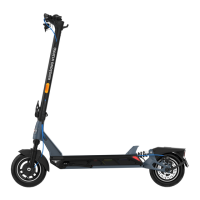
The electric scooter is a recreational personal transporter designed for individual mobility. It features a handlebar with a brake handle, bell, dashboard, and power button. The dashboard displays speed and battery level, and the power button controls the scooter's on/off state and headlight. An accelerator is located on the handlebar for controlling speed. The scooter is equipped with a folding mechanism for portability and a kick-stand for parking. It utilizes both front drum brake and rear disc brake, supplemented by an EABS system for enhanced braking performance. Suspension is provided at both the front and rear for a smoother ride. The scooter is powered by a motor, with a charge port for recharging the battery. A headlight and brake light are included for visibility and safety.
Important Technical Specifications
The KS-N15 series offers three models with varying performance characteristics: KS-N15, KS-N15 Pro, and KS-N15 Pro+. All models feature 10-inch tires, available in either inner honeycomb or inflatable types.
- Top Speed:
- KS-N15: 30 km/h
- KS-N15 Pro: 30 km/h
- KS-N15 Pro+: 35 km/h
- Mileage (Range):
- KS-N15: Around 20 km
- KS-N15 Pro: Around 40 km
- KS-N15 Pro+: Around 60 km
- Grade-ability:
- KS-N15: Around 22%
- KS-N15 Pro: Around 25%
- KS-N15 Pro+: Around 47%
- Battery Capacity:
- KS-N15: 37V, 6Ah
- KS-N15 Pro: 37V, 10.4Ah
- KS-N15 Pro+: 48V, 14.5Ah
- Motor Power:
- KS-N15: 350W
- KS-N15 Pro: 500W
- KS-N15 Pro+: 600W
- Charging Time:
- KS-N15: Around 3-4 hours
- KS-N15 Pro: Around 6-7 hours
- KS-N15 Pro+: Around 7-8 hours
- Charger Input/Output: All models use an input AC: 100-240V.
- KS-N15/KS-N15 Pro: Output DC: 42V/2A
- KS-N15 Pro+: Output DC: 54.6V/2A
- Max Load: 120 kg for all models.
- User Height: 150-200 cm.
- Dimensions (Unfolded): 1165 * 535 * 1201 mm
- Dimensions (Folded): 1165 * 535 * 540 mm
- Net Weight:
- KS-N15: 21.4 kg
- KS-N15 Pro: 21.9 kg
- KS-N15 Pro+: 22.7 kg
- Operating Conditions: -10°C to +50°C; 0-85% Humidity
- Storage Conditions: -20°C to +60°C; 0-85% Humidity
- Headlight: 1.5W
- Brake Light: LED
- Display: LED with 5 bars battery display, 1-4 speed gear indication, and malfunction display.
- Safety Features: Real-time temperature monitoring, short circuit/low voltage/overcurrent/overcharging protection.
- Material: Superior Aviation Aluminum Alloy.
Usage Features
- Assembly: The scooter requires minimal assembly. Users need to unfold and fasten the handlebar stem, connect internal wires, install the head, and pull the brake wire through the silicone plug, leaving about 20mm outside. Screws on the stem should be tightened with a hexagon wrench. After assembly, the power button should be pressed to verify proper function.
- Power ON/OFF: Long press the power button for 3 seconds to turn the scooter on or off. All icons will light up, showing speed and battery level.
- Headlight Control: Click the power button to turn the headlight ON/OFF.
- Speed Gear Adjustment: Click the power button twice to cycle through 4 speed gears (P1, P2, P3, P4). Speed increases from P1 to P3. P4 is a pedestrian mode with a maximum speed of 6 km/h.
- APP Connectivity: The scooter can be connected to a mobile app (iOS 10.0+ or Android 4.3+, Bluetooth 4.0+) for enhanced control and monitoring. Users need to install the app, register/login, and grant necessary permissions. To connect, enable Bluetooth/location (GPS), search for the KS-N15 model in the device list, and select it. The scooter will beep upon successful connection. The app allows checking battery level and remaining mileage.
- Learning to Ride:
- Check Status: Ensure the environment is safe and check battery level via the app.
- Wear Protective Equipment: Always wear a helmet and other necessary protectors like elbow pads and kneecaps.
- Slide with One Leg: Practice sliding with one leg to get a feel for the scooter.
- Throttle and Two Legs: Gently touch the throttle and try to place both feet on the deck.
- Braking: During riding, practice releasing the throttle and pulling the brake lever.
- Headlight Use: Learn to use the headlight for visibility.
- Cruise Control: This feature can be activated via the app. When maintaining a constant speed for 3-5 seconds, the scooter enters cruise-control mode. It is recommended to use cruise control only on flat roads.
- Folding and Carrying: To fold, ensure the scooter is off, unlock the folding mechanism, and bend the handlebar stem to hook it to the buckle. To unfold, remove the hook, erect the handlebar, and lock the folding structure. The scooter can be carried by holding the handlebar stem with one or both hands.
- Handlebar Adjustment: If the handlebar or stem sways during riding, use a hexagon wrench to tighten the screws on the folding mechanism.
- Disc Brake Adjustment: If the brake is too tight, loosen the screws on the caliper with a hexagon wrench, slightly push back the brake cable to shorten its exposed length, then tighten the screws. If the brake is too loose, loosen the screws, slightly pull out the brake cable to lengthen its exposed length, then tighten the screws.
- Pre-ride Check: Before riding, check the scooter's firmness and tighten any loose screws. The fixed screw torque for position ① is 4N/m, and for position ② is 14N/m. Also, check tire pressure; recommended pressure is 250-300kPa, with a maximum of 300-350kPa.
Maintenance Features
- Charging: The scooter has a built-in lithium battery. Charge it when the battery is low. Use only the King Song supplied charger. Plug the charger into the power source after inserting the charger plug into the scooter. Charging is complete when the red light turns green. It's advisable to wait until charging is complete before unplugging to allow the protection circuit to perform flow equilibrium. Do not charge if the charger or power outlet is wet.
- Cleaning: Ensure the scooter is off before cleaning. Use a soft cloth to clean it. Do not use water to wash the scooter or immerse it in water.
- Storage: Store the scooter in cool and ventilated places (temperature -20°C to 60°C, relative humidity 0-85%). Avoid placing heavy objects on the scooter or squeezing it.
- Battery Pack Maintenance: When fully charged, check the battery voltage in the app. Normal voltage for N15 Pro+ is 48V-54.6V, and for N15/N15 Pro is 37V-42V. If the voltage is outside this range, contact the distributor. Charge the scooter at least once a month to extend battery life. Do not disassemble, assemble, or change the battery yourself.
- Regular Maintenance: Do not disassemble or assemble the E-scooter without professional guidance or help from the seller/distributors.
- Troubleshooting (Error Description): The manual provides a detailed table of error codes (EO, E1, E3, E4, E5, BL, BH, BP, H1, H2, H3, LR, S1, S2, SN) with their descriptions and corresponding solutions, such as checking connections, restarting, replacing components, or adjusting riding behavior.
- Warranty: For warranty policy, consult the point of purchase or contact the manufacturer's service team via email at support@szkingsong.com.

 Need help?

 To Next Page
 General