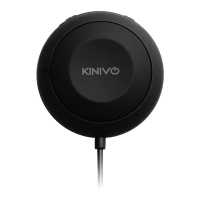
The Kinivo BTC480 Bluetooth Car Kit is a device designed to seamlessly integrate Bluetooth connectivity into your car's audio system, enabling hands-free calling, stereo music streaming, and voice commands. It is compatible with a wide range of Bluetooth-enabled devices, including Apple iPhones, iPod Touches, iPads, Android smartphones and tablets, Windows tablets, Apple tablets, Android tablets, Kindle Fire HD, BlackBerry smartphones, Windows smartphones, Samsung smartphones, Droids, and HTC devices. The car kit supports Bluetooth profiles such as HFP (Hands-free Profile), A2DP (Advanced Audio Distribution Profile), and AVRCP (Audio/Video Remote Control Profile), ensuring broad compatibility and functionality.
Function Description:
The BTC480 allows users to stream music wirelessly from any Bluetooth-capable device to their car stereo. It supports hands-free calling, enabling users to make and receive calls safely while driving. The device also facilitates Siri and Google Now voice commands on supported phones, enhancing convenience and reducing distractions. A key feature is Bluetooth Multipoint, which allows the BTC480 to connect to two devices simultaneously, making it easy to switch between personal and work phones, or between a phone and a tablet for music. The built-in echo and noise-cancelling technology contribute to clearer call quality, minimizing background noise for both parties during a conversation. Additionally, the BTC480 includes a USB port, allowing users to charge their devices while listening to music.
Important Technical Specifications:
- Bluetooth Specification: Bluetooth 4.1 with multipoint
- Bluetooth Profiles: HFP, A2DP, and AVRCP
- Operating Distance: 30 ft (10m) Class II
- Operating Temperature: -10°C to 50°C
- Storage Temperature: -20°C to 80°C
- Dimensions: 42 mm x 12 mm
- Weight: 35g
Usage Features:
- Automatic Power On/Off: The BTC480 automatically powers on when the car is switched on and powers off with the vehicle in most cases. However, in some vehicles where the 12V accessory port remains powered after the vehicle is off, users may need to manually unplug the cigarette lighter plug to prevent minimal power drain.
- Volume Adjustment: Volume can be adjusted using the connected phone/audio player and/or the car stereo volume controls.
- Bluetooth Pairing:
- First Device Pairing: The device automatically enters pairing mode when first powered on. If not, users can press and hold the multifunction button for 5 seconds until the LED alternately flashes red and blue. Pairing times out after ten minutes if not completed.
- Multipoint Pairing (Second Device): To pair a second device, first disconnect the car kit from the initial device by disabling Bluetooth on that device. The BTC480 will re-enter pairing mode. Then, enable Bluetooth on the second device and pair it. Finally, reactivate Bluetooth on the first paired device. The device paired second will act as the primary device for music streaming, call answering, re-dialing, and voice commands. The BTC480 will auto-connect only with the second paired device; the first device will require a manual connection.
- Button Functions:
- Multifunction Button:
- Press and hold for 5+ seconds: Enters Bluetooth pairing mode.
- Single press: Answers/ends calls, plays/pauses music.
- Press and hold for 2 seconds (no active call): Rejects an incoming call.
- Double click: Activates voice command/dialing (Siri/Google Now on supported phones).
- Next Track Button: Press to skip to the next song. Long press (2 seconds) to redial the last number.
- Previous Track Button: Press to go to the previous song.
- LED Indication:
- Off: Powered off.
- Blinking Blue: Powered on, incoming call.
- Alternating Blinking Blue and Red: Pairing mode.
- Blinking Blue every 7 seconds: Active call.
- Slow Blinking Blue: Standby mode.
- Memory: The BTC480 can remember up to four previous Bluetooth connections and connect to up to two devices simultaneously (Multipoint).
Maintenance Features:
- Cleaning: Do not use abrasive cleaners. Always unplug and power off the unit before cleaning.
- Environmental Care: Avoid exposing the device to liquid, moisture, high humidity, or extreme high/low temperatures.
- Disposal: Dispose of packaging and the unit according to local regulations.
- Factory Reset: To perform a factory reset, simultaneously press and hold the previous and next song buttons for 5 to 7 seconds. The BTC480 will emit two audible beeps and blink red and blue alternately. This action deletes all previous pairings and restores default settings. After a factory reset, users must remove the BTC480 pairing from their Bluetooth device and repeat the pairing process. This feature is useful for troubleshooting persistent issues.
- Troubleshooting Audio Distortion: If experiencing electrical humming noise (groundloop issue), Kinivo support can provide a free ground loop isolator.
- Product Support: Kinivo offers product support via their website (http://support.kinivo.com) and email (support@kinivo.com) for assistance with setup, operation, and troubleshooting.
- Warranty: The BTC480 comes with a 2-year limited hardware warranty, covering defects in material or workmanship under normal use. Kinivo will repair or replace defective products free of charge. The warranty does not cover damage from misuse, natural disasters, or other circumstances beyond Kinivo's control.
The Kinivo BTC480 Bluetooth Car Kit is designed for ease of installation and use, providing a reliable and feature-rich solution for in-car Bluetooth connectivity.

 Need help?
 General

 To Next Page