CHILLER – FREEZER THERMOSTAT
Model RN5+ (COMPATIBLE WITH RN2 / RN3 / RN4 / RN4+ / RN5)
Read carefully these instructions before installing and using this device and keep them for future reference. Attention to installation and electrical wiring. Use this device
only as described in this document and never use itself as a security device. Disconnect the power supply before performing any type of maintenance operation. Do
not expose the device to liquid leakage, high temperatures over +55
o
C, high humidity over 80%. The device must be disposed of in accordance with local standards
for the collection of electrical and electronic equipment.
RN5+ is a thermostat for chiller or freezer cabinet, without plastic enclosure, suitable for all applications including the ones with anti-explosive standards and has the following
specifications: room and evaporator temperature is controlled with NTC / PTC sensors; 3 indication digits with resolution 0.5°C and 5 buttons; one serial input for controlling
the cabinet’s door; 5 relays: compressor 30Α 250VAC, fan 10Α 250VAC, deFrost 10Α 250VAC, lamp 10Α 250VAC and door resistance in chillers or drainage resistance in
freezers 10Α 250VAC; defrosting may be electric or by hot gas; a buzzer in case of an alarm; a serial data port in order to connect either to cloud online IoT platform Cortex or
to a computer via CAMIN software for full monitoring and data logging of the device (see page 2 – Serial input of the thermostat). The device is mounted through panel hole
and secured by screws.
ATTENTION: Read carefully the technical specifications and make sure that the working conditions are appropriate. According to safety standards, the device must be fastened in such a way that
it cannot be removed without the use of tools.
Dimensions are in mm. The device is mounted through panel hole and secured by 3 screws (Φ=3mm).
For more indications regarding the alarms please see the alarm’s table at page 6.
By pressing at the same time for 3 seconds, the countdown starts and the keyboard unlocks while the yellow small key on the display turns off. Instantly the
temperature measurement unit
o
C/
o
F is displayed. The keyboard locks automatically after 60 seconds of inertia.
1. Unlock the keyboard by pressing at the same time and the countdown starts for 3 seconds.
2. Press to display the first parameter SPo.
3. Press to display its value. With
or change its value.
4. Press to save the new value. The cabinet is working properly with the new adjustment.
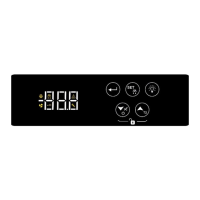
INDICATIONS AND BUTTONS FUNCTION
evaporator’s
sensor is
deactivated
enter/exit the parameter’s menu
confirm new value of a parameter
display the parameter’s value
manual deFrost
down arrow
mute buzzer
ON/OFF cabinet
up arrow
display the evaporator temperature Τ2 (and the
room temperature if Set Point is constantly
displayed)
ADJUSTING ROOM’S TEMPERATURE – SET POINT


 To Next Page
 Need help?
 General