EasyManua.ls Logo

KirbEbike NC-81F - User Manual

KirbEbike NC-81F
23 pages
Print Icon
To Next Page IconTo Next Page
Loading...
Electric Bike Display
User’s Manual
NC-81F
www.kirbebike.com
Question and Answer IconNeed help?

Do you have a question about the KirbEbike NC-81F and is the answer not in the manual?

Summary

Product Introduction

Product Name and Model Number

Identifies the product as a Smart LCD display for electric bicycles, model NC-81F.

Product Specifications

Lists key technical specifications including power supply, current ratings, operating temperature, and storage temperature.

Appearance and Size

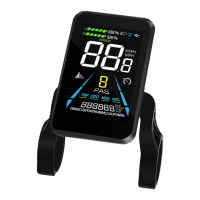
Describes the physical appearance and dimensions of the electric bike display.

Display Functionality

Functional Overview

Provides a comprehensive overview of the NC-81F display's features and capabilities.

Functional Areas Identification

Details and illustrates the different areas and indicators on the NC-81F display interface.

Button Operation Guide

Explains the function of each button on the operating unit for user interaction.

Routine Operations

Powering the Display On and Off

Instructions for turning the NC-81F display on and off, including auto-shutoff features.

Switching Display Information

Guides on cycling through different display screens like trip, ODO, max speed, and average speed.

Walk Boost and Cruise Control

Explains how to engage the walk boost mode for pushing assistance and cruise control for steady speed.

Parameter Configuration

Backlight Luminance Settings

Adjusts the brightness of the display backlight to three levels: minimum, standard, and maximum.

Unit System Selection

Allows switching between metric (km) and imperial (mile) units for speed and distance measurements.

Rated Voltage Configuration

Sets the display to match the electric bike's rated voltage (36V, 48V, or 52V).

Automatic Sleep Timer

Configures the auto power-off timer to save battery, adjustable from 1 to 60 minutes.

PAS Level Adjustment

Allows customization of the Pedal Assist System (PAS) levels, affecting motor assistance.

Wheel Diameter Configuration

Sets the wheel diameter to ensure accurate speed and distance readings on the display.

Speed Sensor Magnets Setup

Configures the number of magnets on the speed sensor for precise speed detection.

Speed Limit Adjustment

Sets the maximum speed limit for the electric bike, up to 100 km/h.

Start-up Mode Selection

Chooses between zero start or non-zero start modes for the electric bike's initial acceleration.

Drive Mode Selection

Selects the primary drive mode: Pedal Assist only, Electric only, or Both.

Pedal Assist Sensitivity Tuning

Adjusts how sensitive the pedal assist is to crank rotations, affecting motor engagement.

Pedal Assist Strength Control

Sets the relative strength of the pedal assist from the controller, from weakest to strongest.

Pedal Assist Sensor Magnets Count

Specifies the number of pedal assist sensor magnets, typically ranging from 5 to 12 pcs.

Controller Current Limit Setting

Limits the maximum current drawn by the controller, adjustable from 1 to 50A.

ODO Reset Configuration

Determines whether the Odometer (ODO) value is reset or retained after power cycles.

Power-on Password Security

Enables and sets a four-digit password to prevent unauthorized use of the display.

Advanced Features and Maintenance

Factory Default Restore

Guides on restoring the display settings to their original factory defaults.

Trip Odometer Reset Procedure

Instructions for manually clearing the trip odometer data.

Support and Safety Information

Warranty Terms and Conditions

Outlines the limited warranty period and conditions provided by the manufacturer.

Warranty Exclusions List

Details what is NOT covered by the product warranty, such as physical damage or misuse.

Wire Connection Guide

Illustrates the standard wire connection sequence and the function of each wire.

General Operating Precautions

Provides essential safety advice and operational guidelines for using the display.

Error Code Reference

Error Code Definitions

Lists and defines specific error codes (NC-01, NC-02) that may appear on the display.

Overview

The NC-81F is a smart LCD display designed for electric bicycles, offering a comprehensive suite of features to enhance the riding experience.

Function Description

The display serves as the central interface for controlling and monitoring various aspects of an electric bicycle. Its primary functions include:

  • Battery Level Indication: Shows the current charge status of the battery with a 5-bar indicator. When the battery is fully depleted, the last bar flashes to prompt charging.
  • Pedal Assist (PAS) Level Indication: Displays the current pedal assist level, allowing riders to adjust motor output power.
  • Speed Display: Provides real-time current speed, maximum speed, and average speed.
  • Mileage Display: Tracks both single trip odometer (TRIP) and total odometer (ODO).
  • Walk Boost Mode: Enables the bicycle to move at a fixed speed of 6 km/h, useful for pushing the bike.
  • Light ON/OFF Control: Allows control over the bicycle's lights and adjusts the display backlight accordingly.
  • Error Code Indicator: Automatically displays error codes if a fault occurs in the electronic system, helping diagnose issues.
  • Cruise Control Indicator (Optional): Shows when cruise control is active, maintaining a constant speed.
  • Bluetooth Connection Indicator (Optional): Indicates Bluetooth connectivity status.
  • Personalized Parameter Settings: Offers extensive customization options for various parameters, including wheel diameter, speed limit, rated voltage, and PAS settings.
  • Factory Default Parameter Recovery: Allows users to restore the display to its original factory settings.

Important Technical Specifications

  • Power Supply: Compatible with 36V, 48V, and 52V systems.
  • Display Rated Current: 15mA.
  • Display Maximum Current: 30mA.
  • Shutdown Leakage Current: <1uA.
  • Supplied Current to Controller: 50mA.
  • Operating Temperature: -20°C to 60°C.
  • Storage Temperature: -30°C to 70°C.
  • Dimensions: Front view: 59.5mm width, 86.0mm height. Side view: 71.2mm depth, with a 31.8mm clamp diameter.
  • Control Buttons: Equipped with five buttons: Power ON/OFF, Plus (+), Minus (-), Light (D), and Toggle (i).

Usage Features

Routine Operation

  • Power ON/OFF: Long press the power button to turn the display on or off. The display consumes less than 1uA leakage current when off. It automatically shuts off after 10 minutes of inactivity.
  • Display Interface Switching: Short press the "i" button to cycle through Trip Odometer, Odometer, Maximum Speed, and Average Speed displays.
  • Walk Boost Mode: Long press the "-" button to activate walk boost mode, moving the bike at 6 km/h. Release the button to stop. This mode is only for pushing the bicycle, not riding.
  • Cruise Control: When the bicycle is at a stable speed, long press the "+" button to enter cruise mode. Press the "+" button again, turn the knob, or press the brake to exit.
  • Turning ON/OFF Lights: Press the "D" button to turn on the lights and dim the display backlight. Press it again to turn off the lights and restore backlight brightness.
  • PAS Level Selection: Use the "+" and "-" buttons to switch between PAS levels, adjusting the motor's output power.

Personalized Parameter Settings

To access personalized settings, ensure the display is ON and the speed is 0.

  1. Enter Settings: Press and hold "+" and "-" simultaneously for more than 2 seconds.
  2. Toggle Interfaces: Use "+" and "-" to navigate between setting interfaces.
  3. Enter Parameter Changing State: Press "i" to enter the parameter modification state.
  4. Select Parameter: Use "+" for addition and "-" for subtraction.
  5. Save Settings: Press "i" to save the current parameter and return to the setting interface. Long press "i" to save and exit the setting interface.

Available settings include:

  • Backlight Luminance (01P): Options 01 (minimum), 02 (standard), 03 (maximum).
  • Metric and Imperial Setting (02P): 00 for metric (km/h) and 01 for imperial (mile/h).
  • Rated Voltage Setting (03P): Options for 36V, 48V, 52V.
  • Auto Sleep Time Setting (04P): Adjustable from 1 to 60 minutes; 00 means no auto shutdown. Default is 10 minutes.
  • PAS Level Setting (05P): Configurable PAS levels (e.g., 0-3, 0-5, 0-9).
  • Wheel Diameter Setting (06P): Adjustable from 1 to 50 inches.
  • Number of Speed Sensor Magnets Setting (07P): Adjustable from 1 to 255 magnets.
  • Speed Limit Setting (08P): Adjustable from 1 to 100 km/h (actual limit may vary by protocol).
  • Start-up Setting (09P): 00 for zero start, 01 for non-zero start.
  • Drive Mode Setting (10P): 00 for Pedal assist only, 01 for Electric only, 02 for Both Pedal assist and electric.
  • Pedal Assist Sensitivity Setting (11P): Adjustable from 1 to 24. Higher numbers require more crank rotations to activate the motor.
  • Pedal Assist Strength Setting (12P): Adjustable from 0 (weakest) to 5 (strongest) for PWM signal strength.
  • Number of Pedal Assist Sensor Magnets Setting (13P): Adjustable from 5 to 12 magnets.
  • Controller Current Limit Setting (14P): Adjustable from 1 to 50A.
  • ODO Resets Setting (15P): 00 for non-reset, 01 for reset.
  • Power-on Password Setting (16P): Allows activation (PSd-y) or deactivation (PSd-n) of a four-digit power-on password. Default is 1212. Users are warned to remember the password.

Shortcut Operation

  • Restore Factory Settings (dEF): From the main setting interface (speed 0), press and hold "+" and "D" simultaneously for 2 seconds. Use "+"/"-" to toggle to dEF-Y, then press "i" to confirm. The display will show dEF-0 and restore settings.
  • Trip Odometer Reset: From the main setting interface (speed 0), press and hold "-" and "i" simultaneously for 2 seconds. The main interface will flash during the reset.

Maintenance Features

  • Error Code Display: The display automatically shows error codes (E001-E006) if a fault occurs in the electronic system. This feature helps users troubleshoot problems promptly, as the bicycle may not operate normally with an active error.
    • E001: Controller failure
    • E002: Communication failure
    • E003: Hall failure
    • E004: Throttle failure
    • E005: Brake failure
    • E006: Motor phase failure

Precautions

  • Avoid plugging or unplugging the display while it is powered on.
  • Protect the display from bumps.
  • Do not change parameter settings arbitrarily, as this may affect normal riding.
  • If the display malfunctions, send it to a repair center.
  • Product specifications may vary due to upgrades; refer to the physical product.

Warranty

  • Warranty Period: 12 months from the date of factory shipment for failures caused by product defects under normal use.
  • Warranty Exclusions:
    • Opened shell.
    • Damaged connector.
    • Scratches on the appearance after leaving the factory.
    • Scratched or broken wires.
    • Failure or damage due to force majeure (e.g., fire, earthquake, natural disaster).
    • Out of warranty period.

KirbEbike NC-81F Specifications

General IconGeneral
BrandKirbEbike
ModelNC-81F
CategoryBicycle Accessories
LanguageEnglish