GET STARTED
QUICK START GUIDE
In a few easy steps, you’ll be on your way to enjoying something delicious!
For complete instructions and videos, go online to kitchenaid.com/quickstart.
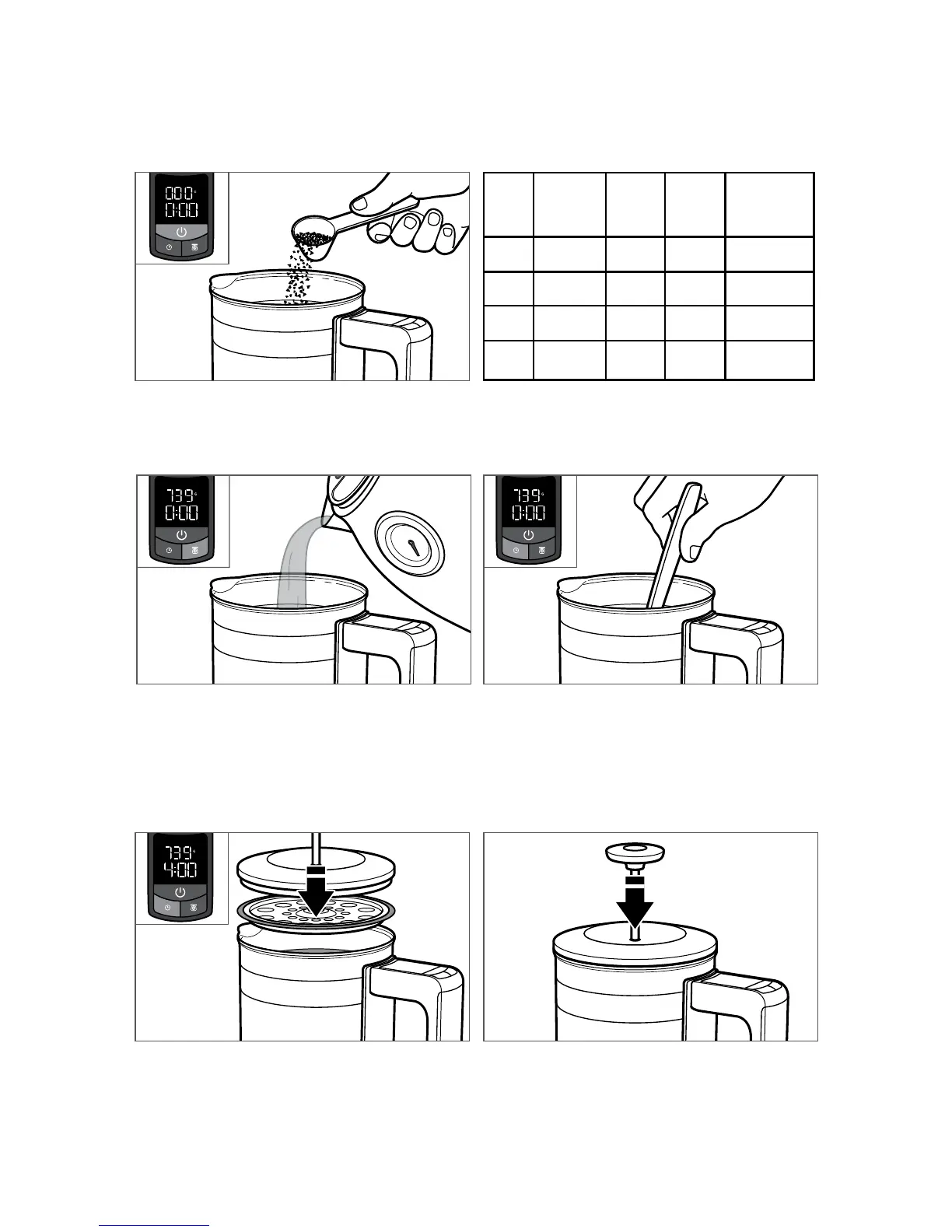
1. Press the POWER button to turn on the
Precision Press Coffee Maker. The LCD display
will read --- for a few moments before changing
to 0 G and 0:00 minutes when it is ready to use.
4. Press the TIMER button. Gently stir the coffee
back and forth to “break the crust.”
3. Press the SCALE button to tare your
measurement. To ensure scale accuracy,
slowly pour hot water (195°F-205°F) into the
carafe. Fill according to your desired number
of cups, the scale will automatically measure
the water to help you get the right amount.
Do not fill past the MAX fill line.
5. Place the lid on the carafe. Do not press the
plunger. Allow the coffee to steep. A good
starting point for steep time is 4 minutes. Steep
for more or less time according to taste.
6. Slowly (10-15 seconds) and evenly press the
plunger down to separate the grounds from
the brewed coffee. When pressing the plunger
down, ensure it is vertically positioned for a
cleaner brew. Immediately pour your coffee
and enjoy!
Cups Water
oz.
(weight)
Water
grams
Coffee
grams
Approx.
# of level
scoops
2 10 296 18 2
3 15 444 28 3
4 20 591 37 4
5 25 739 46 5
2. Scoop coarsely ground coffee into the carafe.
The scale will weigh the coffee automatically.
To switch from grams to ounces, press and hold
the SCALE button for 3 seconds.
NOTE: The scale measurement will increase
with time and temperature. This is normal.
TIP: For best pour, slightly lift the plunger
handle before serving.









 To Next Page