10
PROGRAMING THE WATER TEMPERATURE AND WATER HARDNESS
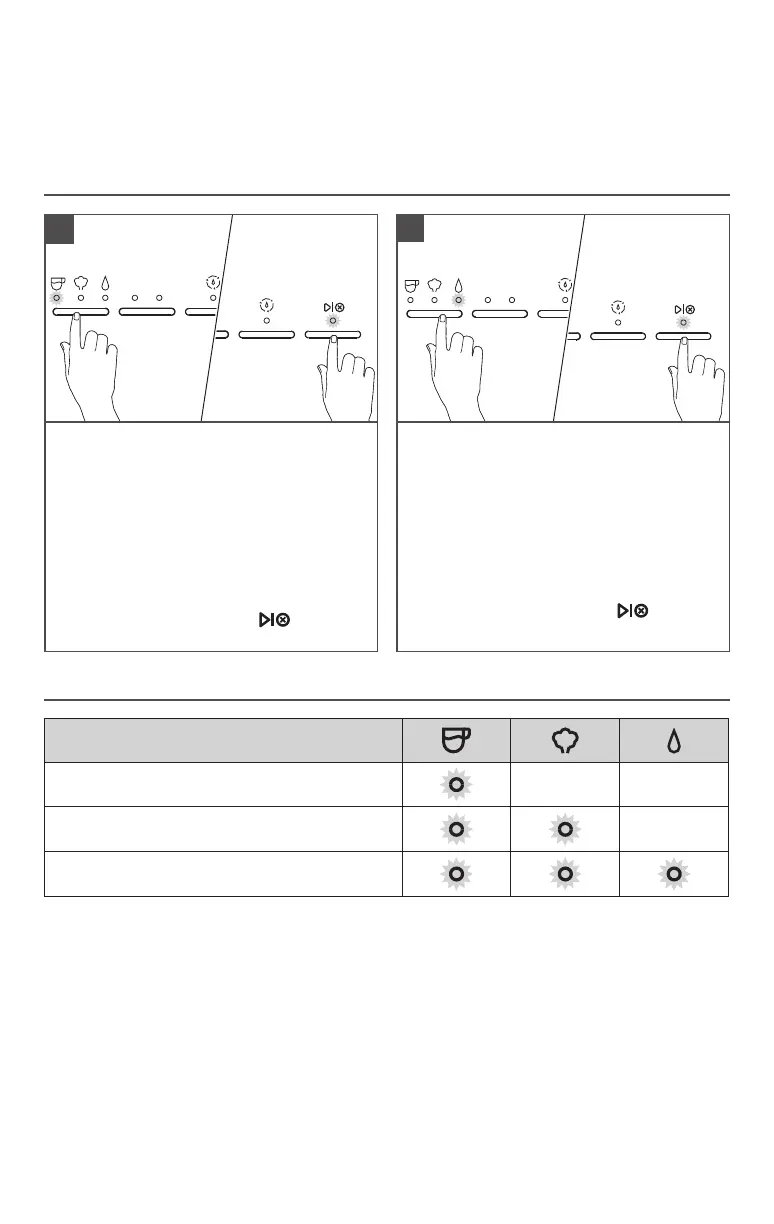
To change pre-programmed Water
Temperature: Toggle the Mode Button
to select Espresso, press and hold for 3
seconds.
The indicator lights will show the default
factory setting or previous saved setting
(see Indicator light chart for reference).
Toggle the Mode Button between Low-Mid-
High to select desired temperature.
To save your selection, press button or
wait for 10 seconds.
1
To change pre-programmed Water
Hardness: Toggle the Mode Button to
Water, Press and hold for 3 seconds.
The indicator lights will show the default
factory setting or previous saved setting
(see Indicator light chart for reference).
Toggle the Mode Button between Low-
Mid-High to select desired water hardness.
To save your selection, press button
or wait for 10 seconds.
2
INDICATOR LIGHT CHART
TIP: To restore all factory settings, Press and Hold “Dose Button” for 3 seconds.
All indicator lights will blink indicating that all settings are restored.
Water Temperature or Water Hardness
Low
Medium
High
NOTE: Water Hardness - Low: 0 to 60 ppm
Medium: 60 to 120 ppm
High: more than 120 ppm
PROGRAMING FUNCTION
TIP: To restore all factory settings, Press and Hold “Dose Button” for 3 seconds.
Changing the factory default Espresso or Water Volumes may impact the intended
performance of the machine.








 To Next Page