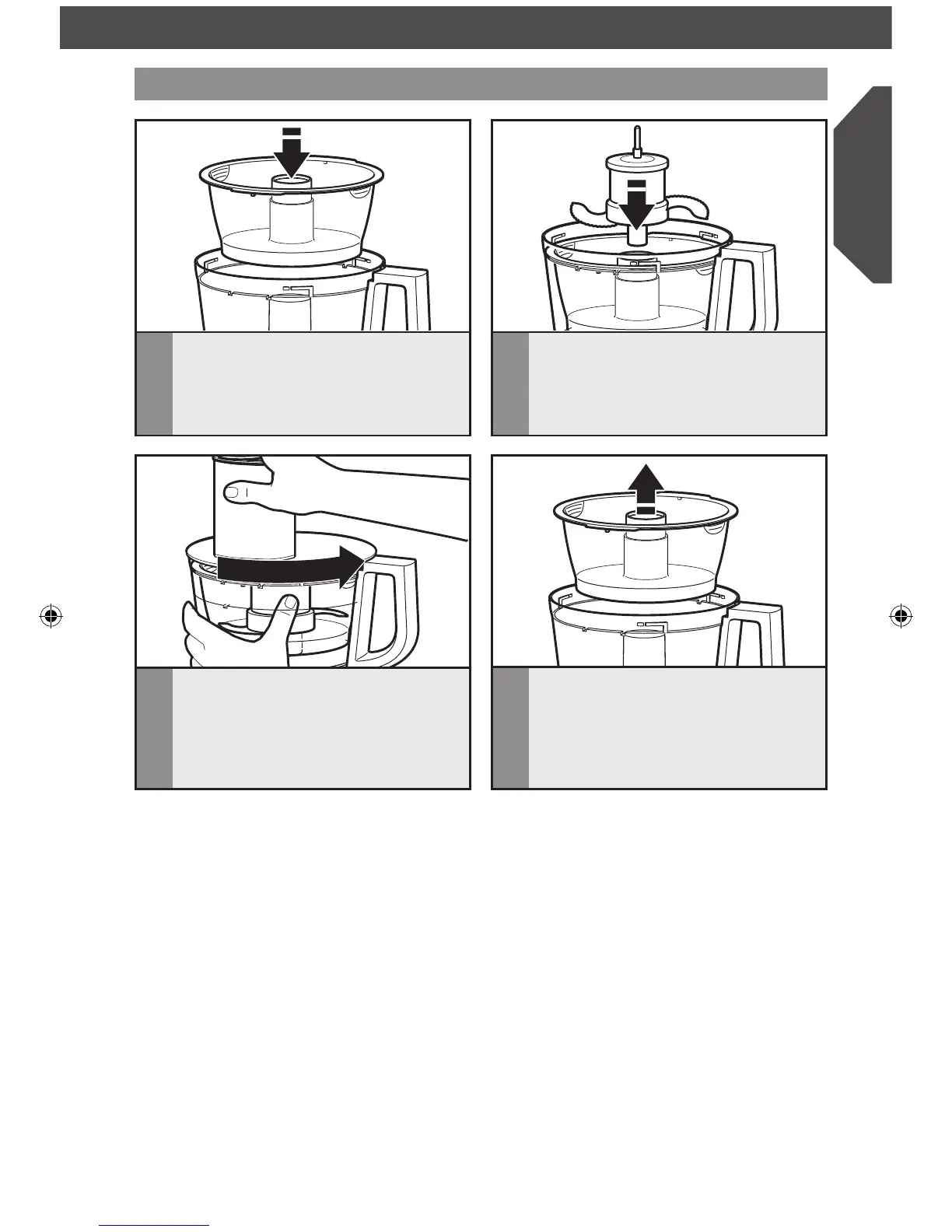
ASSEMBLING THE FOOD PROCESSOR
Installing the mini-bowl and mini-blade
1
Place the mini-bowl inside the work
bowl over the power shaft. Rotate the
mini-bowl until the tabs on the top edge
of the bowl drop into the indents on the
top of the work bowl.
2
Insert the drive adapter into the mini-
blade, and place on the power shaft. It
may be necessary to rotate the blade
until it falls into place. Press down firmly
to lock it into place.
3
Install the work bowl cover, being sure
it locks into place.
4
To remove the mini-bowl after
processing, remove the mini-blade by
pulling straight up on the cap. Then lift
the bowl straight up and out, using the
two finger grips located along the top
edge of the bowl.
W10694199A_FINAL2.indd 13 5/1/14 9:32 AM



 To Next Page