3
MAINTENANCE
CLEANING: Be sure the solar panel is disconnected from all power
sources and devices. Use a clean, dry, soft, lint-free cloth to wipe
down the solar panel surface. Do not use abrasive cleaners or
solvents. If necessary, dampen a clean cloth with a mix of mild soap
and water to clean the solar panel surface.
NOTE – Scratching the solar panel surface will impact the
performance of the panel.
STORAGE: Store in cool temperatures and mild humidity.
Avoid storing the device in direct sunlight while not in use (see
GENERAL SPECIFICATIONS). Leaving the device in a vehicle
or other confined spaces in extremely hot temperatures can
lead to a decrease in service life, overheating, or fire. Extremely
cold temperatures below the specified storage range can also
harm the performance and service life of the device. Keep away
from corrosive chemicals and gases. After taking the device
out of storage, inspect visually to make sure the device and
all accessories look satisfactory. Allow the device to return to
ambient conditions before using.
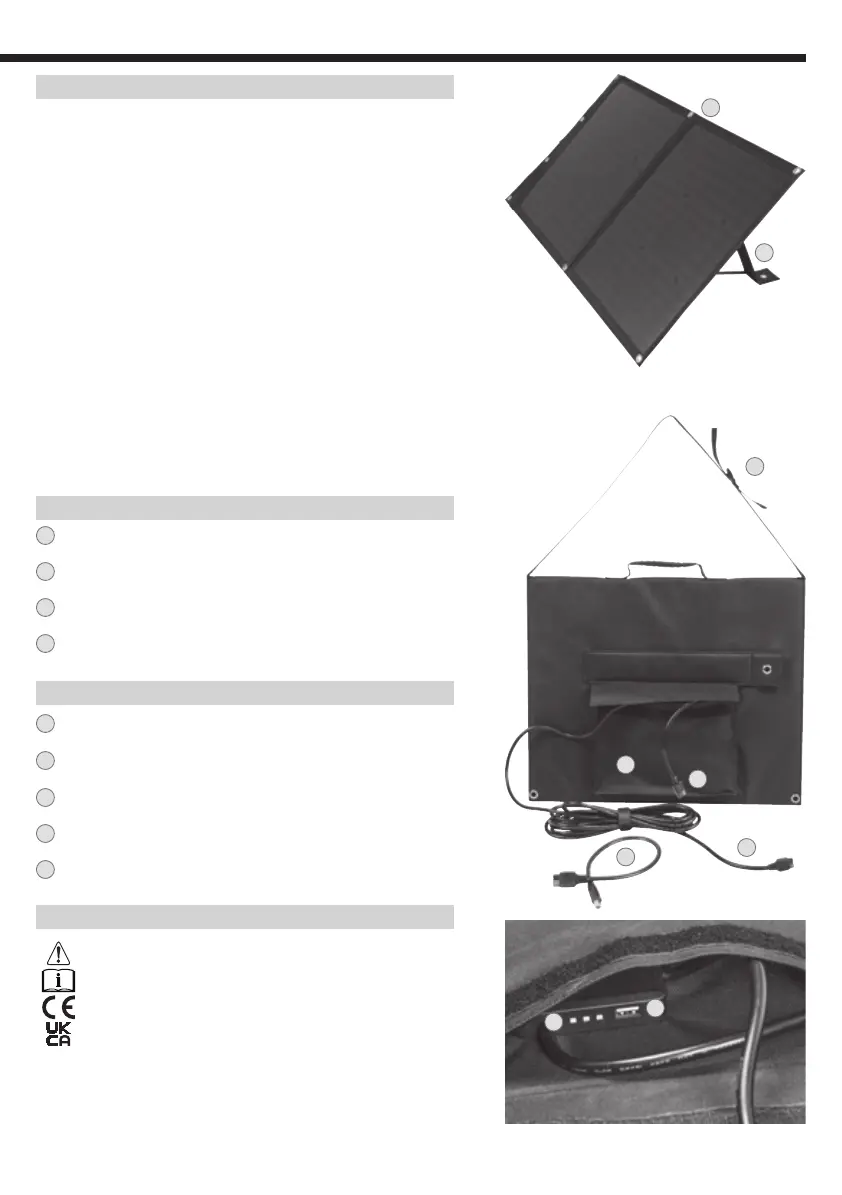
FEATURE DETAILS
1
Mounting hole
2
Kickstand(s)
3
Adjustable Shoulder Strap
4
Pocket
CONTROL PANEL FEATURES
5
Input port (APP
®
) to chain an additional solar panel
6
Anderson Power Pole
®
(APP
®
) to 8mm DC adapter
7
Solar Panel Output (APP
®
)
8
Power output indicator
9
5V Regulated output (USB-A)
SYMBOLS ON PRODUCT
Warning Caution Symbol
Read instructions
CE – Conforms with European Economic Area Directives
UKCA – United Kingdom Conformity Assessment
3
4
2
1
5
7
6
9
8



 To Next Page