7
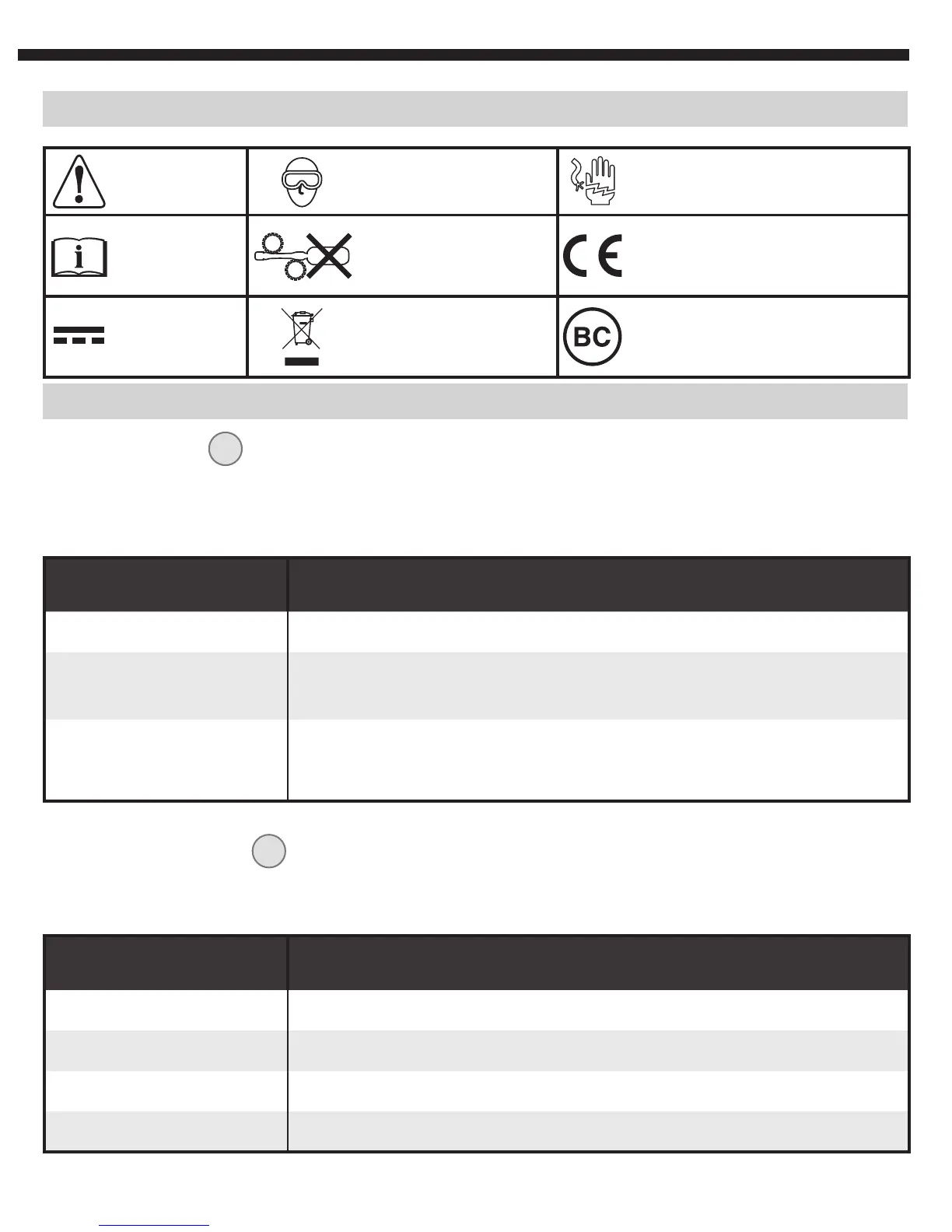
SYMBOLS ON BACK OF INSTRUMENT
Warning or
Caution
Wear approved
eye protection
NOT insulated - Will NOT
protect against electric shock
Read
Instructions
Do not probe
moving machinery
Conformité Européenne:
Conforms with European
Economic Area directives
DC voltage/
current
WEEE –
Battery disposal
Conforms with BCS
regulations of California
Energy Commission
INDICATOR COLOR STATUS INDICATED
Solid green Unit is connected to a phone and is active
Slow-blinking green
The device is actively transmitting a WiFi signal, labeled as
“KT Borescope”
Quick-blinking green
The phone initially connected to the borescope is no longer
connected, normally the result of the phone entering
Power-Save mode
INDICATOR COLOR STATUS INDICATED
Solid green Battery has more than 20% charge remaining
Solid red Battery has 20% charge remaining
Slow-blinking green Battery is charging, currently at or below 20% charge level
Slow-blinking red Battery is charging, currently at more than 20% charge level
INDICATORS
WiFi INDICATOR
4
When turning on the borescope, the WiFi Indicator will illuminate solid green for a few
seconds, then begin to slowly blink when transmitting a WiFi signal. Other behaviors
detailed below:
BATTERY INDICATOR
5
During initial power-up of the borescope, the battery light will blink green 3 times. Other
behaviors detailed below:


 To Next Page