The KLIM Fusion Type C Earphones are designed to provide a high-quality audio experience for music, movies, gaming, and phone calls. They feature a USB-C connector for compatibility with Android phones and Nintendo Switch devices.
Function Description:
These earphones are primarily for audio playback and communication. They incorporate a built-in microphone for calls and voice commands, and a multi-function button for controlling playback and phone functions. The in-ear design, combined with memory foam ear tips, aims to provide maximum external isolation, comfort, and sound quality. The earphones also feature magnetized heads for convenient storage and to prevent cable entanglements.
Important Technical Specifications:
- Audio:
- Freq. response: 15 Hz - 21 KHz
- Sensitivity: 98 ± 3 dB
- Impedance: 16 ohm
- THD: < 0.1%
- Microphone:
- Frequency: 50 Hz - 10 KHz
- Sensitivity: -42 dB ± 3 dB
- Impedance: < 2.2 K Ohm
- Other:
- Connector type: USB type C
- Cable length: 130 cm
- Weight: 20 g
Usage Features:
- Volume Controller: The earphones include an independent volume slider on the controller, allowing users to adjust output volume without affecting the device's main volume settings. This system is designed for broad compatibility across various phones, tablets, and computers.
- Multi-function Button: This button provides versatile control over audio playback and phone calls:
- Play / Pause: Press once to play or pause the current track or song.
- Skip track: Press twice in quick succession to skip to the next track or song.
- Previous track: Press three times in quick succession to go back to the previous track or song.
- Pick up call / Mute microphone: Press once to pick up an incoming call or mute the microphone during a call.
- End call: Press for a few seconds during a call.
- Google assistant: Press for a few seconds to bring up the assistant.
- Note: Playback controls and microphone/call compatibility may vary depending on the specific device.
- Memory Foam Ear Tips: The earphones come with innovative memory foam ear tips that automatically expand in the ear, providing enhanced comfort, sound quality, and external noise isolation.
- Accessories: The product includes a lapel clip, a carry pouch, and spare ear tips for added convenience and customization.
- First-time Use and Equalization: Users are advised to allow 10-15 minutes for their ears to adapt to the sound profile of the KLIM Fusion earphones, as ears are accustomed to familiar sounds. The audio experience can also be customized using third-party equalization apps available on PC and Android.
- Warning: Prolonged use of earphones at high volumes (greater than 85 dB) may cause permanent hearing damage.
Maintenance Features:
- General Handling: It is recommended to handle the product with care, avoiding impacts or excessive cable pulls. When stored in a pocket or bag, users should prevent placing too much weight on the earphones and keep the cable as straight as possible, particularly near the connector, volume control unit, and earphone heads, to prevent damage.
- Cleaning Memory Foam Ear Tips: To clean the memory foam ear tips, use a slightly damp cloth, paper towel, or a thin ear cue-tip to gently remove dirt. It is crucial to dry them out afterward. Avoid soaking the tips in water, as this can harden them and degrade their properties. Also, refrain from scraping too hard to prevent foam damage.
- Replacement Ear Tips: For optimal audio experience, it is recommended to periodically replace worn-out memory foam ear tips. Replacements are available for purchase on the KLIM store at https://store.klimtechs.com.
For any issues, users are encouraged to contact KLIM support at support@klimtechnologies.com.
Common issues and solutions include:
- No sound or very low volume: Ensure the connector is properly plugged in, check the volume slider's position (it might have been inadvertently moved), and verify device sound settings.
- Next/previous command not working or modifying volume: USB-C devices may interact differently depending on the phone model. Users should refer to their mobile device's manual for headset customization options or contact support for assistance.
- Rustling sound during calls: Avoid using the microphone in windy areas and ensure it is not rubbing against clothing. The included lapel clip can help position the cable and microphone to prevent unwanted contact.

 Need help?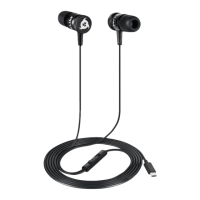

 To Next Page
 General