KLIM Fusion Type C User Manual www.klimtechs.com
IV. TROUBLESHOOTING & CONTACT
If you ever encounter any problems, remember that we remain at your disposal to help you
with any issues. Do not hesitate to contact us at support@klimtechnologies.com for
additional support.
There is no sound coming off the earphones / the volume is very low
Make sure that the connector is properly plugged into your device. Check that the volume
slider is at an adequate position (it may sometimes be inadvertently moved, reducing or
muting the sound) and verify the sound settings on your device.
The next/previous command does not work or it modifies the volume instead
Devices connected via USB-C devices may interact differently depending on the phone
model, affecting how the phone interprets the multi-function button presses. Some models
have headset customization options, please refer to your mobile device's manual for more
accurate instructions, or contact us to receive further assistance.
There is a rustling sound when I speak during the calls
Avoid using the microphone in windy areas and check that the microphone is not rubbing
against your clothes. Use the lapel clip to better position the cable and microphone and
avoid any unwanted contact with your clothing.
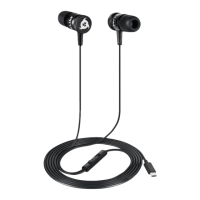
We thank you again for your purchase and hope that you enjoy using our KLIM Fusion C
earphones. Do not hesitate to leave a comment on the site you purchased it, it will help
us tremendously :)
The KLIM Team


 To Previous Page
 Loading...