INSTALLATION AND DEINSTALLATION
Installation steps
OPEN
OFF
ON
1
2
3
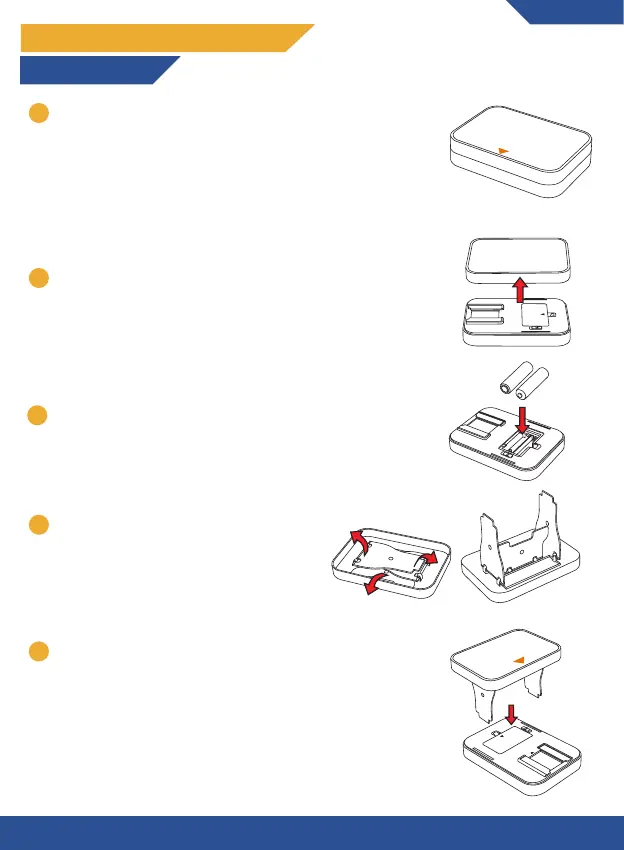
Place the film scanner on a steady and flat surface. The
anti-slip silicon should be facing downwards while the PU
leather top should face upwards. Note that the top also
has an orange arrow;
Note: Optionally you can use the included cleaning cloth
to remove any dust from the bottom of the anti-slip
surface for full stability.
Insert 2 AA batteries into the battery compartment of
the bottom shell.
Flip out the support brackets which are fixed
to the bottom of the upper shell.
ON
OFF
AA
AA
1
3
4
ENGLISH
Open the film scanner by lifting up the upper shell.
2
3
1
5
Place the upper shell onto the bottom shell by carefully
inserting the support brackets into the holes of the
bottom shell whilst having the orange arrow on the top
shell pointed towards the direction of the light plate.
OPEN
OFF
ON
2
3


 To Next Page