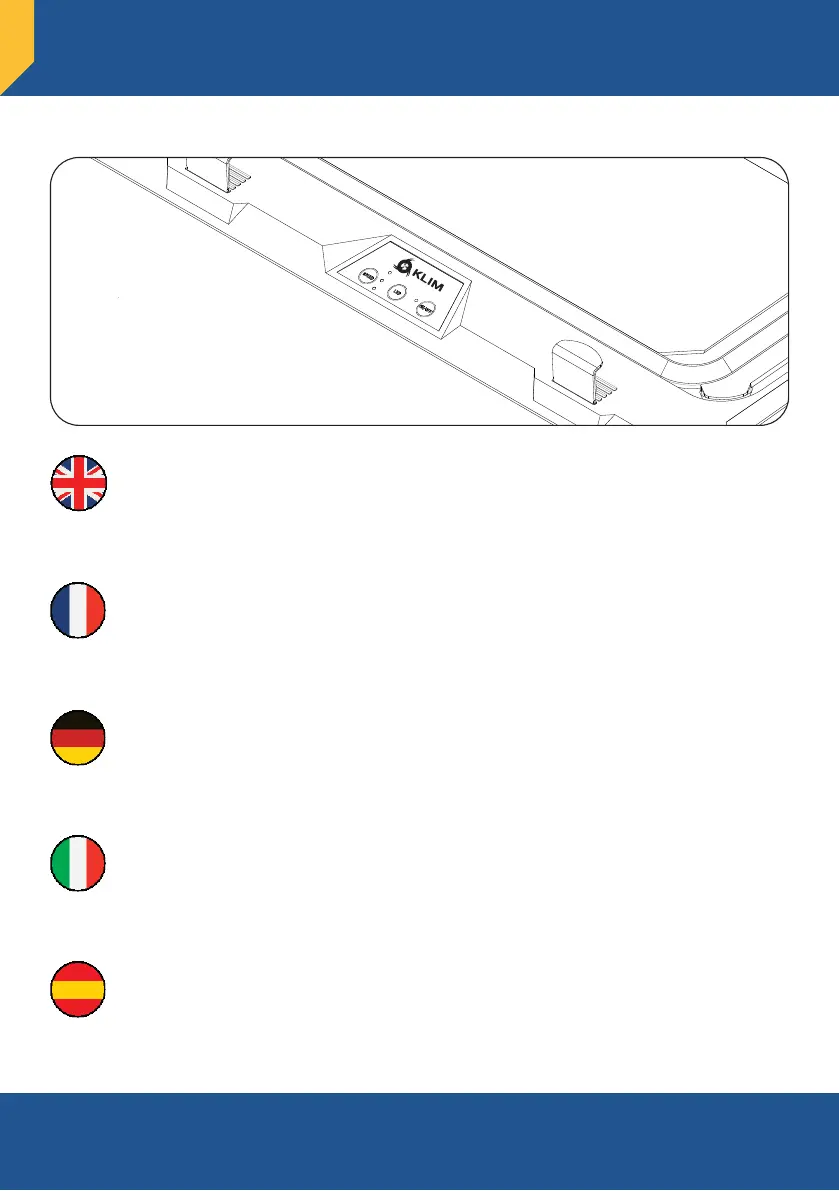
Use the control buttons to operate the cooler:
a) ON/OFF: turn the laptop cooler on and off.
b) LED: change the lighting color. Press and hold to switch the lighting off.
c) SPEED: change the fan speed (3 levels).
Utilisez les boutons de commande pour faire fonctionner le refroidisseur :
a) ON/OFF : marche / arrêt.
b) LED : changer la couleur de l'éclairage. Appuyez et maintenez pour l’éteindre.
c) SPEED : modifier la vitesse des ventilateurs (3 niveaux).
Benutze die Steuerungstasten, um den Kühler zu bedienen:
a) ON/OFF: schalte den Laptop-Kühler ein und aus.
b) LED: ändere die Farbe der Beleuchtung. Zum Ausschalten lang drücken.
c) SPEED: ändere die Lüftergeschwindigkeit (3 Stufen).
Utilizza la pulsantiera per gestire il raffreddatore:
a) ON/OFF: Accende o spegne la base di raffreddamento.
b) LED: Cambia il colore dell’illuminazione. Tieni premuto per spegnere le luci.
c) SPEED: Cambia la velocità delle ventole (3 livelli).
Usa los botones para controlar la base:
a) ON/OFF: enciende/apaga la base de refrigeración.
b) LED: cambia el color de la iluminación. Mantén pulsado para apagarla.
c) SPEED: cambia la velocidad de los ventiladores (3 niveles).
Controls
Commandes - Steuerung
Comandi - Controles
7


 To Next Page