Need help?
Do you have a question about the KLIM TEMPEST and is the answer not in the manual?
Details the components of the KLIM Tempest laptop cooler with numbered labels.
Explains how to attach and adjust the metal connecting plate for the cooler.
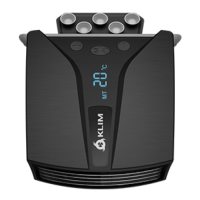
Details how to attach the cooler to the laptop's exhaust port using a rubber sleeve.
Describes automatic fan speed adjustment based on laptop temperature.
Explains how to manually adjust fan speed and switch modes.
Instructions on how to turn off the KLIM Tempest cooler.
Addresses noise issues, distinguishing normal fan noise from potential foreign object interference.
Provides steps for when the cooler does not turn on or the fan fails to start.
Lists the physical and performance characteristics of the KLIM Tempest cooler.
 General
| Brand | KLIM |
|---|---|
| Model | TEMPEST |
| Category | Laptop Accessories |
| Language | English |

 To Next Page