Q: The laptop cooler does not turn on
A: Check that the cable is in good condition and connected
properly. If available, you can try on a different port on your
computer, or with another compatible cable.
Q: The cooler turns on but the fan does not start
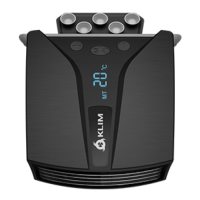
A: This can be normal if the device is in automatic mode (AT) and
not detecting high temperature. Press the ON/M button to
enter Manual mode (MT) and select your desired speed using
the + and - buttons. If the fan does not work in Manual Mode,
please contact us.
Technical specifications
- Size: 100 x 82 x 40 mm
- Weight: 120 g
- Gross weight: 260 g
- Fan size: 65 x 65 x 20 mm
- Number of fans: 1
- Fan type: exhaust-type turbo fan
- Max. fan speed: 4000 RPM ± 10 %
- Speed levels: 13
- Fan speed change per level: 300 RPM± 10 %
- Max. fan noise: 43 dBA
- Current: 0.5 A ± 10 %
- Voltage: 5 V
- Power: 2.5 W
ENGLISH
4


 To Next Page