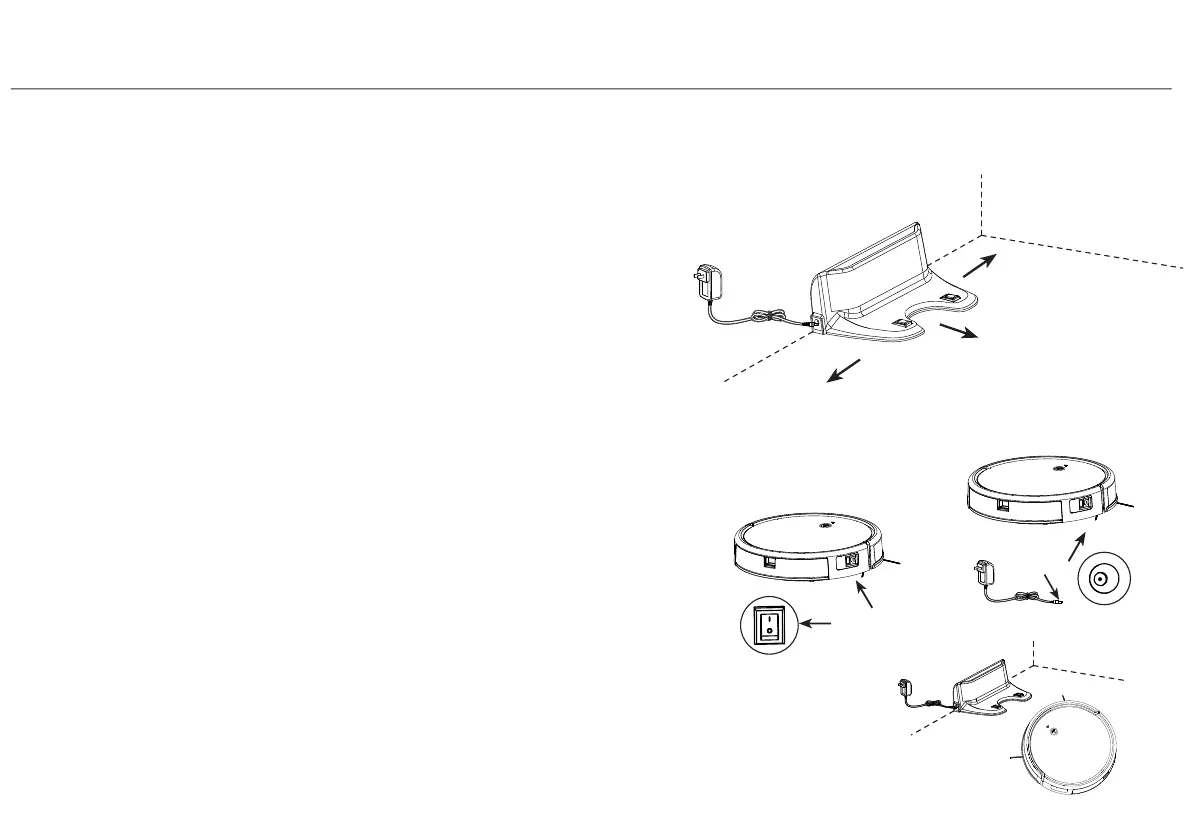
1.Place the docking station against the wall edge on a flat surface
and connect adapter with mains power.
Note:
a. The docking station should have more than 0.5m(1.6ft)
of clearance on each side, and more than 1.5m(5ft) in
the front.
b. If the power cable is vertical to ground,it may be caught
by the machine,causing the docking station to be
disconnected.
2.Power on and charge
Press power switch to turn on the robot.
Robot power indicator lights up with a voice prompt,
place the robot onto the docking station to begin charging or
charging directly with adapter.
Note:
a. Please charging more than 8 hours for first time using.
b. The robot will not turn on when battery is too low, please
manual charging the robot.
c. Users can control auto charging function through remote
control or APP.
12
4.Instruction for Use
4.2 Docking Station Installation
More than 0.5m(1.6ft)
More than 0.5m(1.6ft)
More than 1.5m(5ft)


 To Next Page