UberTuner User‟s Manual Page 2
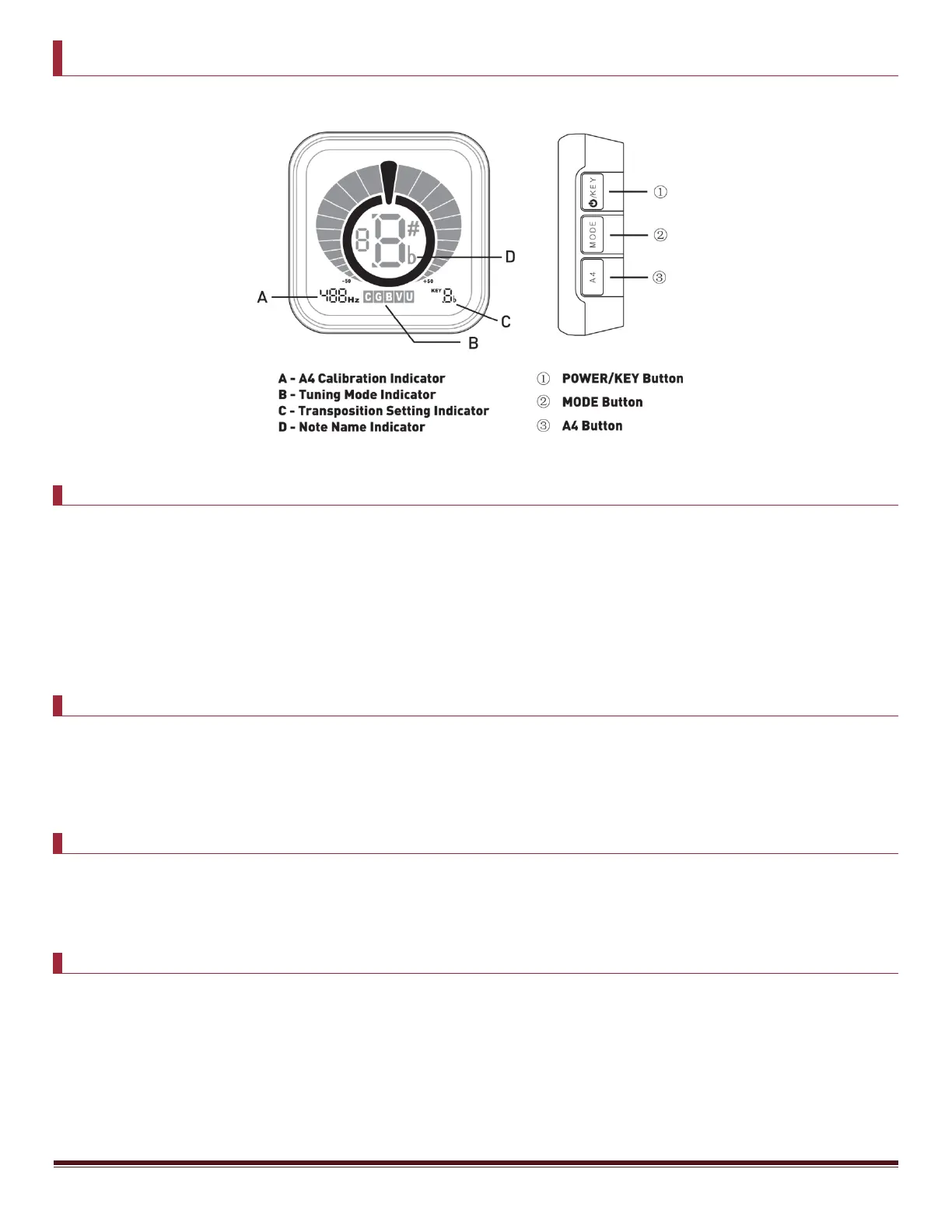
DISPLAY & BUTTON FUNCTIONS
OPERATING INSTRUCTIONS
1. Press and hold the POWER/KEY button (1) for 2 seconds. The power will turn on/off each time you press and
hold this button.
2. Play a single note on your instrument. The Note Name Indicator (D) will display the name of the note that‟s
closest to the pitch detected. The yellow indicators to the left of the note will light up if the pitch is too low
or flat. The red indicators to the right of the note will light up if the pitch is too high or sharp. Adjust the
tuning so that the green circle around the note lights up (along with the yellow indicators to the left), which
means the note you‟re playing is perfectly in tune.
TUNING MODES
To change the tuning mode, press and hold the MODE Button (2) for 2 seconds. Display indicators A, B, and C will
begin to flash. Each time you press the MODE button (2), the tuning mode will change, with the current mode shown
by the Tuning Mode Indicator (B). The various tuning modes are Chromatic Mode C, Guitar Mode G, Bass Mode B,
Violin Mode V, and Ukulele Mode U.
A4 REFERENCE PITCH CALIBRATION
To set the A4 calibration, press and hold the MODE button (2) for 2 seconds. Display indicators A, B, and C will begin
to flash. Each time you press the A4 button (3), the calibration value (reference pitch) will increase in 1 Hz steps,
with the current value shown by the Reference Pitch Indicator (A). This setting range is between 430 and 450 Hz.
TRANSPOSITION SETTINGS
This function is for tuning a transposing instrument. To select the appropriate transposition setting for your
instrument, press and hold the MODE button (2) for 2 seconds. Display indicators A, B, and C will begin to flash. Each
time you press the KEY button (1), the setting will cycle between C, B
♭
, E
♭
, and F under Chromatic Mode C, and
between C and D under Ukulele Mode U, with the current value shown by the Transposition Setting Indicator (C).


 To Next Page
 Loading...