8
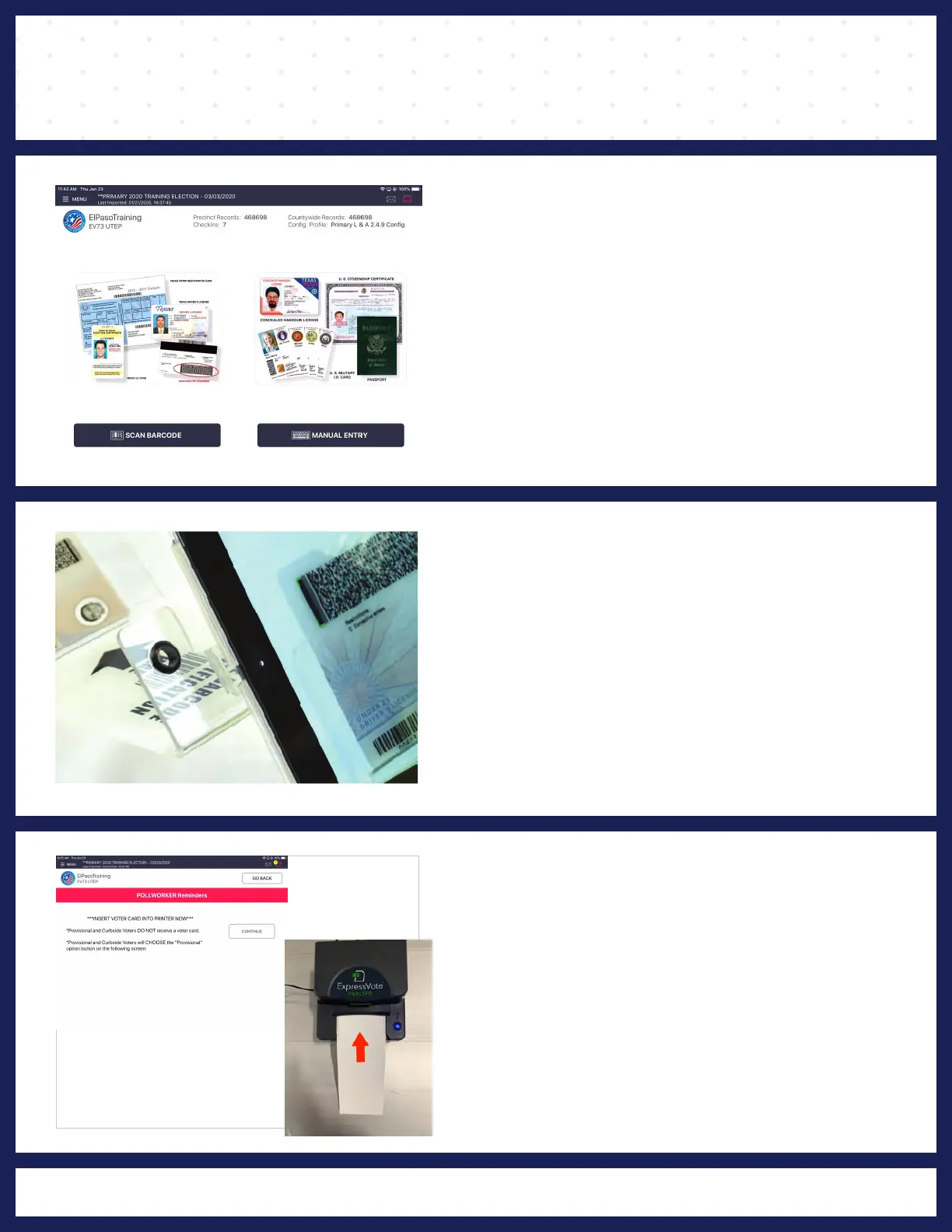
PROCESSING VOTERS | SEARCH BY SCAN BARCODE
❶ VERIFY VOTER'S INFORMATION
Ask the voter to provide an acceptable form of ID.
After verifying the voter's ID is valid, start the
check-in process by touching SCAN BARCODE
with your stylus.
❷ SCAN VOTER'S ID
Place his or her photo ID (with the barcode facing
the camera) onto the ID tray.
NOTE: If the camera is unable to scan the voter's Photo
ID or if the ID is not placed onto the ID tray within five
seconds, the Poll Pad will display "Barcode Scan Failed."
If this occurs, find the voter using the manual search
method.
❸ POLLWORKER REMINDERS
Once the barcode is recognized, the
"POLL WORKER REMINDER" screen appears
and instructs the
Poll Worker to insert the vote
card into the printer. Press the "CONTINUE"
button.
The "POLL WORKER REMINDER" screen also
reminds the Poll Worker that:
*PROVISIONAL and CURBSIDE voters DO NOT
receive a activation card.



 To Next Page